Convert Clinical Formats to BFF
Pheno-Ranker reads Beacon v2 Models (BFF) and Phenopackets v2 (PXF) directly. For other structured clinical standards, use Convert-Pheno to normalize the source data to BFF before comparison.
individuals.json (BFF)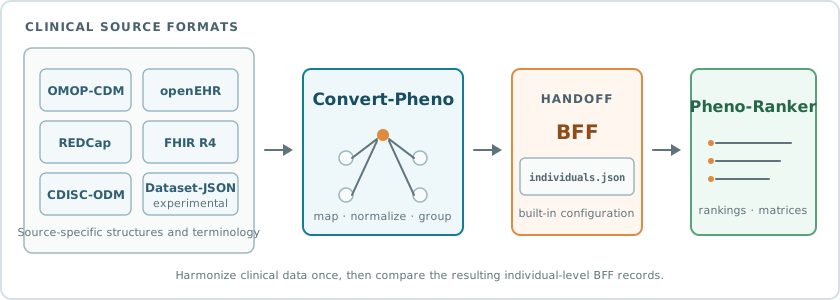
Clinical standards encode identity, terminology, and repeated events differently. Convert-Pheno owns those source-specific mappings and groups the data into individual-level BFF records. Pheno-Ranker can then use its built-in BFF configuration and canonicalization instead of treating clinical JSON as an arbitrary structure.
Run This Format
First use Convert-Pheno to produce BFF individuals.json. Then run that BFF
output in Pheno-Ranker; no source-format configuration is required.
- Desktop
- CLI
- In Convert-Pheno, convert the clinical source to Beacon v2/BFF.
- In Pheno-Ranker Desktop, select New analysis and choose cohort or patient mode.
- Under User files, select the generated
individuals.jsonas the reference. - In patient mode, also select a target record, then select Run analysis.
For cohort mode:
pheno-ranker -r individuals.json
For patient mode:
pheno-ranker -r individuals.json -t target.json
Continue with Cohort Mode, Patient Mode, or the full CLI Reference.
Source Format Guides
Use the maintained Convert-Pheno guide for your source format. These pages contain the current installation requirements, mapping scope, examples, and format-specific options.
OMOP-CDM
Consolidate relational clinical tables into individual-level BFF records.
Experimental mappingopenEHR
Group canonical compositions by patient and normalize their clinical content.
Experimental mappingFHIR R4
Map supported Bundle resources into the corresponding BFF structures.
Clinical sourceREDCap
Transform project exports into structured individual records.
Clinical researchCDISC-ODM
Normalize operational clinical-study data through the BFF target model.
Experimental mappingCDISC Dataset-JSON
Convert supported tabular clinical-study datasets into BFF.
This workflow is for clinical harmonization. To compare arbitrary categorical tables or custom records, use CSV Import or Generic JSON/YAML instead.