Generic JSON
Google Colab notebook
Try out Pheno-Ranker using our Google Colab notebook. You can view it without signing in, but running the code requires a Google account.

We also have a local copy of the notebook that can be downloaded from the repo.
This tutorial deliberately uses generic JSON data (i.e., movies) to illustrate the capabilities of Pheno-Ranker, as starting with familiar examples can help you better grasp its usage.
Once you are comfortable with the concepts using movie data, you will find it easier to apply Pheno-Ranker to real GA4GH standards. For specific examples, please refer to the cohort and patient pages in this documentation.
Run This Format
Generic JSON/YAML requires a configuration that identifies each record and the fields to compare. The MoviePackets tutorial below creates both files.
- Desktop
- CLI
- Select New analysis, then choose cohort or patient mode.
- Open User files and select the JSON/YAML records as the reference.
- Open Advanced settings and select the matching configuration file.
- In patient mode, also select the target record, then select Run analysis.
See the Desktop guide for the visual workflow.
For cohort mode:
pheno-ranker -r records.json --config config.yaml
For patient mode:
pheno-ranker -r records.json -t target.json --config config.yaml
Continue with the full CLI Reference for additional options.
MoviePackets
For this tutorial, we will use MoviePackets to show how Pheno-Ranker can work with generic JSON files.

What is a MoviePacket file?
A MoviePacket is an invented data exchange format 😄 designed for movies. In this tutorial it plays the same role that Phenotype Exchange Format (PXF) plays for pheno-clinical data: it is simply the input data model. Since it is generic JSON, its Pheno-Ranker configuration uses format: JSON.
Imagine you have a catalog of 25 movies described in JSON format. Each movie is one record, and each record has several properties, such as title, genre, year, country, and rating. In Pheno-Ranker documentation, these selectable properties are often called terms.
See JSON
[
  {
    "title": "TheShawshankRedemption",
    "genre": [
      "Drama"
    ],
    "year": 1994,
    "country": "USA",
    "rating": 9.3
  },
  {
    "title": "TheGodfather",
    "genre": [
      "Crime",
      "Drama"
    ],
    "year": 1972,
    "country": "USA",
    "rating": 9.2
  },
  {
    "title": "TheDarkKnight",
    "genre": [
      "Action",
      "Crime",
      "Drama"
    ],
    "year": 2008,
    "country": "USA",
    "rating": 9
  },
  {
    "title": "PulpFiction",
    "genre": [
      "Crime",
      "Drama"
    ],
    "year": 1994,
    "country": "USA",
    "rating": 8.9
  },
  {
    "title": "Schindler'sList",
    "genre": [
      "Biography",
      "Drama",
      "History"
    ],
    "year": 1993,
    "country": "USA",
    "rating": 8.9
  },
  {
    "title": "Inception",
    "genre": [
      "Action",
      "Adventure",
      "Sci-Fi"
    ],
    "year": 2010,
    "country": "USA",
    "rating": 8.8
  },
  {
    "title": "FightClub",
    "genre": [
      "Drama"
    ],
    "year": 1999,
    "country": "USA",
    "rating": 8.8
  },
  {
    "title": "TheLordoftheRings:TheReturnoftheKing",
    "genre": [
      "Adventure",
      "Drama",
      "Fantasy"
    ],
    "year": 2003,
    "country": "NewZealand",
    "rating": 8.9
  },
  {
    "title": "Goodfellas",
    "genre": [
      "Biography",
      "Crime",
      "Drama"
    ],
    "year": 1990,
    "country": "USA",
    "rating": 8.7
  },
  {
    "title": "ForrestGump",
    "genre": [
      "Drama",
      "Romance"
    ],
    "year": 1994,
    "country": "USA",
    "rating": 8.8
  },
  {
    "title": "TheMatrix",
    "genre": [
      "Action",
      "Sci-Fi"
    ],
    "year": 1999,
    "country": "USA",
    "rating": 8.7
  },
  {
    "title": "TheLordoftheRings:TheFellowshipoftheRing",
    "genre": [
      "Adventure",
      "Drama",
      "Fantasy"
    ],
    "year": 2001,
    "country": "NewZealand",
    "rating": 8.8
  },
  {
    "title": "StarWars:EpisodeV-TheEmpireStrikesBack",
    "genre": [
      "Action",
      "Adventure",
      "Fantasy"
    ],
    "year": 1980,
    "country": "USA",
    "rating": 8.7
  },
  {
    "title": "TheSilenceoftheLambs",
    "genre": [
      "Crime",
      "Drama",
      "Thriller"
    ],
    "year": 1991,
    "country": "USA",
    "rating": 8.6
  },
  {
    "title": "Se7en",
    "genre": [
      "Crime",
      "Drama",
      "Mystery"
    ],
    "year": 1995,
    "country": "USA",
    "rating": 8.6
  },
  {
    "title": "Interstellar",
    "genre": [
      "Adventure",
      "Drama",
      "Sci-Fi"
    ],
    "year": 2014,
    "country": "USA",
    "rating": 8.6
  },
  {
    "title": "Casablanca",
    "genre": [
      "Drama",
      "Romance",
      "War"
    ],
    "year": 1942,
    "country": "USA",
    "rating": 8.5
  },
  {
    "title": "TheGreenMile",
    "genre": [
      "Crime",
      "Drama",
      "Fantasy"
    ],
    "year": 1999,
    "country": "USA",
    "rating": 8.6
  },
  {
    "title": "CityofGod",
    "genre": [
      "Crime",
      "Drama"
    ],
    "year": 2002,
    "country": "Brazil",
    "rating": 8.6
  },
  {
    "title": "LifeisBeautiful",
    "genre": [
      "Comedy",
      "Drama",
      "Romance"
    ],
    "year": 1997,
    "country": "Italy",
    "rating": 8.6
  },
  {
    "title": "TheUsualSuspects",
    "genre": [
      "Crime",
      "Mystery",
      "Thriller"
    ],
    "year": 1995,
    "country": "USA",
    "rating": 8.5
  },
  {
    "title": "SpiritedAway",
    "genre": [
      "Animation",
      "Adventure",
      "Family"
    ],
    "year": 2001,
    "country": "Japan",
    "rating": 8.6
  },
  {
    "title": "SavingPrivateRyan",
    "genre": [
      "Drama",
      "War"
    ],
    "year": 1998,
    "country": "USA",
    "rating": 8.6
  },
  {
    "title": "ThePianist",
    "genre": [
      "Biography",
      "Drama",
      "Music"
    ],
    "year": 2002,
    "country": "France",
    "rating": 8.5
  },
  {
    "title": "Gladiator",
    "genre": [
      "Action",
      "Adventure",
      "Drama"
    ],
    "year": 2000,
    "country": "USA",
    "rating": 8.5
  }
]
Download the tutorial dataset:
curl -L https://raw.githubusercontent.com/CNAG-Biomedical-Informatics/pheno-ranker/main/t/data/movies.json -o movies.json
Configure the data
Generic JSON does not have a fixed data model, so it requires a small YAML or JSON configuration file. The configuration identifies each record, selects the fields that can be compared, and lists any first-level array fields.
For MoviePackets, save the following as movies_config.yaml:
format: JSON
primary_key: title
allowed_terms: [country,genre,year,title]
indexed_terms: [genre]
This configuration means:
titleuniquely identifies each movie.country,genre,year, andtitlemay be compared.genreis an array rather than a single value.
The rating field is intentionally omitted because this tutorial compares
categorical values rather than continuous measurements. Scalar array values such
as Drama and Sci-Fi are handled automatically.
If you are adapting the example to your own data, replace these field names with the corresponding fields in your records. CSV users should instead follow the CSV import guide, which generates the configuration automatically.
Advanced configuration: explicit array identities
From Pheno-Ranker v1.08 onward, the configuration names are indexed_terms,
index_regex, and identity_paths. Older names remain accepted for
compatibility.
You can explicitly define how first-level array elements are named. This is useful when an array contains objects or when you want generated keys to be easier to inspect.
The MoviePacket configuration included with the repo uses this explicit form:
format: JSON
primary_key: title
allowed_terms: [country,genre,year,title]
indexed_terms: [genre]
index_regex: '^([^:]+):(\d+)'
identity_paths:
  JSON:
    genre: genre
For format: JSON, identity_paths is optional. Without it, first-level arrays
are canonicalized automatically:
- Scalar arrays use the scalar value itself.
- Object arrays first try direct fields such as
id,identifier,code,name,title, orvalue. - If none of those fields exist,
Pheno-Rankerderives a stable identity from the object's meaningful content.
Arrays nested inside other arrays are also compared independently of their original order. Pheno-Ranker derives stable identities for those deeper elements from the categorical content used in the comparison. See the algorithm description for the technical details.
Run the MoviePackets Examples
Once movies.json and movies_config.yaml are in the current directory, run
pheno-ranker with the CLI examples below. In Desktop, load those same
files under User files, select the configuration under Advanced settings,
and choose the corresponding terms, weights, and outputs. The examples explain
how each choice changes the comparison; running shell commands is not required
to analyze these records in Desktop.
- Intra-catalog comparison
- Inter-catalog comparison
- Movie recommendations
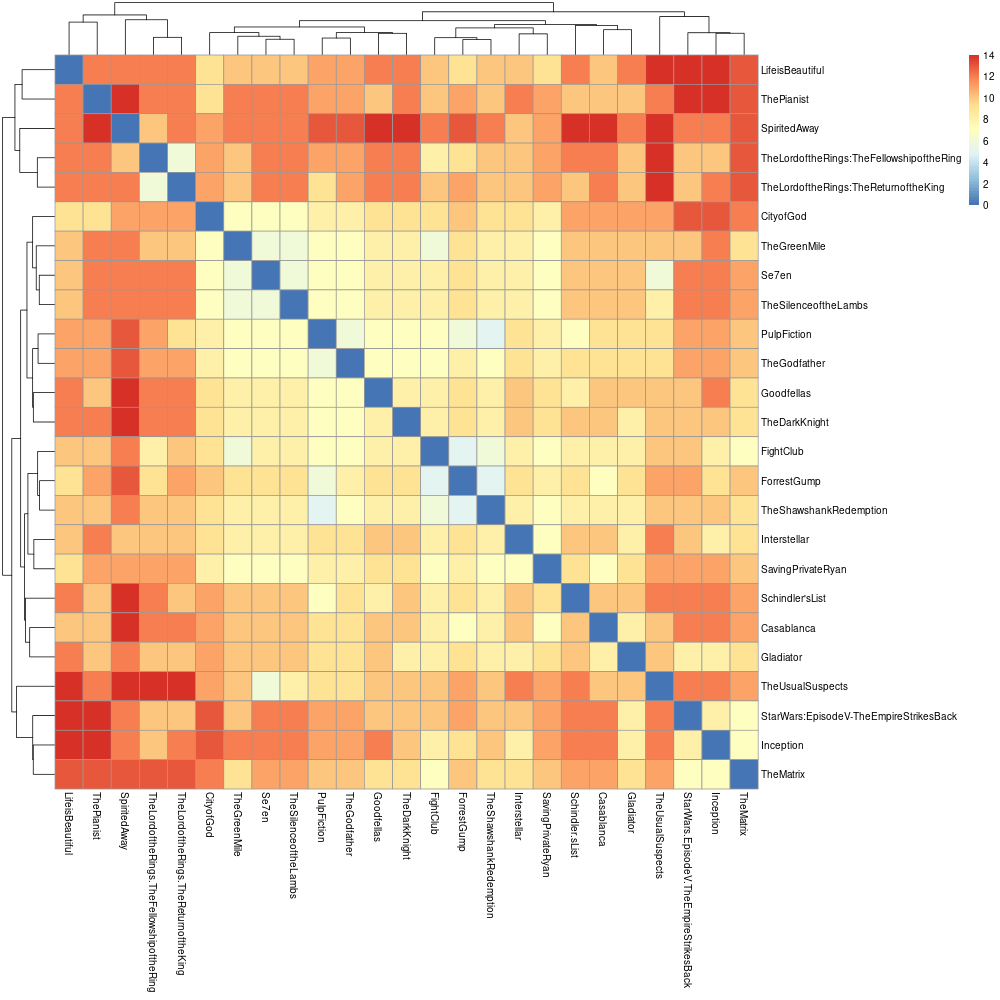
Example 1: Let's start by using all configured terms
pheno-ranker -r movies.json --config movies_config.yaml
The result is a file named matrix.txt. In this run, Pheno-Ranker uses all
terms allowed by movies_config.yaml. The figure below shows the matrix after
clustering it in R.
Included R scripts
You can find in the link below a few examples to perform clustering and multidimensional scaling with your data:
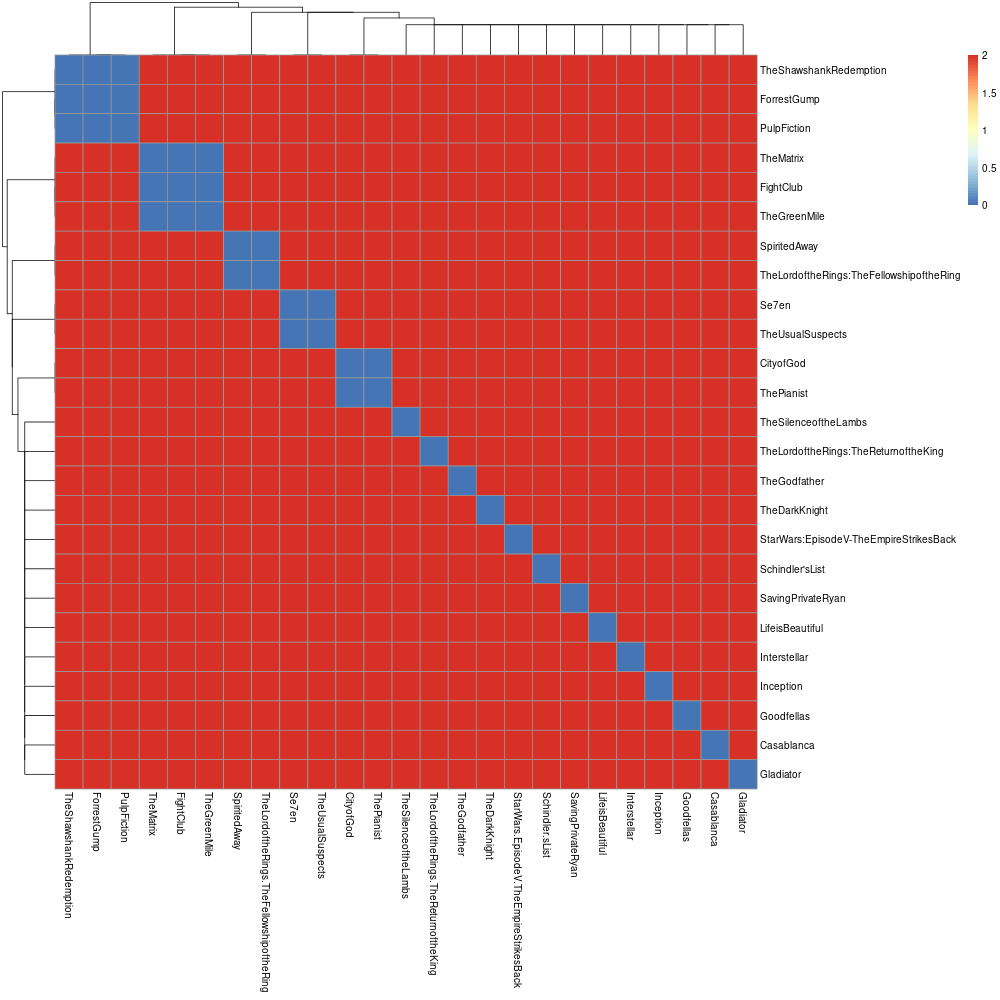
Example 2: Let's cluster by year
pheno-ranker -r movies.json --include-terms year --config movies_config.yaml
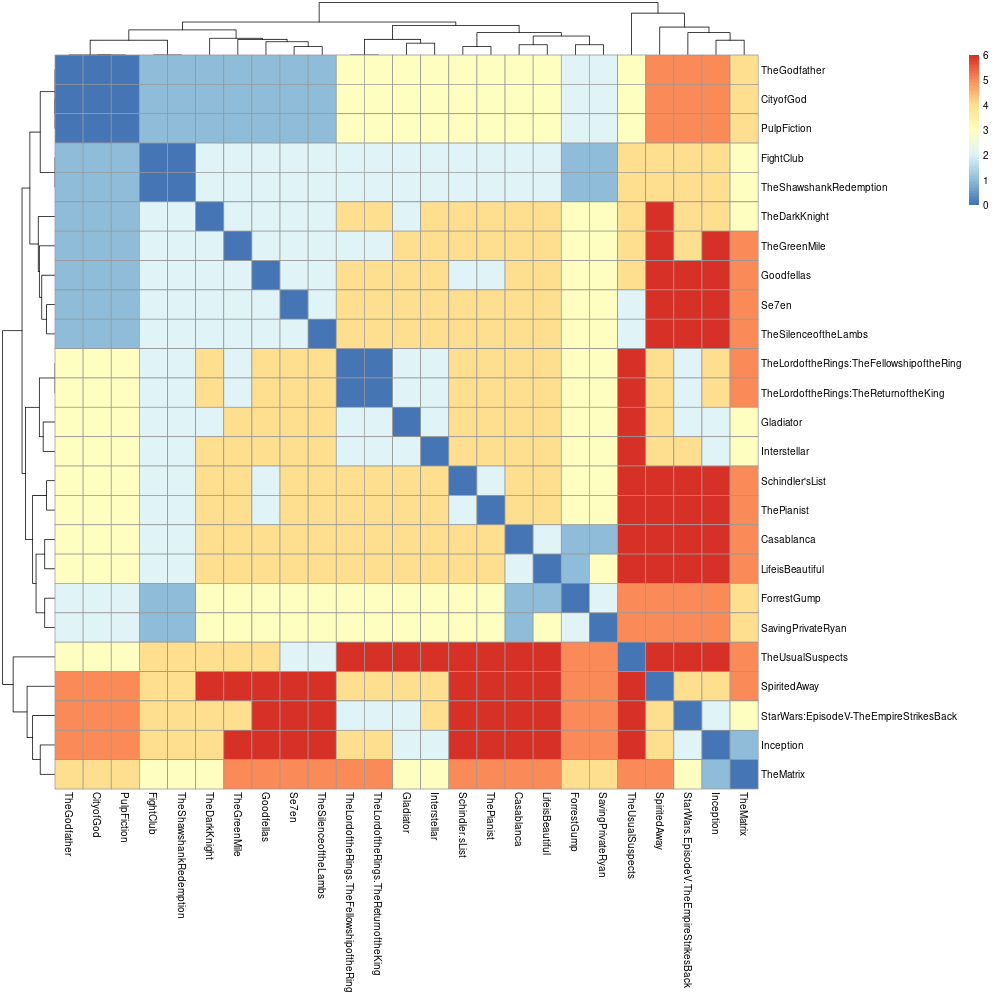
Example 3: Let's cluster by genre
pheno-ranker -r movies.json --include-terms genre --config movies_config.yaml
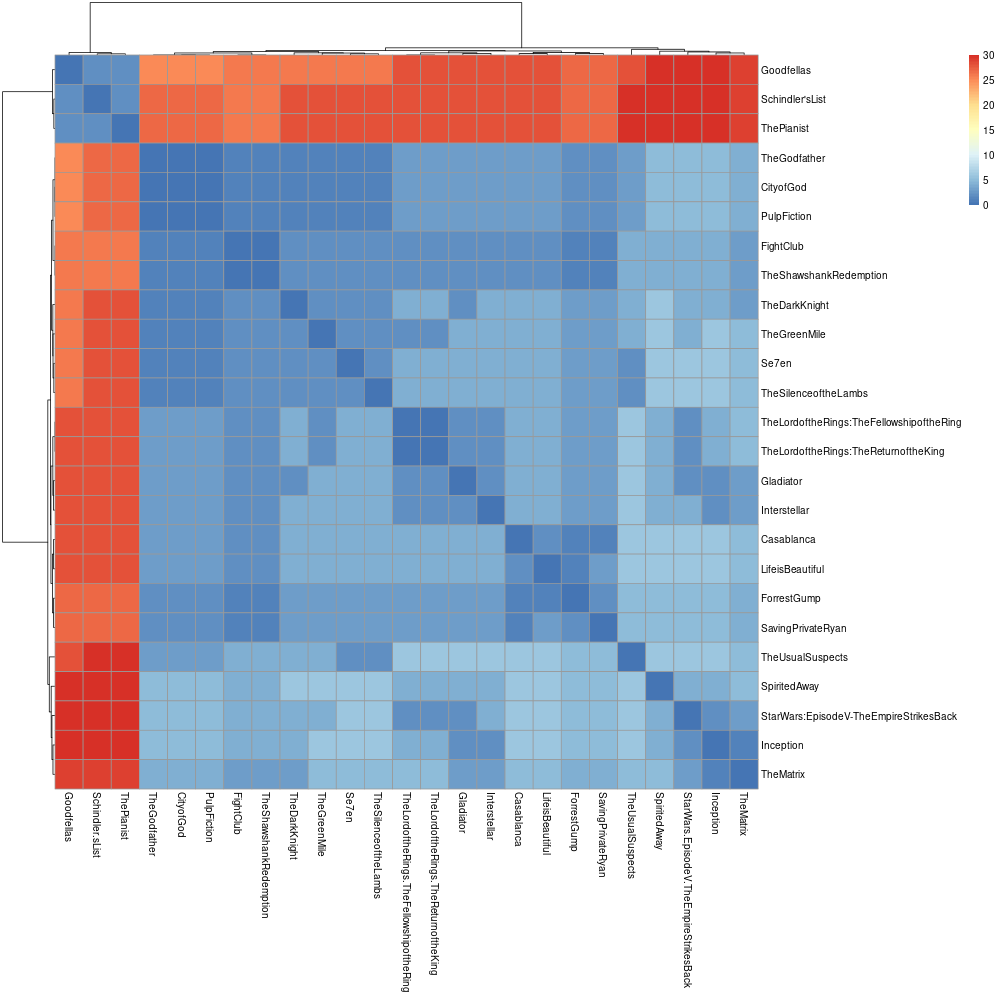
Example 4: Let's apply weights to genre
Save the following as movies_weights.yaml:
---
genre.Biography: 25
pheno-ranker -r movies.json --include-terms genre --weights movies_weights.yaml --config movies_config.yaml
Example 5: Let's create a graph to be used in Cytoscape
Pheno-Ranker can export a graph in a JSON format that is compatible with the Cytoscape ecosystem:
pheno-ranker -r movies.json --cytoscape-json cytoscape.json --graph-stats graph_stats.txt --config movies_config.yaml
The cytoscape.json file contains one edge per pairwise comparison and avoids duplicated symmetric edges. The graph is intended to be interpreted as undirected for visual purposes. Ensure that your application logic or analysis tools interpret this accordingly if they rely on undirected connectivity.
Preview cytoscape.json
{
  "elements": {
    "edges": [
      {
        "data": {
          "source": "Casablanca",
          "target": "CityofGod",
          "weight": "11"
        }
      }
    ],
    "nodes": [
      {"data": {"id": "Casablanca"}},
      {"data": {"id": "CityofGod"}}
    ]
  }
}
The complete output contains every movie node and one edge for every pairwise comparison.
Loading graph...
Preview graph_stats.txt
Metric: Hamming
Number of vertices: 25
Number of edges: 300
Is connected: 1
Connected Components: 1
Graph Diameter: Casablanca->SpiritedAway
Average Path Length: 9.85333333333333
This excerpt shows the graph-level summary. The complete file also reports per-vertex degrees and shortest paths.
Imagine you have several MoviePacket 😄 catalogs and you want to compare the similarity among them.
The way you compute this with Pheno-Ranker is similar to the intra-catalog example. The main difference is that the catalogs (i.e., cohorts) receive prefixes so that records from different input files can be identified.
Example 1: Default catalog (cohort) nomenclature
For demonstration purposes, this example reuses the same movies.json file:
pheno-ranker -r movies.json movies.json --config movies_config.yaml
After executing this command, you will obtain a file named matrix.txt, consisting of all (25+25) x (25+25) pairwise comparisons.
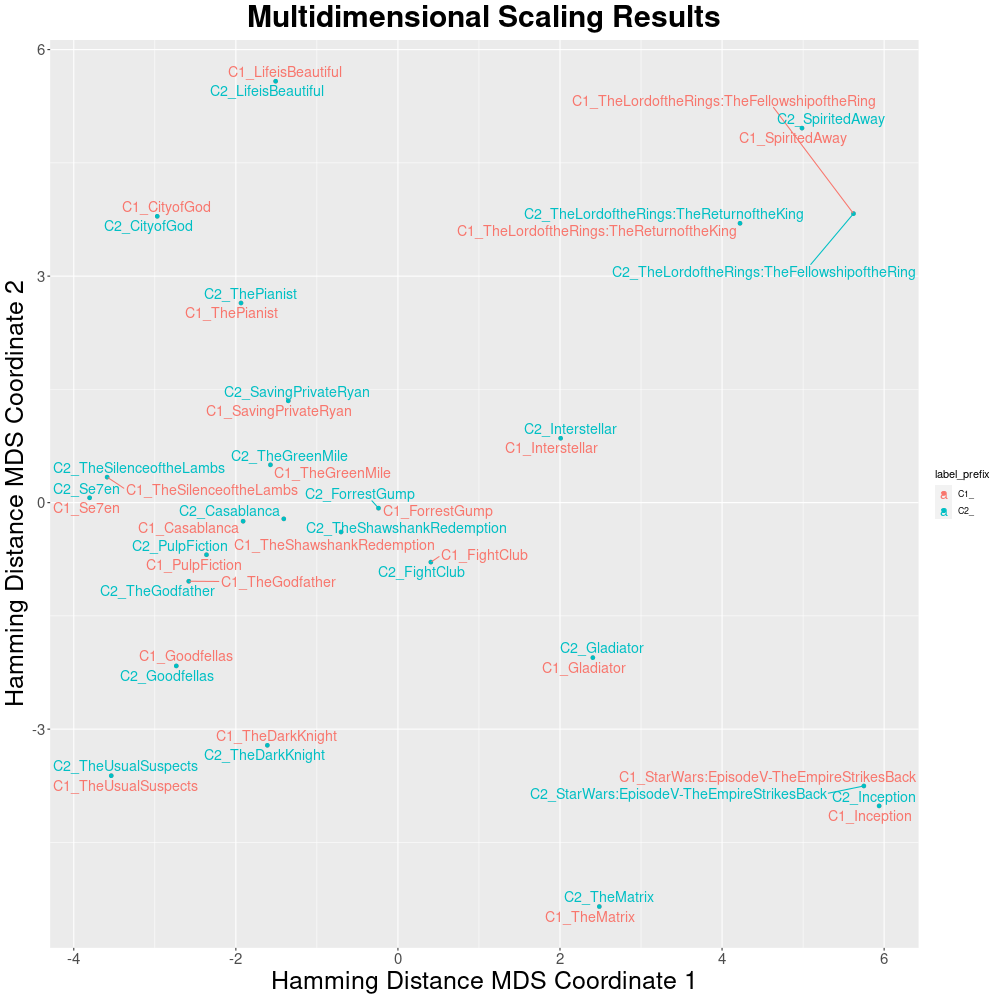
By default, the IDs in each catalog will be renamed to C1_, C2_ and so on, but you can add your own prefixes with --append-prefixes.
Example 2: Set up catalog nomenclature prefixes
pheno-ranker -r movies.json movies.json movies.json --append-prefixes NETFLIX HBO PRIME_VIDEO --config movies_config.yaml
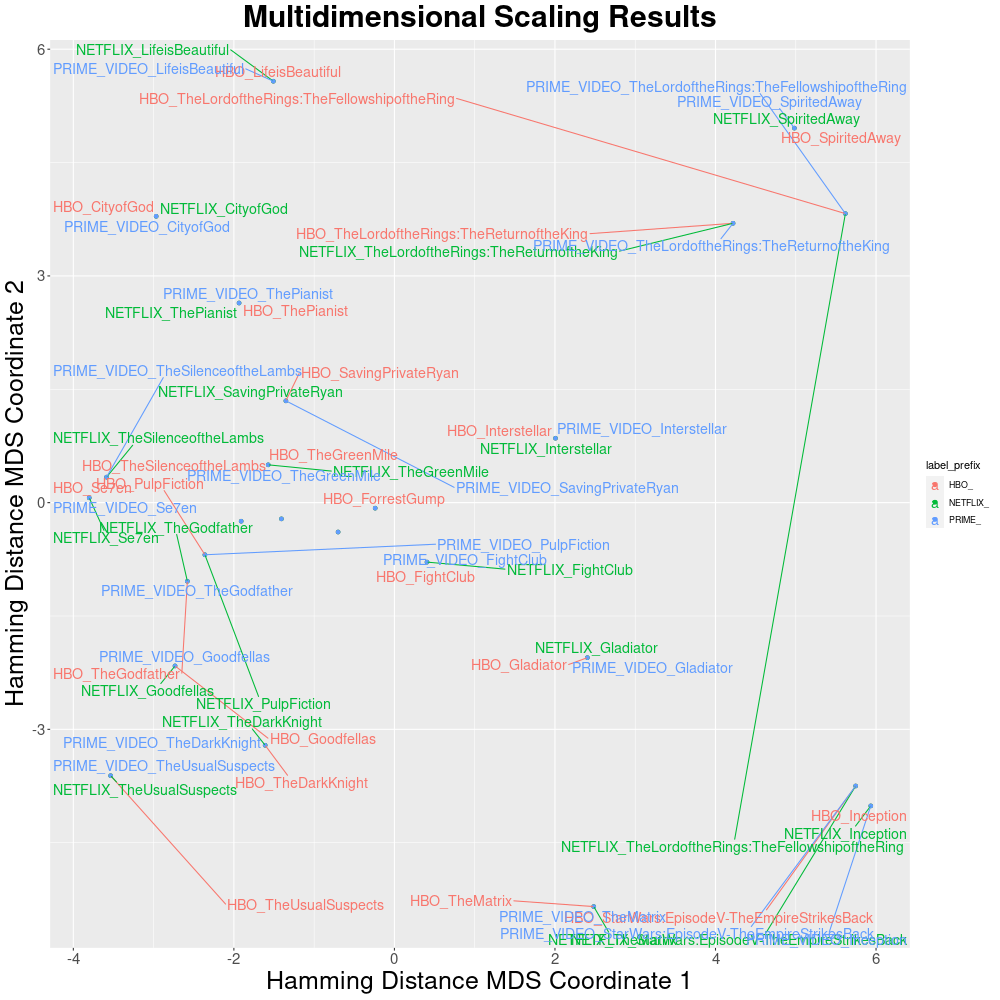
Imagine you'd like to discover movies similar to a specific one, such as Interstellar.
Step 1: Isolate the Movie
To single out the Interstellar movie data:
pheno-ranker -r movies.json --patients-of-interest Interstellar --config movies_config.yaml
This command will carry out a dry-run, producing an extracted JSON object named Interstellar.json.
{
   "country" : "USA",
   "genre" : [
      "Adventure",
      "Drama",
      "Sci-Fi"
   ],
   "rating" : 8.6,
   "title" : "Interstellar",
   "year" : 2014
}
Step 2: Rank Similar Movies
Next, run the following command to initiate the ranking process:
pheno-ranker -r movies.json -t Interstellar.json --config movies_config.yaml
This will output the results to the console and additionally save them in a file titled rank.txt.
Preview rank.txt
| Rank | Reference movie | Hamming distance | Jaccard index | Shared variables | Completeness |
|---|---|---|---|---|---|
| 1 | Interstellar | 0 | 1.000 | 7 | 100.00% |
| 2 | SavingPrivateRyan | 7 | 0.300 | 3 | 50.00% |
| 3 | TheGreenMile | 8 | 0.273 | 3 | 42.86% |
| 4 | Inception | 8 | 0.273 | 3 | 42.86% |
| 5 | TheSilenceoftheLambs | 8 | 0.273 | 3 | 42.86% |
The target itself ranks first. The remaining rows show the closest matches under the default Hamming-distance ordering. See Patient Mode for the full column reference.
You can also perform the ranking against multiple cohorts and select specific terms.
pheno-ranker -r movies.json movies.json --append-prefixes NETFLIX HBO -t Interstellar.json --include-terms genre year --config movies_config.yaml --max-out 10
Preview rank.txt
| Rank | Reference movie | Hamming distance | Jaccard index | Shared variables | Completeness |
|---|---|---|---|---|---|
| 1 | NETFLIX_Interstellar | 0 | 1.000 | 4 | 100.00% |
| 2 | HBO_Interstellar | 0 | 1.000 | 4 | 100.00% |
| 3 | NETFLIX_Inception | 4 | 0.333 | 2 | 50.00% |
| 4 | NETFLIX_TheShawshankRedemption | 4 | 0.200 | 1 | 50.00% |
| 5 | NETFLIX_TheLordoftheRings:TheReturnoftheKing | 4 | 0.333 | 2 | 50.00% |
The two copies of Interstellar rank first because this example compares the
same movie catalog under the NETFLIX and HBO prefixes.