Phenopackets Corpus
Here we will describe how to use Pheno-Ranker with the data from the recently published Phenopacket Corpus.
- Desktop
- CLI
- Select Cohort comparison > Use cases > Phenopacket Store collections.
- Select Check latest release, then download it. Downloaded releases remain available offline.
- Select the collections to compare and choose Load as one cohort. Their individual Phenopackets are combined into one reference dataset.
- Select Run analysis and explore the projection or other available results. Collection labels colour the plots; they are not included in similarity scores.
For patient ranking, use the same collection selection and supply your own target patient. Plot availability depends on the selected cohort size and viewer limits.
CLI and R Walkthrough
The example below uses a 1,000-record subset and external R plotting. It is separate from the Desktop release importer: selecting today's latest release will not reproduce the historical figures exactly. Keep the release identifier and selected records with your analysis.
Data Download
We will download the data from the Monarch Initiative phenopacket-store GitHub repository BSD3 open-source license. If you don't have wget, dos2unix, and jq, please install them using:
sudo apt install wget dos2unix jq
We assume that you have R installed and are capable of installing its required modules.
wget https://github.com/monarch-initiative/phenopacket-store/releases/latest/download/all_phenopackets.zip
unzip all_phenopackets.zip
dos2unix */*/*.json
As this is an exercise, instead of using all PXF files, we will randomly select 1000 and create a JSON array file named combined.json:
jq -s '.' $(ls -1 */*/*.json | shuf -n 1000) > combined.json
About reproducibility
We used 0.1.20. You can reproduce this example with the following list of files:
*/*/PMID_37183190_Family_4_individual_ind_8.json
*/*/PMID_33731876_fam265.json
*/*/PMID_19800048_III_9.json
*/*/PMID_36553465_P9.json
*/*/PMID_26915616_case_report.json
*/*/PMID_24355708_IHG25353_individual_2.json
*/*/PMID_36553465_P29.json
*/*/PMID_20887961_Patient_3.json
*/*/PMID_34722527_individual_1797–3128_5_Farzad_Jamshidi_Contributionof.json
*/*/PMID_10939567_EMD1_IV-13.json
*/*/PMID_37761890_50 .json
*/*/PMID_29513881_III_5.json
*/*/PMID_27067446_IV1.json
*/*/PMID_36446582_Parenti2021_P4.json
*/*/PMID_34722527_individual_individual_6_Arif_O_Khan_TheRPGRIP1-rel.json
*/*/STX_32521962_P10.json
*/*/PMID_38596211_individual_16.json
*/*/PMID_31527767_II_5.json
*/*/STX_P_34.json
*/*/PMID_32274456_Family_FGCO_individual_1111.json
*/*/PMID_28468610_8_year_old_boy.json
*/*/PMID_16965330_Sibling_of_patient_11.json
*/*/PMID_24369382_Family_1_II.4.json
*/*/PMID_35112411_35112411_P2.json
*/*/PMID_39013458_individual_KS110007.json
*/*/PMID_33731876_fam402.json
*/*/PMID_28940506_Family_14_Individual_18.json
*/*/PMID_37660254_Patient_4.json
*/*/PMID_28132690_Family_D_IV_1.json
*/*/PMID_29196670_Patient_1.json
*/*/PMID_31844624_31844624_P1.json
*/*/PMID_37951597_Family_28_Subject_2.json
*/*/PMID_36586412_21.json
*/*/PMID_37761890_19 .json
*/*/PMID_36446582_Ockeloen2015_P4.json
*/*/PMID_12789647_K13_II_2.json
*/*/PMID_38480682_F1_II_1.json
*/*/PMID_10874631_II.2.json
*/*/PMID_36446582_Gnazzo_2020_P19.json
*/*/STX_26865513_Patient_22.json
*/*/PMID_22541558_individual_P_1.json
*/*/PMID_24736735_G043_Father.json
*/*/PMID_12789647_K14_II_1.json
*/*/PMID_25835445_1-II:12*.json
*/*/PMID_39013458_individual_VUSM110017_A_father.json
*/*/PMID_37582359_F1-II-1.json
*/*/PMID_36965478_Individual_5.json
*/*/PMID_27087320_Subject_6.json
*/*/PMID_31021519_individual_SATB2_123.json
*/*/PMID_38428335_Patient.json
*/*/PMID_36446582_Parenti2021_P9.json
*/*/PMID_36446582_KBG38.json
*/*/PMID_36446582_Murray_2017_P9_5_1.json
*/*/PMID_37943620_F/28.json
*/*/PMID_34722527_individual_individual_1_S_Gerber_Completeexon-i.json
*/*/STX_26865513_Patient_13.json
*/*/PMID_31021519_individual_SATB2_142.json
*/*/PMID_28851325_Case_1.json
*/*/PMID_36446582_Kutkowska_Kazmierczak2021_P7.json
*/*/PMID_31021519_SATB2_02_from_Zarate_et_al__2018a_Scott_et_al.json
*/*/PMID_37054711_Family_2_Subject_3.json
*/*/PMID_33350388_Patient_KD_1_3.json
*/*/PMID_26286438_Patient_2.json
*/*/PMID_28652255_V_3.json
*/*/PMID_35420632_Patient_3_III-3.json
*/*/PMID_33731876_fam422.json
*/*/PMID_15781812_individual_123.json
*/*/PMID_15781812_individual_138.json
*/*/PMID_28285769_Individual_1_II_3.json
*/*/PMID_23335590_Subject_1330.json
*/*/PMID_18412284_Patient_III_8.json
*/*/PMID_37947183_Family_F11_individual_P15.json
*/*/PMID_33731876_fam252.json
*/*/PMID_26178382_UAB_R8423.json
*/*/PMID_27153400_Family_B_IV_4.json
*/*/PMID_25477417_F13_1.json
*/*/STX_26648591_Patient_2.json
*/*/PMID_36074124_2_IV_1.json
*/*/PMID_32853638_Patient_2.json
*/*/PMID_36182950_Patient_101.json
*/*/PMID_33731876_fam417.json
*/*/PMID_15911822_Patient_4.json
*/*/PMID_8704215_proband_18y.json
*/*/PMID_30945334_Individual_2.json
*/*/STX_26514728_Patient_15.json
*/*/PMID_38596211_individual_9.json
*/*/PMID_28927821_subject_I_2.json
*/*/PMID_34645992_Individual_3.json
*/*/PMID_32710489_Group_1_Patient_2.json
*/*/PMID_30580808_Ind-06-Fam-06.json
*/*/PMID_12384777_Family_4_4A.json
*/*/PMID_29883675_first_family_patient_1.json
*/*/PMID_24736735_G13684_Mother.json
*/*/PMID_33731876_fam114.json
*/*/PMID_25794864_P4.json
*/*/PMID_36446582_Low_2016_P17_10.json
*/*/PMID_33731876_fam234.json
*/*/PMID_27743463_S7.json
*/*/PMID_29290338_Family_ROT_R9008_individual_F.json
*/*/PMID_33731876_fam133.json
*/*/STX_EG0598P.json
*/*/PMID_34722527_individual_TB34R-R77_3_Tami_Current.json
*/*/PMID_33042910_Case_Presentation.json
*/*/PMID_34722527_individual_individual_3_Arif_O_Khan_TheRPGRIP1-rel.json
*/*/PMID_21358634_Family_6.json
*/*/STX_P_05.json
*/*/PMID_36446582_Kutkowska_Kazmierczak2021_P23.json
*/*/STX_G3_P31.json
*/*/PMID_19800048_III_10.json
*/*/PMID_35617047_Proband_2.json
*/*/PMID_21683322_29.json
*/*/PMID_36553465_P21.json
*/*/PMID_34038384_Family_G_II_1.json
*/*/PMID_22956686_18-IV-1.json
*/*/PMID_36528028_Individual_4.json
*/*/PMID_23211637_e_index_case.json
*/*/PMID_26437932_26437932_P1.json
*/*/PMID_37163662_Family_B_Patient_3.json
*/*/PMID_29707406_C_II_5.json
*/*/STX_32105008_case_report.json
*/*/PMID_30580808_Machol_Ind_6-Fam-36.json
*/*/PMID_24498630_ISR2.json
*/*/PMID_36996813_Individual_7.json
*/*/PMID_34722527_individual_35_5_Tobias_Eisenberger_Increasingthe.json
*/*/PMID_21367767_F34_III_2.json
*/*/STX_26514728_Patient_22.json
*/*/PMID_39013458_individual_KS110027.json
*/*/PMID_25477417_F1_1.json
*/*/PMID_36446582_Parenti2021_P16.json
*/*/PMID_21683322_22-a.json
*/*/PMID_14569098_F7_individual_1.json
*/*/PMID_20513137_individual_NF00573_GSM_GSM492688.json
*/*/PMID_37167966_F1-II:1.json
*/*/PMID_31089937_case_2_II_2.json
*/*/PMID_35344616_A21.json
*/*/PMID_36182950_Patient_97.json
*/*/PMID_8664912_Patient_0544_twin_1.json
*/*/PMID_27153400_Family_C_IV_13.json
*/*/PMID_26467218_individual_3_Denayer_et_al__22.json
*/*/PMID_34722527_individual_CR-F028_3_Leen_Abu-Safieh_Autozygome-guid.json
*/*/PMID_18256394_5.json
*/*/PMID_18423521_Patient_4.json
*/*/PMID_32154675_Family_1_Patient_2.json
*/*/STX_S011.json
*/*/PMID_39013458_individual_KS110064.json
*/*/PMID_37196654_Individual_60_(MSSNG_AU4427301).json
*/*/PMID_21594992_20_year_old_man.json
*/*/PMID_39069253_individual_21_Kruszka_et_al.json
*/*/PMID_14531790_F524_individual_II_4.json
*/*/PMID_36446582_Low_2016_P6_7.json
*/*/PMID_31721432_patient_4.json
*/*/PMID_31949313_F4_II_9.json
*/*/PMID_37167966_F4-II:1.json
*/*/PMID_26178382_UAB_R7444.json
*/*/PMID_20513137_individual_GUE_GSM_GSM492710.json
*/*/PMID_36446582_Novara_2017_P4.json
*/*/STX_P_01.json
*/*/STX_CHCO_01.json
*/*/PMID_19776401_Patient_4-2.json
*/*/PMID_33731876_fam263.json
*/*/PMID_29169895_patient_2_sister.json
*/*/PMID_37761890_53 .json
*/*/PMID_30679813_Individual_10.json
*/*/PMID_25477417_F14_1.json
*/*/PMID_29290338_Family_UG_R01_C2_individual_F.json
*/*/PMID_23913798_Patient_1.json
*/*/PMID_28051070_Brother_1_203.json
*/*/PMID_30247636_PMID_12930321_Patient_2_IV_8.json
*/*/STX_31130284_UPN_1176.json
*/*/PMID_20937753_individual.json
*/*/PMID_10939567_EMD2_II-3.json
*/*/PMID_22541558_individual_M_1.json
*/*/PMID_34521999_49.json
*/*/PMID_35638551_Patient_PM4.json
*/*/PMID_10580070_B_III-1.json
*/*/PMID_36446582_Miyatake_2017_P1.json
*/*/PMID_21487760_Patient_1.json
*/*/PMID_20513137_individual_LAF_GSM_GSM492712.json
*/*/PMID_29290338_Family_UAB_R3537__individual_RS.json
*/*/PMID_38441608_Patient_3.json
*/*/PMID_27807076_Patient_II_4.json
*/*/PMID_28782633_Family_1_8_year_old_daughter_P10.json
*/*/PMID_34722527_individual_individual_2_Jana_Zernant_GenotypingMicr.json
*/*/STX_31780880_Patient1214.json
*/*/PMID_35420632_patient21_IV-2.json
*/*/PMID_36446582_Goldenberg2016_P27.json
*/*/PMID_20519243_4.json
*/*/PMID_31239556_individual_11.json
*/*/PMID_18297069_Case_2.json
*/*/PMID_33731876_fam61.json
*/*/PMID_15983957_F3_individual_II_2.json
*/*/PMID_39069253_individual_16_Kruszka_et_al.json
*/*/PMID_35470444_P5.json
*/*/PMID_25868664_Family_25_Case_8.json
*/*/PMID_33776626_fetus.json
*/*/PMID_30580808_Ind-13-Fam-13.json
*/*/PMID_27764983_Family_2_brother_of_MZ.json
*/*/PMID_36965478_Individual_2.json
*/*/PMID_29290338_Family_UAB_R0008_individual_RS.json
*/*/PMID_30099644_III:7.json
*/*/PMID_36303223_individual_26_PMID_31870341.json
*/*/PMID_26426912_Patient_1.json
*/*/PMID_31569402_Family_11_Patient_I.json
*/*/PMID_17160901_family_Q_individual_1.json
*/*/PMID_26178382_UAB_R8216.json
*/*/PMID_36446582_KBG14.json
*/*/PMID_36446582_Parenti2016_P2.json
*/*/PMID_36446582_Goldenberg2016_P6.json
*/*/PMID_32710489_Group_1_Patient_11.json
*/*/PMID_33087723_E5.json
*/*/STX_26514728_Patient_9.json
*/*/PMID_26981933_Family_B_individual_B7.json
*/*/PMID_35977029_family_9.json
*/*/PMID_26178382_UAB_R3412.json
*/*/PMID_31021519_SATB2_07_from_Zarate_et_al__2018a.json
*/*/PMID_30879264_case_report.json
*/*/PMID_25835445_1-III:13*.json
*/*/PMID_21236492_Individual_P8.json
*/*/PMID_36189931_Individual_19.json
*/*/PMID_38325380_Patient_10.json
*/*/PMID_33731876_fam320.json
*/*/PMID_23972372_family_2_V_2.json
*/*/STX_CHCO_02.json
*/*/PMID_33209733_Case_presentation.json
*/*/PMID_35977029_family_6.json
*/*/PMID_10939567_Spo20.json
*/*/PMID_29290338_Family_UAB_R45401FN_201_individual_PrS.json
*/*/PMID_30580808_Ind-04-Fam-04.json
*/*/PMID_34035203_34035203_P1.json
*/*/PMID_28619360_probadn.json
*/*/PMID_25447906_Patient_1.json
*/*/PMID_37964426_S6_L2611del.json
*/*/PMID_34722527_individual_individual_2_Naeimeh_Tayebi_Targetednextg.json
*/*/PMID_25439728_IV.6.json
*/*/PMID_33731876_fam109.json
*/*/PMID_21217753_Fam_1_IV-9.json
*/*/PMID_37660254_Patient_2.json
*/*/PMID_10580070_B_IV-16.json
*/*/STX_Syrbe_14.json
*/*/PMID_10580070_A_III-14.json
*/*/PMID_36006710_Patient_3.json
*/*/PMID_33539324_C-II.4.json
*/*/PMID_29321044_Patient_1.json
*/*/STX_EG1184P.json
*/*/PMID_38230350_Proband_P2_family_A_II_2.json
*/*/PMID_36303223_individual_32_PMID_34025712.json
*/*/PMID_39069253_individual_2_Current.json
*/*/PMID_34038384_Family_F_II_4.json
*/*/PMID_37964426_Individual_R269W_2.json
*/*/PMID_16917909_667_3.json
*/*/PMID_22158539_individual_1.json
*/*/PMID_37303127_5.json
*/*/PMID_26739615_individual_5.json
*/*/PMID_33731876_fam31.json
*/*/PMID_30968594_individual_43.json
*/*/PMID_35979925_Case_8.json
*/*/PMID_33731876_fam147.json
*/*/PMID_31239556_individual_9.json
*/*/PMID_33731876_fam108.json
*/*/PMID_18256394_12.json
*/*/PMID_24736735_G15198_.json
*/*/PMID_22772371_TAA288_III_4.json
*/*/PMID_36446582_Kutkowska_Kazmierczak2021_P10.json
*/*/PMID_21487760_Patient_2.json
*/*/PMID_31944623_Patient_A.json
*/*/PMID_30968594_individual_15.json
*/*/PMID_10580070_A_III-5.json
*/*/PMID_23388215_Proband_1.json
*/*/PMID_30679813_Individual_2.json
*/*/PMID_18000979_OX2877-III:3.json
*/*/PMID_33731876_fam42.json
*/*/PMID_28757203_Individual_2_P2.json
*/*/PMID_33766796_17.json
*/*/PMID_33045405_Liu_et_al._(2019)_patient_1.json
*/*/PMID_21358634_Family_10.json
*/*/PMID_28137957_HSP84.II.3.json
*/*/PMID_34645992_Individual_6.json
*/*/PMID_36446582_Goldenberg2016_P2.json
*/*/PMID_25105228_Individual_2.json
*/*/PMID_23993194_Family_2_Case_3.json
*/*/PMID_11992252_Patient_1.json
*/*/PMID_31021519_individual_SATB2_106.json
*/*/PMID_21683322_26.json
*/*/PMID_27843126_A-III.1.json
*/*/PMID_30612693_8.json
*/*/PMID_15623688_Individual_IV_2.json
*/*/PMID_28065471_PI:2.json
*/*/PMID_26136118_patient.json
*/*/PMID_27374306_Case_2.json
*/*/PMID_36553465_P12.json
*/*/PMID_12818525_B_III_5.json
*/*/PMID_12203992_B9.json
*/*/PMID_25896430_Patient_5.json
*/*/PMID_10939567_Spo28.json
*/*/STX_P_02.json
*/*/PMID_25835445_1-II:14*.json
*/*/PMID_36586412_3.json
*/*/PMID_23714749_23714749_P2.json
*/*/PMID_27656288_patient.json
*/*/PMID_26706854_Subject_2.json
*/*/PMID_31239556_individual_27.json
*/*/PMID_39013458_individual_KS110091.json
*/*/PMID_37951597_Family_1_Subject_1.json
*/*/PMID_24736735_P15112_.json
*/*/PMID_30580808_Ind-03-Fam-03.json
*/*/PMID_33731876_fam122.json
*/*/PMID_25477417_F3_2.json
*/*/PMID_30945334_Individual_4.json
*/*/STX_31487502_Patient_55.json
*/*/PMID_26178382_UAB_R5455_II1.json
*/*/STX_G3_P5.json
*/*/PMID_36586412_23.json
*/*/PMID_37962958_44.json
*/*/PMID_33731876_fam62.json
*/*/PMID_37913506_II-3.json
*/*/PMID_36553465_P23.json
*/*/PMID_31332438_A:II:3.json
*/*/PMID_17160901_family_C_individual_3.json
*/*/PMID_22541558_individual_D_1.json
*/*/PMID_18551513_12.json
*/*/PMID_30679813_Individual_19.json
*/*/PMID_24357517_III_13_Family_B.json
*/*/PMID_37711075_Family_2_MR176_0.json
*/*/PMID_24721225_Patient_III-1.json
*/*/PMID_20618352_Patient_1.json
*/*/PMID_34112922_A_Japanese_girl.json
*/*/PMID_12789647_K2_II_1.json
*/*/PMID_29290338_Family_UAB_R2355__individual_F.json
*/*/PMID_31021519_individual_SATB2_114.json
*/*/PMID_38459354_Family_2_proband.json
*/*/PMID_32154675_Family_5_Patient_12.json
*/*/PMID_34038384_Family_A_II_2.json
*/*/PMID_10939567_EMD2_III-7.json
*/*/PMID_37071997_Individual_12.json
*/*/PMID_30580808_Machol_Ind_3-Fam-33.json
*/*/PMID_25439728_IV.3.json
*/*/PMID_37964426_Individual_Y567C.json
*/*/PMID_31021519_Case_8_AN_from_Bengani_et_al.json
*/*/PMID_33731876_fam272.json
*/*/STX_Fila_5_EG_CB.json
*/*/PMID_36446582_Novara_2017_P12.json
*/*/PMID_33500254_Case_2.json
*/*/PMID_18695062_18695062_P3.json
*/*/PMID_18930476_individual_III3.json
*/*/STX_30776697_Patient_70.json
*/*/PMID_34722527_individual_LCA-F009_2_Leen_Abu-Safieh_Autozygome-guid.json
*/*/PMID_29359243_29359243_P1.json
*/*/PMID_28781842_patient_2.json
*/*/PMID_26178382_UAB_R4844.json
*/*/STX_23020937_P4276.json
*/*/PMID_36747105_proband.json
*/*/PMID_37196654_Individual_55_(SSC_13446.p1).json
*/*/PMID_28132690_Family_D_III_1.json
*/*/PMID_38014483_Family_d_individual_d_4.json
*/*/PMID_28074573_GC1.json
*/*/PMID_36586412_14.json
*/*/PMID_16965330_patient_5.json
*/*/PMID_33731876_fam29.json
*/*/PMID_26008899_patient.json
*/*/PMID_17160901_family_K_individual_1.json
*/*/PMID_35052493_individual_G02.json
*/*/PMID_25533820_proband.json
*/*/PMID_36446582_Scarano_2013_P1.json
*/*/PMID_33731876_fam216.json
*/*/PMID_34521999_2.json
*/*/PMID_30046498_proband.json
*/*/STX_26514728_Patient_4.json
*/*/PMID_22034507_AIV_8.json
*/*/PMID_37196654_Individual_25.json
*/*/PMID_31021519_SATB2_34_from_Zarate_et_al__2018a_Scott_et_al.json
*/*/PMID_36047608_Patient_1_F1_II_4.json
*/*/PMID_22219643_II_13.json
*/*/PMID_30057029_Individual_15.json
*/*/PMID_34421895_P3.json
*/*/PMID_25896430_Patient_4.json
*/*/PMID_30968594_individual_46.json
*/*/PMID_12789647_K15_IV_1.json
*/*/PMID_39013458_individual_KS130015.json
*/*/PMID_35150594_C:II:1.json
*/*/STX_EG0542P.json
*/*/PMID_27743463_S4.json
*/*/PMID_32725632_patient_25.json
*/*/PMID_23714749_23714749_P1.json
*/*/PMID_33731876_fam198.json
*/*/STX_G3_P4.json
*/*/PMID_35923690_50–8.json
*/*/PMID_21683322_24.json
*/*/PMID_17661815_Patient_B_III_1.json
*/*/PMID_33855675_girl.json
*/*/PMID_26178382_UAB_R8414.json
*/*/PMID_36553465_P4.json
*/*/PMID_34722527_individual_133_12_Hui_Wang_ComprehensiveM.json
*/*/PMID_27374306_Case_1.json
*/*/PMID_30771478_Patient_1.json
*/*/PMID_36446582_Scarano_2013_P8.json
*/*/PMID_25868664_Family_15_Case_14.json
*/*/PMID_36586412_6.json
*/*/PMID_34722527_individual_QT491_3_Lin_Li_DetectionofVa.json
*/*/PMID_33731876_fam324.json
*/*/PMID_33731876_fam44.json
*/*/PMID_28331220_Patient_1.json
*/*/PMID_23714749_23714749_P13.json
*/*/PMID_28488678_V_5.json
*/*/PMID_14702087_Patient_4_of_PMID_1790747.json
*/*/PMID_14569098_F2_individual_7.json
*/*/PMID_33766796_3.json
*/*/PMID_36446582_Parenti2021_P8.json
*/*/PMID_34722527_individual_individual_1_Juliana_Maria_Ferraz_Sallum1_7_Clinicalandmo.json
*/*/PMID_38054405_Family_1_individual_P1.json
*/*/PMID_29290338_Family_UG_R391__individual_RS.json
*/*/PMID_33381903_nan.json
*/*/PMID_16917909_620_2.json
*/*/PMID_33277917_Patient_18.json
*/*/PMID_31021519_SATB2_04_from_Zarate_et_al__2018a_Scott_et_al.json
*/*/PMID_28488678_IV_3.json
*/*/PMID_12189163_V:6.json
*/*/PMID_36446582_KBG25.json
*/*/PMID_32376980_34.json
*/*/PMID_37196654_Individual_15.json
*/*/PMID_25145518_patient_VI_1.json
*/*/PMID_33731876_fam140.json
*/*/PMID_29330883_Subject_5.json
*/*/PMID_24736735_G094_.json
*/*/PMID_37761890_28 .json
*/*/PMID_29175559_Patient_6_Zolotushko_2011_IV5.json
*/*/PMID_15623688_Individual_II_12.json
*/*/PMID_36331550_Family_14_Patient_19.json
*/*/PMID_10580070_B_III-13.json
*/*/PMID_31332438_C:III:3.json
*/*/PMID_30679813_Individual_17.json
*/*/PMID_39177731_Case_1_Patient_6.json
*/*/PMID_37962958_33.json
*/*/PMID_35344616_A2.json
*/*/PMID_25835445_9-I:1.json
*/*/PMID_36047608_Patient_4_F3_II_3.json
*/*/PMID_30701076_patient.json
*/*/PMID_24259288_propositus_III_9.json
*/*/PMID_28292286_Affected_brother.json
*/*/PMID_10939567_EMD1_III-20.json
*/*/PMID_36446582_Gnazzo_2020_P14.json
*/*/PMID_27087320_Subject_9.json
*/*/PMID_33766796_9.json
*/*/PMID_11179005_Family_10.json
*/*/PMID_33731876_fam126.json
*/*/PMID_31021519_ER52725_from_Rauch_et_al.json
*/*/PMID_8900230_Wang_et_al_1996_Patient_CS961588.json
*/*/PMID_31021519_Patient_1_from_Kikuiri_et_al.json
*/*/PMID_18445049_patient.json
*/*/PMID_32710489_Group_1_Patient_4.json
*/*/PMID_25835445_11-I:1*.json
*/*/PMID_22541559_individual_M_314_V_1.json
*/*/PMID_32666529_Family_4_II.1.json
*/*/PMID_17245395_Family_F739_individual_II_1.json
*/*/PMID_15983957_F3_individual_III_1.json
*/*/PMID_26706854_Subject_1-1.json
*/*/PMID_23222957_Family_5_5.2.json
*/*/PMID_36446582_KBG54.json
*/*/PMID_27087320_Subject_5.json
*/*/PMID_27182039_3_5_year_old_boy.json
*/*/PMID_33674768_Patient_1_This_study.json
*/*/PMID_36006710_Patient_1.json
*/*/PMID_33731876_fam104.json
*/*/PMID_37183190_Family_14_individual_ind_19.json
*/*/PMID_31569402_Family_4_Patient_II.json
*/*/PMID_26467218_individual_5_Denayer_et_al__22.json
*/*/PMID_33277917_Patient_17.json
*/*/PMID_36446582_Low_2016_P16_9.json
*/*/PMID_22541558_individual_C_1.json
*/*/PMID_15266616_100.json
*/*/PMID_35344616_A5.json
*/*/PMID_37196654_Individual_28.json
*/*/PMID_22034507_DII_7.json
*/*/PMID_25808063_Patient_3.json
*/*/PMID_30868101_KRS-103-IV-9.json
*/*/PMID_26178382_CARD_CFB_II1.json
*/*/PMID_37761890_33 .json
*/*/PMID_20979188_patient.json
*/*/PMID_38433265_mother_II_1.json
*/*/PMID_39069253_individual_31_Park_et_al.json
*/*/PMID_16596670_Patient_4.json
*/*/PMID_23714749_23714749_P7.json
*/*/PMID_37962958_41.json
*/*/PMID_19776401_Patient_2-1.json
*/*/PMID_29050398_P3.json
*/*/PMID_32765928_Case_1.json
*/*/PMID_25868664_Family_19_Case_12.json
*/*/PMID_36943452_Family_2_individual_III_3.json
*/*/PMID_27843126_B-II.7.json
*/*/PMID_8825048_father.json
*/*/PMID_34521999_6.json
*/*/PMID_34722527_individual_individual_1_Juan_C__Zenteno_Extensivegenic.json
*/*/PMID_10939567_Spo78.json
*/*/PMID_39069253_individual_5_Ramocki_et_al.json
*/*/PMID_26178382_UAB_R2945_II2.json
*/*/PMID_26178382_UAB_R2265.json
*/*/PMID_20375004_3-II:2.json
*/*/PMID_34521999_8.json
*/*/PMID_25835445_1-III:8.json
*/*/PMID_25835445_2-IV:1.json
*/*/PMID_25868664_Family_13_Case_10.json
*/*/PMID_33731876_fam253.json
*/*/PMID_33674768_Patient_46_Lederer_2014_Am_J_Med_Genet_A_164_1289.json
*/*/STX_23708187_T22595.json
*/*/PMID_21217753_Fam_1_III-13.json
*/*/PMID_10939567_EMD3_IV-5.json
*/*/PMID_37541189_Individual_11.json
*/*/PMID_28285769_Individual_4_II_3.json
*/*/PMID_30746398_younger_brother.json
*/*/PMID_30580808_Machol_Ind_13-Fam-43.json
*/*/PMID_37156989_P2.json
*/*/PMID_37196654_Individual_50_(DEASD_0129_001).json
*/*/PMID_30580808_Ind-32-Fam-23.json
*/*/PMID_30643655_F1_IV_3.json
*/*/PMID_21236492_Individual_P5.json
*/*/PMID_29506490_Patient_67.json
*/*/STX_25533962_258242.json
*/*/PMID_29290338_Family_PAD_R300_individual_RS.json
*/*/PMID_30053862_Case_II_2.json
*/*/PMID_30356099_Patient_5.json
*/*/PMID_39013458_individual_KS110003_VUSM110009.json
*/*/PMID_37584719_Patient_P7.json
*/*/PMID_37962958_36.json
*/*/PMID_25085748_ANK_06.json
*/*/PMID_36446582_Kleyner_2016.json
*/*/PMID_32376980_10.json
*/*/PMID_21367767_F49_III_3.json
*/*/PMID_36446582_VanDongen2019_P4.json
*/*/PMID_37196654_Individual_33.json
*/*/STX_28944233_261220.json
*/*/PMID_26178382_UAB_R7464.json
*/*/STX_26865513_Patient_30.json
*/*/PMID_37196654_Individual_85.json
*/*/PMID_39013458_individual_VUSM110013.json
*/*/PMID_30057029_Individual_10.json
*/*/PMID_15731757_Family_10_II_1.json
*/*/PMID_35344616_A19.json
*/*/PMID_23222957_Family_11_11.1.json
*/*/PMID_26453364_Patient_4.json
*/*/PMID_22034507_CII_2.json
*/*/PMID_26843181_Patient_2.json
*/*/PMID_21217753_Fam_1_IV-7.json
*/*/PMID_25447906_Patient_2.json
*/*/PMID_25808063_Patient_7.json
*/*/STX_EG0451P.json
*/*/PMID_22736615_Patient_3.json
*/*/PMID_16501001_patient.json
*/*/PMID_31021519_SATB2_65_from_Zarate_et_al__2018a_Scott_et_al.json
*/*/PMID_12789647_K5_II_1.json
*/*/PMID_8188302_IV_2.json
*/*/PMID_30968594_individual_69.json
*/*/PMID_28106895_proband_II_2.json
*/*/PMID_21217753_Fam_1_IV-10.json
*/*/PMID_22772371_MS239_IV_2.json
*/*/PMID_18513678_individual_5051.json
*/*/PMID_24408148_8_year_old_male_patient.json
*/*/PMID_36446582_KBG2.json
*/*/PMID_30157302_Patient_4.json
*/*/PMID_26178382_UAB_R6651_I2.json
*/*/PMID_32496011_proband.json
*/*/PMID_39013458_individual_KS110070.json
*/*/PMID_15623688_Individual_II_6.json
*/*/PMID_37761890_29 .json
*/*/PMID_37196654_Individual_51_(ASC_80001103038).json
*/*/PMID_30968594_individual_36.json
*/*/PMID_33731876_fam94.json
*/*/PMID_29290338_Family_CAR_R655763_individual_RS.json
*/*/PMID_34722527_individual_1CRD_8_A_Hameed__EvidenceofRPG.json
*/*/PMID_10939567_EMD4_III-8.json
*/*/PMID_39013458_individual_VUSM110042.json
*/*/PMID_36331550_Family_23_Patient_28.json
*/*/PMID_17661815_Patient_A_III_2.json
*/*/PMID_33731876_fam316.json
*/*/PMID_17160901_family_A_individual_1.json
*/*/STX_P_38.json
*/*/PMID_24357517_III_11_Family_B.json
*/*/PMID_23086397_Patient_4.json
*/*/PMID_36074901_22.json
*/*/PMID_15983957_F1_individual_IV_1.json
*/*/PMID_31069201_Mother.json
*/*/PMID_25868664_Family_8_Case_2.json
*/*/PMID_11506412_nan.json
*/*/PMID_22258530_Patient_8.json
*/*/PMID_36932076_Patient_3.json
*/*/PMID_32710489_Group_1_Patient_5.json
*/*/PMID_35979925_Case_12.json
*/*/PMID_24949580_X4014.json
*/*/PMID_37964426_Individual_R269W_1.json
*/*/PMID_31021519_individual_SATB2_135.json
*/*/PMID_30580808_Ind-07-Fam-07.json
*/*/PMID_31021519_279803_from_Bengani_et_al.json
*/*/PMID_35112411_35112411_P1.json
*/*/PMID_37964426_Individual_V1562M_2.json
*/*/PMID_26178382_MADR_PP_II2.json
*/*/PMID_4045952_IV.13.json
*/*/STX_30182498_Patient_091.json
*/*/PMID_31569402_Family_17_Patient_I.json
*/*/STX_P_35.json
*/*/PMID_38325380_Patient_3.json
*/*/PMID_37962958_39.json
*/*/PMID_37964426_Individual_100K_E1449A.json
*/*/PMID_30057029_Individual_4.json
*/*/PMID_36446582_Novara_2017_P2.json
*/*/PMID_33731876_fam410.json
*/*/PMID_33731876_fam351.json
*/*/PMID_24736735_G104_F*_.json
*/*/PMID_38609546_patient_P1.json
*/*/PMID_37196654_Individual_45_(DDD_111002863).json
*/*/PMID_35047834_Individual_1_1.json
*/*/PMID_25808063_Patient_4.json
*/*/PMID_17160901_family_E_individual_3.json
*/*/PMID_37711075_Family_2_R176_01.json
*/*/PMID_32376980_11.json
*/*/PMID_37821226_P1.json
*/*/PMID_36823193_Patient_1_Family_1.json
*/*/PMID_21131976_EsM5850.json
*/*/PMID_24190800_24190800_P1.json
*/*/PMID_34722527_individual_individual_1_H_Abouzeid_ANovelRecessi.json
*/*/PMID_29122497_29122497_P10.json
*/*/PMID_23086397_Patient_6.json
*/*/PMID_34722527_individual_IRD002_1_Isabella_Bernardis_Unravellingthe.json
*/*/PMID_33731876_fam377.json
*/*/PMID_39013458_individual_KS110053.json
*/*/PMID_36074124_1_VII_8.json
*/*/PMID_33731876_fam100.json
*/*/PMID_9817917_Family_1_individual_5519.json
*/*/PMID_28503313_patient.json
*/*/PMID_37459438_Family_1_III_1.json
*/*/PMID_23197950_index.json
*/*/PMID_30612693_2.json
*/*/PMID_35911904_III_5.json
*/*/PMID_36303223_individual_7_PMID_12112661.json
*/*/PMID_22772371_TAA288_III_8.json
*/*/PMID_23222957_Family_5_5.1.json
*/*/PMID_24736735_G051_.json
*/*/PMID_35052493_individual_G01.json
*/*/PMID_33576469_Patient_1.json
*/*/PMID_33674768_Patient_48_Lederer_2014_Am_J_Med_Genet_A_164_1289.json
*/*/PMID_37761890_3 .json
*/*/PMID_18297069_Case_1.json
*/*/PMID_34722527_individual_individual_5_Arif_O_Khan_TheRPGRIP1-rel.json
*/*/PMID_36446582_KBG9.json
*/*/PMID_21236492_Individual_P4.json
*/*/PMID_36440963_III-4.json
*/*/PMID_38740982_Family_5_Individual_5_1.json
*/*/PMID_9697705_brother.json
*/*/PMID_37962958_31.json
*/*/PMID_33731876_fam187.json
*/*/PMID_37584719_Patient_P11.json
*/*/PMID_29290338_Family_UAB_R3397__individual_RS.json
*/*/PMID_29678961_proband.json
*/*/PMID_24126608_BAB5311.json
*/*/PMID_31021519_individual_SATB2_124.json
*/*/PMID_31021519_SATB2_39_from_Zarate_et_al__2018a_Scott_et_al.json
*/*/PMID_31021519_SATB2_64_from_Zarate_et_al__2018a.json
*/*/PMID_36446582_Alves_2019.json
*/*/PMID_27153400_Family_B_IV_9.json
*/*/PMID_18930476_individual_II2.json
*/*/PMID_36446582_Murray_2017_P5_3_1.json
*/*/PMID_35470444_P12.json
*/*/STX_28944233_265950.json
*/*/PMID_33731876_fam373.json
*/*/STX_26384463_Patient_1.json
*/*/PMID_26805781_Family_2_Subject2_II_1.json
*/*/PMID_37342957_Patient_2.json
*/*/PMID_18513678_individual_5003.json
*/*/PMID_28074573_MA2.json
*/*/PMID_34722527_individual_1CRD_5_A_Hameed__EvidenceofRPG.json
*/*/PMID_10580070_D_II-1.json
*/*/PMID_22736615_Patient_1.json
*/*/PMID_35963604_proband.json
*/*/STX_26384463_Patient_3.json
*/*/PMID_37962958_26.json
*/*/PMID_37196654_Individual_49_(DEASD_0146_001).json
*/*/PMID_36446582_Youngs2011.json
*/*/PMID_14569098_F1_individual_7.json
*/*/PMID_28686853_Individual_6.json
*/*/PMID_33731876_fam389.json
*/*/PMID_37196654_Individual_57_(PCGC_1-03321).json
*/*/PMID_25168959_K2588.json
*/*/PMID_31001818_individual_9_MCGM_1.json
*/*/PMID_31021519_individual_from_Trakadis_et_al.json
*/*/PMID_36952639_Patient_F.json
*/*/PMID_27180139_case_2.json
*/*/PMID_19949040_Patient_5.json
*/*/PMID_30580808_Ind-17-Fam-16.json
*/*/PMID_10077612_Family_B_III_13.json
*/*/PMID_33731876_fam23.json
*/*/PMID_33731876_fam337.json
*/*/PMID_27764983_Family_1_individual_JD.json
*/*/PMID_32710489_Group_1_Patient_7.json
*/*/PMID_23826568_father.json
*/*/PMID_29290338_Family_CAR_R8012M6__individual_NS.json
*/*/PMID_15731757_Family_1_II_1.json
*/*/PMID_39069253_individual_27_Kruszka_et_al.json
*/*/PMID_33731876_fam214.json
*/*/PMID_21683322_17.json
*/*/PMID_20151160_Patient_1.json
*/*/PMID_25411445_Patient_3.json
*/*/PMID_30612693_5.json
*/*/PMID_39013458_individual_KS13006.json
*/*/STX_S014.json
*/*/PMID_37196654_Individual_34.json
*/*/PMID_16965330_patient_4.json
*/*/STX_23409955_Patient_A.json
*/*/PMID_38596211_individual_6.json
*/*/PMID_36136249_II_3_of_family_A.json
*/*/PMID_30057544_patient.json
*/*/PMID_37761890_13 .json
*/*/PMID_35150594_H:III:1.json
*/*/PMID_26178382_CARD_CFC.json
*/*/PMID_36420349_patient.json
*/*/PMID_28686853_Individual_14.json
*/*/PMID_35150594_E:II:1.json
*/*/PMID_24736735_G068_.json
*/*/PMID_35638551_Patient_PM9.json
*/*/PMID_20513137_individual_NF00398_GSM_GSM492686.json
*/*/PMID_15781812_individual_147_3.json
*/*/PMID_37964426_Individual_D34V_1.json
*/*/PMID_36446582_KBG17.json
*/*/PMID_36446582_Gnazzo_2020_P8.json
*/*/PMID_29513881_IV_10.json
*/*/PMID_15266616_3.json
*/*/STX_Fila_4_EG_CB.json
*/*/PMID_26667307_III_3.json
*/*/PMID_27939403_C_II_1.json
*/*/PMID_36446582_Low_2016_P7_8.json
*/*/PMID_35150594_G:II:1_.json
*/*/PMID_34722527_individual_6b_2_Kristiina_Avela_Thegeneticaet.json
*/*/PMID_34722527_individual_individual_1_Jana_Zernant_GenotypingMicr.json
*/*/PMID_29707406_C_II_6.json
*/*/PMID_10580070_A_III-15.json
*/*/PMID_29169895_proband.json
*/*/PMID_25835445_7-II:4.json
*/*/PMID_37962958_4.json
*/*/PMID_34722527_individual_1EYE20_2_Daisuke_Miyamichi_Retinalstructu.json
*/*/PMID_36303223_individual_14_PMID_11825068.json
*/*/PMID_29290338_Family_ROT_R95424_individual_F.json
*/*/PMID_36446582_Low_2016_34_32.json
*/*/PMID_33731876_fam256.json
*/*/PMID_38054405_Family_3_individual_P4.json
*/*/PMID_22939636_Family_1_Individual_3.json
*/*/PMID_34722527_individual_16_8_Arif_O_Khan_Geneticanalysi.json
*/*/PMID_25835445_2-IV:2*.json
*/*/PMID_31774634_XH601_(this_study).json
*/*/PMID_32847529_Family_FGCO_individual_122.json
*/*/PMID_34722527_individual_patient1_1_Shigeru_Sato_Novelmutation.json
*/*/PMID_37951597_Family_1_Subject_2.json
*/*/PMID_37875108_Patient_2.json
*/*/PMID_12203992_D26.json
*/*/PMID_30057029_Individual_11.json
*/*/PMID_27062503_P4.json
*/*/PMID_16965330_patient_6.json
*/*/PMID_28285769_Individual_7_II_1.json
*/*/PMID_37433783_P18.json
*/*/PMID_24269551_patient_IV_2.json
*/*/PMID_27991736_proband_III_2.json
*/*/PMID_29469822_Family_1_II-2.json
*/*/PMID_25835445_1-II:4.json
*/*/PMID_37964426_Individual_T267A_2.json
*/*/PMID_36355422_IV_4.json
*/*/PMID_34722527_individual_individual_3_Naeimeh_Tayebi_Targetednextg.json
*/*/PMID_35534203_R0036_II_3_P2.json
*/*/PMID_33633439_17413_I_2.json
*/*/PMID_14569098_F1_individual_5.json
*/*/PMID_38054405_Family_5_individual_P9.json
*/*/PMID_33731876_fam255.json
*/*/PMID_29388673_Fam_5_III_2.json
*/*/PMID_25981959_Case_3.json
*/*/PMID_34722527_individual_MOL1124_4_8_Beryozkin_Current.json
*/*/STX_G3_P6.json
*/*/PMID_30315159_Patient_2_(Father_of_Patient_1)_.json
*/*/PMID_22034507_AIII_4.json
*/*/PMID_27977582_male_child .json
*/*/PMID_34038384_Family_B_III_14.json
*/*/PMID_36446582_Parenti2016_P1.json
*/*/PMID_36182950_Patient_71.json
*/*/STX_23020937_MR_NET001.json
*/*/PMID_22428873_P6.json
*/*/PMID_22541559_individual_M_314_VI_4.json
*/*/PMID_10077612_Family_B.json
*/*/PMID_30679813_Individual_24.json
*/*/STX_26514728_Patient_11.json
*/*/PMID_15499950_15499950_P4.json
*/*/PMID_32376980_13.json
*/*/PMID_16965330_patient_3.json
*/*/PMID_17187620_17187620_P1.json
*/*/PMID_26178382_BARC_123_I2.json
*/*/PMID_31782611_PT13.json
*/*/PMID_23993194_Family_5_case_V3.json
*/*/PMID_39013458_individual_KS110074.json
*/*/PMID_34722527_individual_MEP1_2_Martin_McKibbin_Genotype-Phenot.json
*/*/PMID_36333996_Patient_of_family_A.json
*/*/PMID_32376980_9.json
*/*/PMID_14585638_F3_3.json
*/*/PMID_34722527_individual_19_10_Arif_O_Khan_Geneticanalysi.json
*/*/PMID_36446582_KBG48.json
*/*/PMID_30968594_individual_28.json
*/*/STX_EG0086P.json
*/*/PMID_33731876_fam276.json
*/*/PMID_12203992_B37.json
*/*/PMID_20082166_Family_6947_individual_IV_8.json
*/*/PMID_15499950_15499950_P6.json
*/*/PMID_33731876_fam242.json
*/*/PMID_20683840_II-17.json
*/*/PMID_27435956_case_report.json
*/*/PMID_29290338_Family_UAB_R2934_individual_F.json
*/*/PMID_31021519_70886_from_Asadollahi_et_al.json
*/*/PMID_34722527_individual_90_2_Tobias_Eisenberger_Increasingthe.json
*/*/PMID_19818506_Patient_1A.json
*/*/PMID_31021519_SATB2_60_from_Zarate_et_al__2018a.json
*/*/PMID_22541559_individual_M_192_V_3.json
*/*/PMID_33674768_Patient_18_Bögershausen_2016_Hum_Mutat_37_847.json
*/*/PMID_15731757_Family_10_II_2.json
*/*/PMID_17160901_family_A_individual_5.json
*/*/PMID_29037160_Case_2_family_II.json
*/*/PMID_28940506_Family_13_Individual_14.json
*/*/PMID_36446582_Gnazzo_2020_P30.json
*/*/PMID_33633439_12467_I_1.json
*/*/STX_G2_P4.json
*/*/PMID_38708366_Patient_1.json
*/*/PMID_26178382_UG_962_II1.json
*/*/PMID_28074573_HC1.json
*/*/PMID_23378224_Patient_1_family_A.json
*/*/PMID_22956686_558-IV-2.json
*/*/PMID_23988501_Family_F3_individual_III_9.json
*/*/PMID_21236492_Individual_P6.json
*/*/PMID_31239556_individual_19.json
*/*/PMID_18551513_1.json
*/*/PMID_31001818_individual_10_MCGM_2.json
*/*/PMID_30580808_Ind-42-Fam-26.json
*/*/PMID_16965330_patient_12.json
*/*/PMID_11093277_K8345_III-1_FC.json
*/*/PMID_23222957_Family_6_6.1.json
*/*/PMID_37163662_Family_D_Patient_5.json
*/*/PMID_25477417_F4_1.json
*/*/PMID_37183190_Family_6_individual_ind_10.json
*/*/PMID_39013458_individual_KS110034.json
*/*/PMID_36446582_Willemsen2010_P3.json
*/*/PMID_33731876_fam210.json
*/*/PMID_24239060_index_patient_II_2.json
*/*/PMID_37964426_S6_N2591T.json
*/*/PMID_27595554_patient.json
*/*/PMID_20519243_1.json
*/*/PMID_36303223_individual_21_PMID_27289259.json
*/*/PMID_38272031_Individual_3_1.json
*/*/PMID_15911822_Patient_11.json
*/*/PMID_33731876_fam18.json
*/*/PMID_37582359_F4-III-3.json
*/*/PMID_36331550_Family_25_Patient_30.json
*/*/PMID_16917909_619_2.json
*/*/PMID_37541189_Individual_13.json
*/*/PMID_17661820_1.json
*/*/PMID_37196654_Individual_83.json
*/*/PMID_27652283_patient.json
*/*/PMID_16917909_666_1.json
*/*/PMID_36952639_Patient_E.json
*/*/PMID_26401820_Patient_II_2_proband.json
*/*/PMID_31782611_PT12.json
*/*/PMID_22034507_CIII_2.json
*/*/PMID_36446582_Goldenberg2016_P20.json
*/*/PMID_33674768_Patient_38_This_study.json
*/*/PMID_35047834_Individual_7_2_Najmabadi_et_al_2011.json
*/*/PMID_27376152_FPLD_122_2.json
*/*/PMID_31021519_individual_SATB2_94.json
*/*/PMID_32376980_6_(=_patient_DDD4K.01539_in_DDD_study_Nature,_2017),.json
*/*/PMID_37734847_Patient_2.json
*/*/PMID_33731876_fam197.json
*/*/PMID_26178382_UAB_R6651_II1.json
*/*/PMID_29290338_Family_UAB_R2492_individual_F.json
*/*/PMID_11179005_Family_27.json
*/*/PMID_24069336_proband_V_02.json
*/*/PMID_37352860_Individual_1A.json
*/*/PMID_36446582_Kutkowska_Kazmierczak2021_P6.json
*/*/PMID_31949313_F6_I_2.json
*/*/STX_Syrbe_2.json
*/*/PMID_36303223_individual_1_PMID_9050047.json
*/*/PMID_32376980_20.json
*/*/PMID_36446582_Ockeloen2015_P3.json
*/*/PMID_37951597_Family_3_Subject_2.json
*/*/PMID_29290338_Family_UG_R9291_individual_F.json
*/*/PMID_25835445_2-II:4.json
*/*/PMID_33731876_fam70.json
*/*/PMID_22158539_individual_9.json
*/*/PMID_10756346_B13.json
*/*/PMID_37761890_15 .json
*/*/PMID_31527767_III_10.json
*/*/PMID_20513137_individual_COG_GSM_GSM492716.json
*/*/PMID_34722527_individual_p9_1_Jinu_Han_Diagnosticappl.json
*/*/PMID_25868664_Family_10_Case_5.json
*/*/PMID_30580808_Chen_Pat_124-Fam-48.json
*/*/PMID_23378224_Patient_4_family_C.json
*/*/STX_31130284_UPN_0843.json
*/*/PMID_34722527_individual_3676_1_Xia_Wang_Comprehensivem.json
*/*/PMID_17886299_Patient_BM2.json
*/*/PMID_31021519_264840_from_Bengani_et_al.json
*/*/PMID_36189931_Individual_31.json
*/*/PMID_33731876_fam103.json
*/*/PMID_37584719_Patient_P3.json
*/*/PMID_26178382_UAB_R3154_I1.json
*/*/PMID_37196654_Individual_56_(ASP009).json
*/*/PMID_10077612_Family_B_II_2.json
*/*/PMID_29290338_Family_UAB_R8135_individual_RS.json
*/*/PMID_33731876_fam78.json
*/*/PMID_31721432_patient_16.json
*/*/PMID_18669544_FO-07.json
*/*/PMID_29290338_Family_UAB_R45201FN_101_individual_RS.json
*/*/PMID_28823388_3_month_old_girl.json
*/*/PMID_29290338_Family_UAB_R1037_individual_F.json
*/*/PMID_36303223_individual_2_PMID_9600976.json
*/*/PMID_30968594_individual_29.json
*/*/PMID_31021519_SATB2_36_from_Zarate_et_al__2018a.json
*/*/PMID_36996813_Individual_13.json
*/*/PMID_33045405_This_study_patient_2.json
*/*/PMID_34612517_F3-II-3.json
*/*/PMID_10939567_Spo10.json
*/*/PMID_34722527_individual_individual_1_Shiyuan_Wang4_Clinicalandge.json
*/*/PMID_36996813_Individual_4.json
*/*/PMID_32154675_Family_4_Patient_11.json
*/*/PMID_33674768_Patient_55_This_study.json
*/*/PMID_30903679_proband.json
*/*/PMID_36189931_Individual_22.json
*/*/PMID_36182950_Patient_85.json
*/*/PMID_29967133_Family_4_III-2.json
*/*/PMID_10851256_family_815.json
*/*/PMID_33576469_Patient_2.json
*/*/STX_29896790_P4.json
*/*/PMID_29925855_P4.json
*/*/PMID_37303127_3.json
*/*/PMID_22158539_individual_4.json
*/*/PMID_25868664_Family_7_Case_1.json
*/*/PMID_34338282_GLSP_family_3.json
*/*/PMID_14569098_F1_individual_4.json
*/*/PMID_37196654_Individual_39.json
*/*/PMID_23993194_Family_4_Case_6.json
*/*/PMID_33898683_43-year-old_man.json
*/*/PMID_36446582_Ockeloen2015_P9.json
*/*/PMID_31021519_individual_from_Lv_et_al.json
*/*/PMID_36731504_nan.json
*/*/PMID_38480682_F4_II_1.json
*/*/STX_24315539_Patient.json
*/*/PMID_31721432_patient_15.json
*/*/PMID_12203992_D31.json
*/*/PMID_9106527_Putnam_1997_Patient_P319.json
*/*/PMID_27939640_individual_P6.json
*/*/PMID_18256394_14.json
*/*/PMID_29122497_29122497_P7.json
*/*/PMID_31021519_Case_2_from_Rainger_et_al.json
*/*/PMID_35484142_F3/P3.json
*/*/PMID_37584719_Patient_P1.json
*/*/PMID_10580070_E_II-4.json
*/*/PMID_33674768_Patient_39_This_study.json
*/*/PMID_34722527_individual_10_4_Arif_O_Khan_Geneticanalysi.json
*/*/PMID_31239556_individual_5.json
*/*/PMID_37433783_P2.json
*/*/PMID_31340402_patient.json
*/*/PMID_38441608_Patient_2.json
*/*/STX_EG0906P.json
*/*/PMID_21660509_PKDF793d.json
*/*/PMID_25142838_P9.json
*/*/PMID_31021519_Patient_3_from_Kikuiri_et_al.json
*/*/PMID_28285769_Individual_5_II_1.json
*/*/STX_P_16.json
*/*/PMID_29469822_Family_3_II-4.json
*/*/PMID_26178382_MADR_690_II1.json
*/*/PMID_31527767_III_7.json
*/*/PMID_34778490_sister.json
*/*/PMID_27939403_B_1.json
*/*/PMID_14569098_F2_individual_6.json
*/*/PMID_1907800_TS.json
*/*/PMID_26843181_Patient_1.json
*/*/PMID_36182950_Patient_78.json
*/*/PMID_32274456_Family_FGIT_individual_12.json
*/*/PMID_33766796_11.json
*/*/PMID_31021519_SATB2_67_from_Zarate_et_al__2018a.json
*/*/PMID_15266616_116.json
*/*/PMID_20513137_individual_N1248_GSM_GSM492728.json
*/*/PMID_25007886_Subject_2.json
*/*/PMID_30936877_8-year-old_girl.json
*/*/PMID_26421390_a_male_patient.json
*/*/PMID_33045405_Pitt_et_al._2015_B3-1,.json
*/*/PMID_33731876_fam390.json
*/*/PMID_15266616_147.json
*/*/STX_P_09.json
*/*/PMID_27552067_girl.json
*/*/PMID_29925855_P6.json
*/*/PMID_20513137_individual_SOL_GSM_GSM492727.json
*/*/PMID_33674768_Patient_33_Van_Laarhoven_2015_Hum_Mol_Genet_24_4443.json
*/*/PMID_31021519_SATB2_41_from_Zarate_et_al__2018a.json
*/*/PMID_31239556_individual_Bastaki_et_al.json
*/*/PMID_34722527_individual_QT587_2_Lin_Li_DetectionofVa.json
*/*/PMID_33731876_fam92.json
*/*/PMID_30612693_4.json
*/*/PMID_35344616_A17.json
*/*/PMID_33731876_fam258.json
*/*/PMID_19949040_Patient_1.json
*/*/PMID_14569098_F2_individual_4.json
*/*/STX_28944233_270001.json
*/*/PMID_28074573_GB4.json
*/*/PMID_30679813_Individual_21.json
*/*/PMID_34521999_46.json
Analytics
We will use the utility bff-pxf-plot to gather some general statistics.
From now on, we assume that you can find the pheno-ranker directory at ../. Please replace it with the correct path.
../pheno-ranker/utils/bff_pxf_plot/bff-pxf-plot -i combined.json
From v1.09, open output_plots.html in a browser to explore the summary.
It includes annotation distributions, coverage and term frequencies.
The plot utility page includes interactive example
reports generated from sample BFF and simulated PXF data; run the command above
to obtain the report for your downloaded corpus.
Cohort Mode
Let's start with a simple calculation.
../pheno-ranker/bin/pheno-ranker -r combined.json
Since a heatmap won't work for a 1000 x 1000 matrix, we'll perform multidimensional scaling using the matrix.txt results.
Rscript ../pheno-ranker/share/r/mds.R
See R code
library(ggplot2)
library(ggrepel)

# Read in the input file as a matrix
data <- as.matrix(read.table("matrix.txt", header = TRUE, row.names = 1, check.names = FALSE))

# Calculate distance matrix
#d <- dist(data)
#d <- 1 - data  # J-similarity to J-distance

# Perform multidimensional scaling
#fit <- cmdscale(d, eig=TRUE, k=2)
fit <- cmdscale(data, eig=TRUE, k=2)

# Extract (x, y) coordinates of multidimensional scaling
x <- fit$points[,1]
y <- fit$points[,2]

# Create data frame
df <- data.frame(x, y, label=row.names(data))

# Save image
png(filename = "mds.png", width = 1000, height = 1000,
    units = "px", pointsize = 12, bg = "white", res = NA)

# Create scatter plot
ggplot(df, aes(x, y, label = label)) +
  geom_point() +
  geom_text_repel(size = 5, # Adjust the size of the text
                  box.padding = 0.2, # Adjust the padding around the text
                  max.overlaps = 10) + # Change the maximum number of overlaps
  labs(title = "Multidimensional Scaling Results",
       x = "Hamming Distance MDS Coordinate 1",
       y = "Hamming Distance MDS Coordinate 2") + # Add title and axis labels
  theme(
        plot.title = element_text(size = 30, face = "bold", hjust = 0.5),
        axis.title = element_text(size = 25),
        axis.text = element_text(size = 15))

#dev.off()
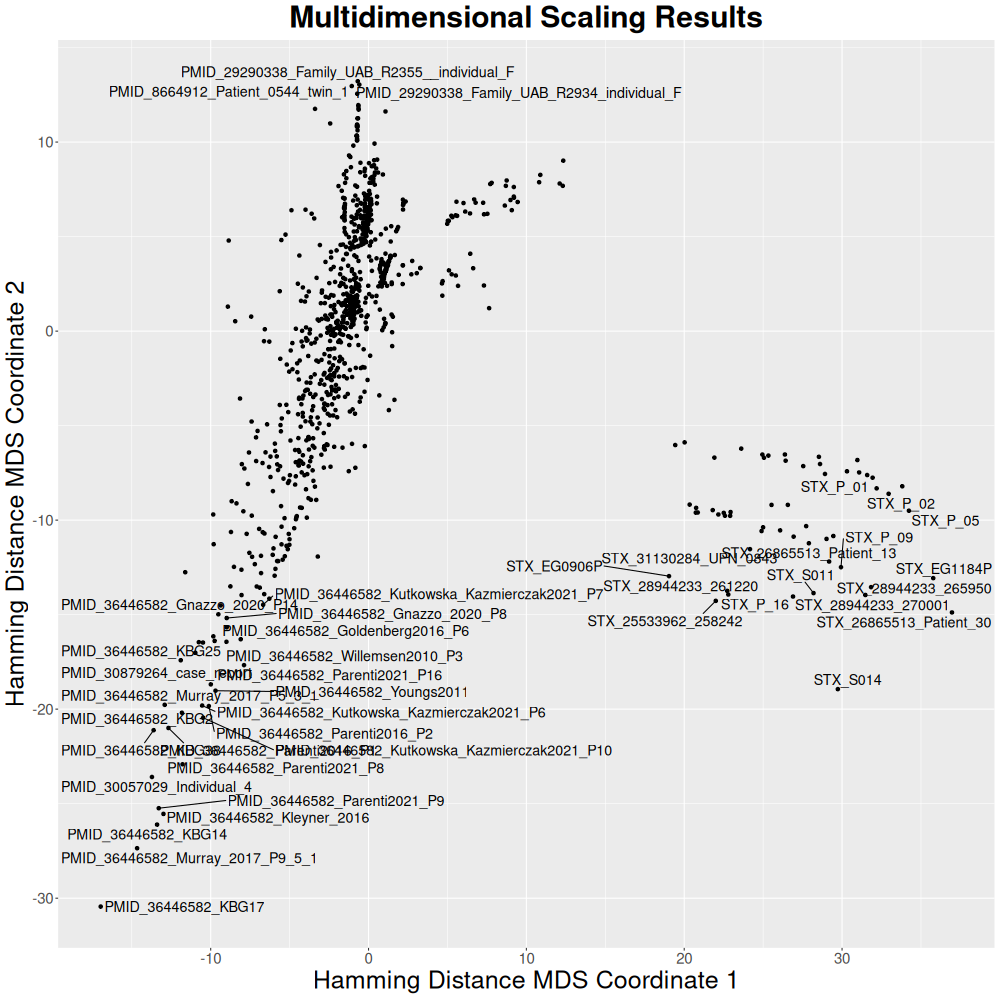
The default cohort output is a dense matrix.txt, which is useful for the included R scripts. For larger cohorts or sparse downstream workflows, write Matrix Market output instead:
../pheno-ranker/bin/pheno-ranker -r combined.json --matrix-format mtx -o combined.mtx
For graph exports, use --graph-max-weight with Hamming distance or --graph-min-weight with Jaccard to avoid very dense networks.
From now on, we will focus on the phenotypicFeatures terms, as ideally, we would like to use them to classify patients.
../pheno-ranker/bin/pheno-ranker -r combined.json -include-terms phenotypicFeatures
Rscript ../pheno-ranker/share/r/mds.R
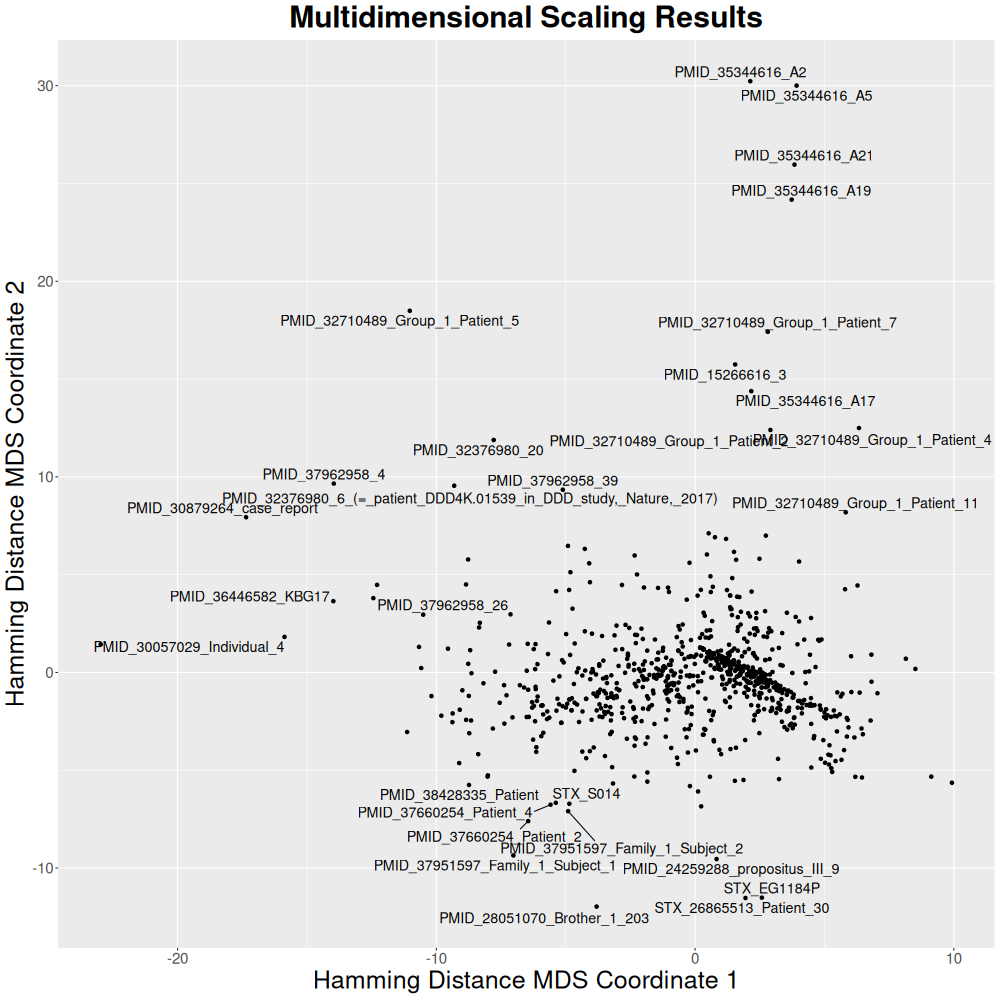
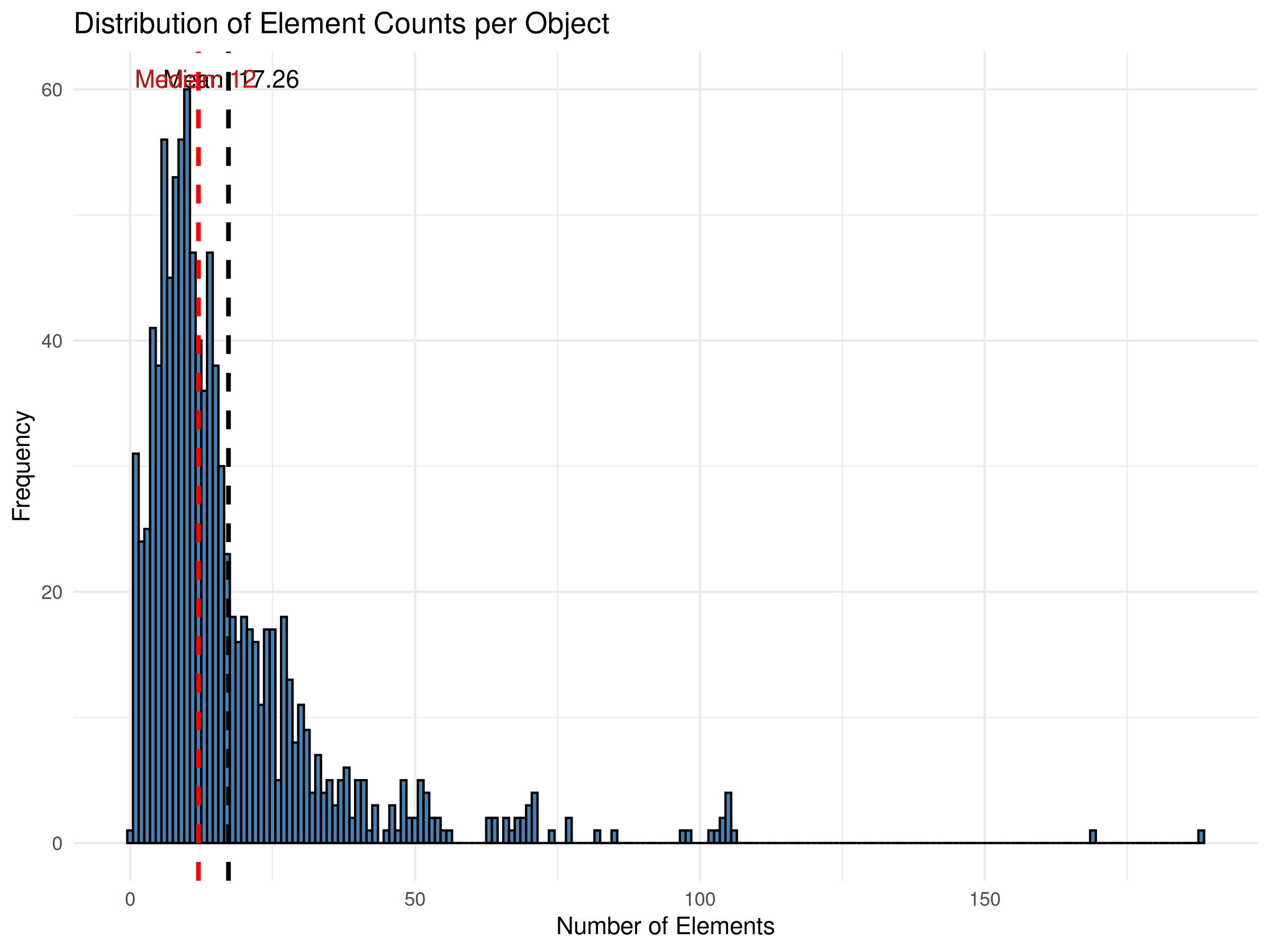
Now, let's examine the distribution of terms across patients. There are many ways to do this, but here we will a Perlscript.
See Perl code
#!/usr/bin/perl
use strict;
use warnings;
use JSON::XS;

# Read from STDIN only
if (-t STDIN) {  # Check if STDIN is empty (no piped input)
    print STDERR "Usage: zcat input.json.gz | $0\n";
    print STDERR "       cat input.json | $0\n";
    exit 1;
}

# Read the entire JSON content from STDIN
my $json_text = do {
    local $/;
    <STDIN>;
};

# Decode JSON
my $json = JSON::XS->new->utf8->decode($json_text);

# Ensure the decoded JSON is an array reference
die "Input JSON is not an array.\n" unless ref($json) eq 'ARRAY';

# Print CSV header
print "key,count\n";

# Iterate through each object in the array
foreach my $obj (@$json) {
    # Ensure the current element is an object with an 'id' field
    next unless ref($obj) eq 'HASH' && exists $obj->{id};

    my $id = $obj->{id};
    my $count = 0;

    # Check if 'phenotypicFeatures' exists and is an array
    if (exists $obj->{phenotypicFeatures} && ref($obj->{phenotypicFeatures}) eq 'ARRAY') {
        $count = scalar @{ $obj->{phenotypicFeatures} };
    }

    # Print the CSV line
    print "\"$id\",$count\n";
}
cat combined.json | ./count_phenotypicFeatures.pl > counts.csv
Now, we will use R to plot a histogram.
See R code
# Load required packages
library(ggplot2)

# Read the CSV file into a data frame
df <- read.csv("counts.csv")

# Calculate the average and median counts
average_count <- mean(df$count)
median_count <- median(df$count)

# Generate the histogram and add vertical lines for the average and median
plot <- ggplot(df, aes(x = count)) +
  geom_histogram(binwidth = 1, fill = "steelblue", color = "black") +
  geom_vline(aes(xintercept = average_count), color = "black", linetype = "dashed", linewidth = 1) +
  geom_vline(aes(xintercept = median_count), color = "red", linetype = "dashed", linewidth = 1) +
  labs(title = "Distribution of Element Counts per Object",
       x = "Number of Elements",
       y = "Frequency") +
  theme_minimal() +
  annotate("text", x = average_count + 0.5, y = Inf, label = paste("Mean:", round(average_count, 2)), vjust = 2) +
  annotate("text", x = median_count - 0.5, y = Inf, label = paste("Median:", round(median_count, 2)), vjust = 2, color = "red")

# Save the plot as a PNG file
ggsave("histogram_with_mean_median.png", plot = plot, width = 8, height = 6, dpi = 300)

# Print confirmation
cat("Histogram saved as histogram_with_mean_median.png\n")
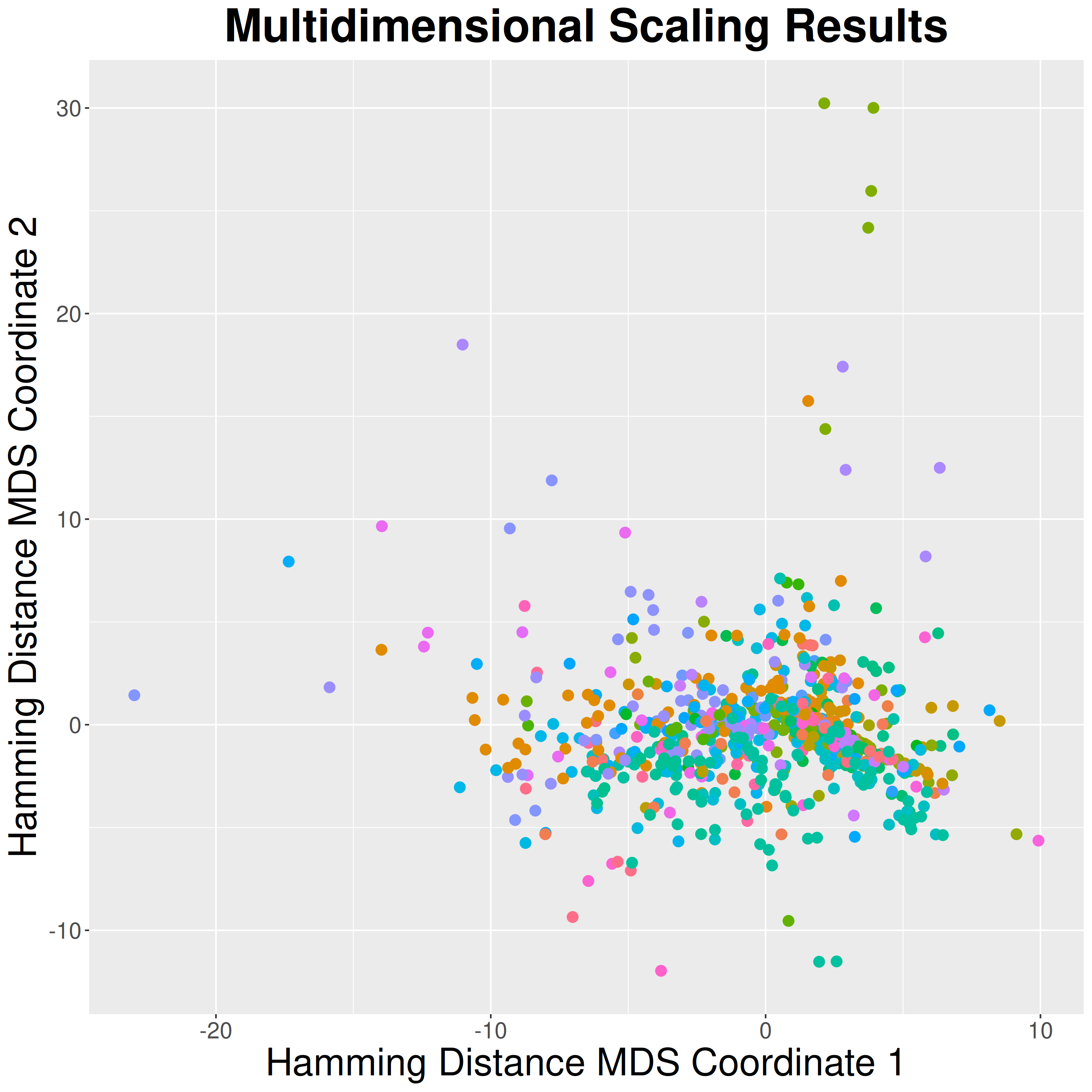
Colored by Disease
We will use Pheno-Ranker output to fetch the diseases so that we can color the MDS plot. We will use the -e option, which exports intermediate files. Let's start by running a job:
../pheno-ranker/bin/pheno-ranker -r combined.json -include-terms diseases -e
mv export.ref_hash.json diseases_info.json
Now we have the disease information stored in diseases_info.json.
We will use R to plot by disease:
See R code
# Load required packages
library(ggplot2)

# Read the CSV file into a data frame
df <- read.csv("counts.csv")

# Calculate the average and median counts
average_count <- mean(df$count)
median_count <- median(df$count)

# Generate the histogram and add vertical lines for the average and median
plot <- ggplot(df, aes(x = count)) +
  geom_histogram(binwidth = 1, fill = "steelblue", color = "black") +
  geom_vline(aes(xintercept = average_count), color = "black", linetype = "dashed", linewidth = 1) +
  geom_vline(aes(xintercept = median_count), color = "red", linetype = "dashed", linewidth = 1) +
  labs(title = "Distribution of Element Counts per Object",
       x = "Number of Elements",
       y = "Frequency") +
  theme_minimal() +
  annotate("text", x = average_count + 0.5, y = Inf, label = paste("Mean:", round(average_count, 2)), vjust = 2) +
  annotate("text", x = median_count - 0.5, y = Inf, label = paste("Median:", round(median_count, 2)), vjust = 2, color = "red")

# Save the plot as a PNG file
ggsave("histogram_with_mean_median.png", plot = plot, width = 8, height = 6, dpi = 300)

# Print confirmation
cat("Histogram saved as histogram_with_mean_median.png\n")
Graph
We will create a graph but we will be using only data from 50 patients to make it faster.
jq -c '.[]' combined.json | shuf -n 50 | jq -s '.' > combined_small.json
../pheno-ranker/bin/pheno-ranker -r combined_small.json -include-terms phenotypicFeatures --cytoscape-json corpus_cytoscape.json --graph-max-weight 10
Loading graph...
Converting data to QR-codes
Pheno-Ranker allows you to convert your data into QR-codes. Let's try an example.
- First we export intermediate files. This time we will include
phenotypicFeaturesonly:
../pheno-ranker/bin/pheno-ranker -r combined.json -include-terms phenotypicFeatures -e
- We use barcode utilities to create the codes as
PNGimages:
../pheno-ranker/utils/barcode/pheno-ranker2barcode -i export.ref_binary_hash.json
This will create 1,000 PNG images inside the directory qr_codes .
See QR codes for the first 10 samples
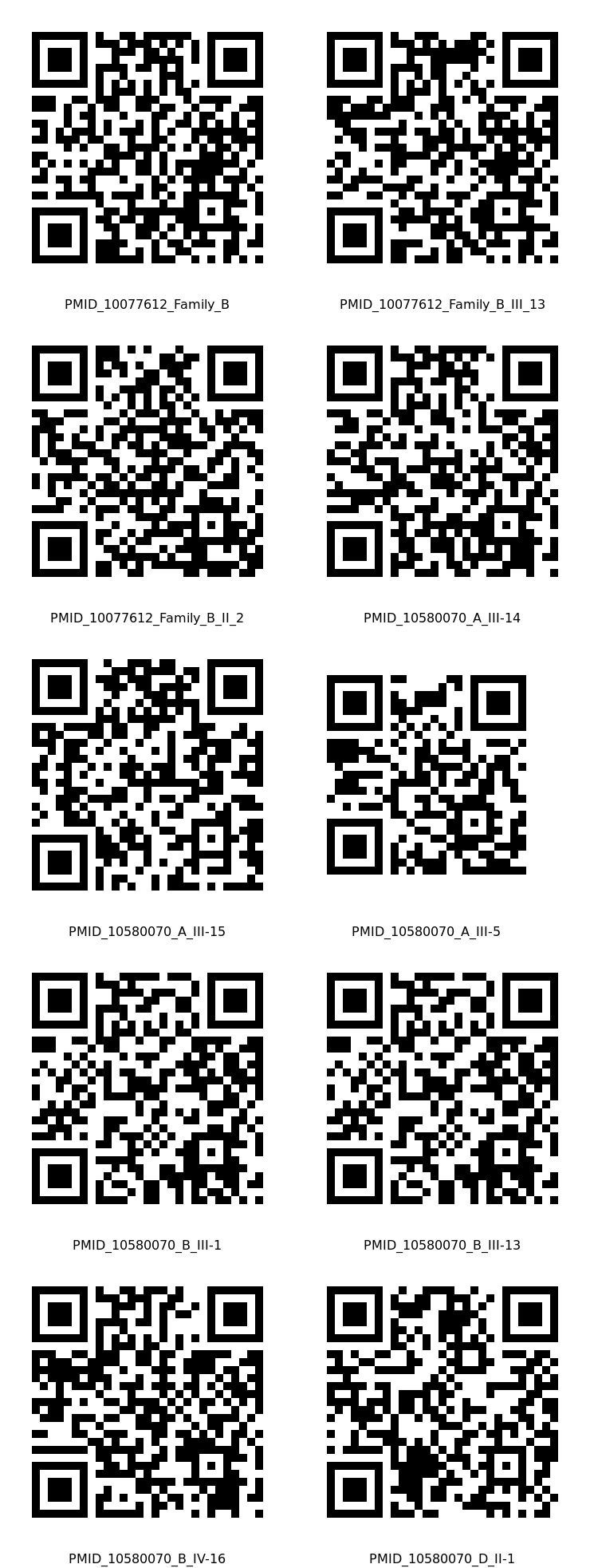
- To decode the
PNGand create aCSV:
../pheno-ranker/utils/barcode/barcode2pheno-ranker -t export.glob_hash.json -i qr_codes/* -o combined.qr.json --generate-csv
Patient Mode
Now, we will choose patient PMID_35344616_A2 to search for similar patients. We already know from the figures above that this patient is related to at least three other patients.
First, we will perform a dry run to obtain the JSON for that individual.
../pheno-ranker/bin/pheno-ranker -r combined.json -poi PMID_35344616_A2
This will create the file PMID_35344616_A2.json.
Now, we run it in patient mode.
../pheno-ranker/bin/pheno-ranker -r combined.json -t PMID_35344616_A2.json -include-terms phenotypicFeatures -max-out 5
| RANK | REFERENCE(ID) | TARGET(ID) | FORMAT | LENGTH | WEIGHTED | HAMMING-DISTANCE | DISTANCE-Z-SCORE | DISTANCE-P-VALUE | DISTANCE-Z-SCORE(RAND) | JACCARD-INDEX | JACCARD-Z-SCORE | JACCARD-P-VALUE | REFERENCE-VARS | TARGET-VARS | INTERSECT | INTERSECT-RATE(%) | COMPLETENESS(%) |
|---|---|---|---|---|---|---|---|---|---|---|---|---|---|---|---|---|---|
| 1 | PMID_35344616_A2 | PMID_35344616_A2 | PXF | 31 | False | 0 | -7.235 | 0.0000000 | -5.5678 | 1.000 | 19.220 | 0.0000000 | 31 | 31 | 31 | 100.00 | 100.00 |
| 2 | PMID_35344616_A5 | PMID_35344616_A2 | PXF | 39 | False | 16 | -4.143 | 0.0000172 | -1.1209 | 0.590 | 11.200 | 0.0000000 | 31 | 31 | 23 | 74.19 | 74.19 |
| 3 | PMID_35344616_A21 | PMID_35344616_A2 | PXF | 38 | False | 18 | -3.756 | 0.0000862 | -0.3244 | 0.526 | 9.960 | 0.0000000 | 27 | 31 | 20 | 64.52 | 74.07 |
| 4 | PMID_35344616_A17 | PMID_35344616_A2 | PXF | 34 | False | 21 | -3.177 | 0.0007451 | 1.3720 | 0.382 | 7.146 | 0.0000000 | 16 | 31 | 13 | 41.94 | 81.25 |
| 5 | PMID_35344616_A19 | PMID_35344616_A2 | PXF | 41 | False | 23 | -2.790 | 0.0026344 | 0.7809 | 0.439 | 8.254 | 0.0000000 | 28 | 31 | 18 | 58.06 | 64.29 |
There might be cases where you want to retain phenotypicFeatures set to "excluded": true (i.e., absent). For instance, when you want to match individuals with the same diseases but lacking some features. Use --retain-excluded-phenotypicFeatures for that.
Citation
If you use any of this information for your research, please cite: