Project policies
A policy adds your project's metadata requirements to the built-in checks. Use it for approved descriptions, empty comment fields, de-identification declarations, or a specific patient-ID format. dicomqc checks the files; it does not change them.
Try the policy demo
The demo creates one synthetic DICOM file in candidate/ and a separate,
corrected file in corrected/. Both use sub-001 for PatientName and
PatientID, with no birth date or private tags. These fields differ:
| DICOM field | Candidate value | Demo policy requirement | Corrected value |
|---|---|---|---|
PatientIdentityRemoved | NO | Exactly YES, at the top level | YES |
StudyDescription | T1w - Example Patient | Exactly T1w or T2w | T1w |
PatientComments | Synthetic identifying comment | Absent or empty | Absent |
These are invented values shown to explain the example. The generated reports do not display them.
Generate the files, their three-rule policy.yaml, and both audits:
dicomqc demo --policy-demo --output-dir dicomqc-policy-demo
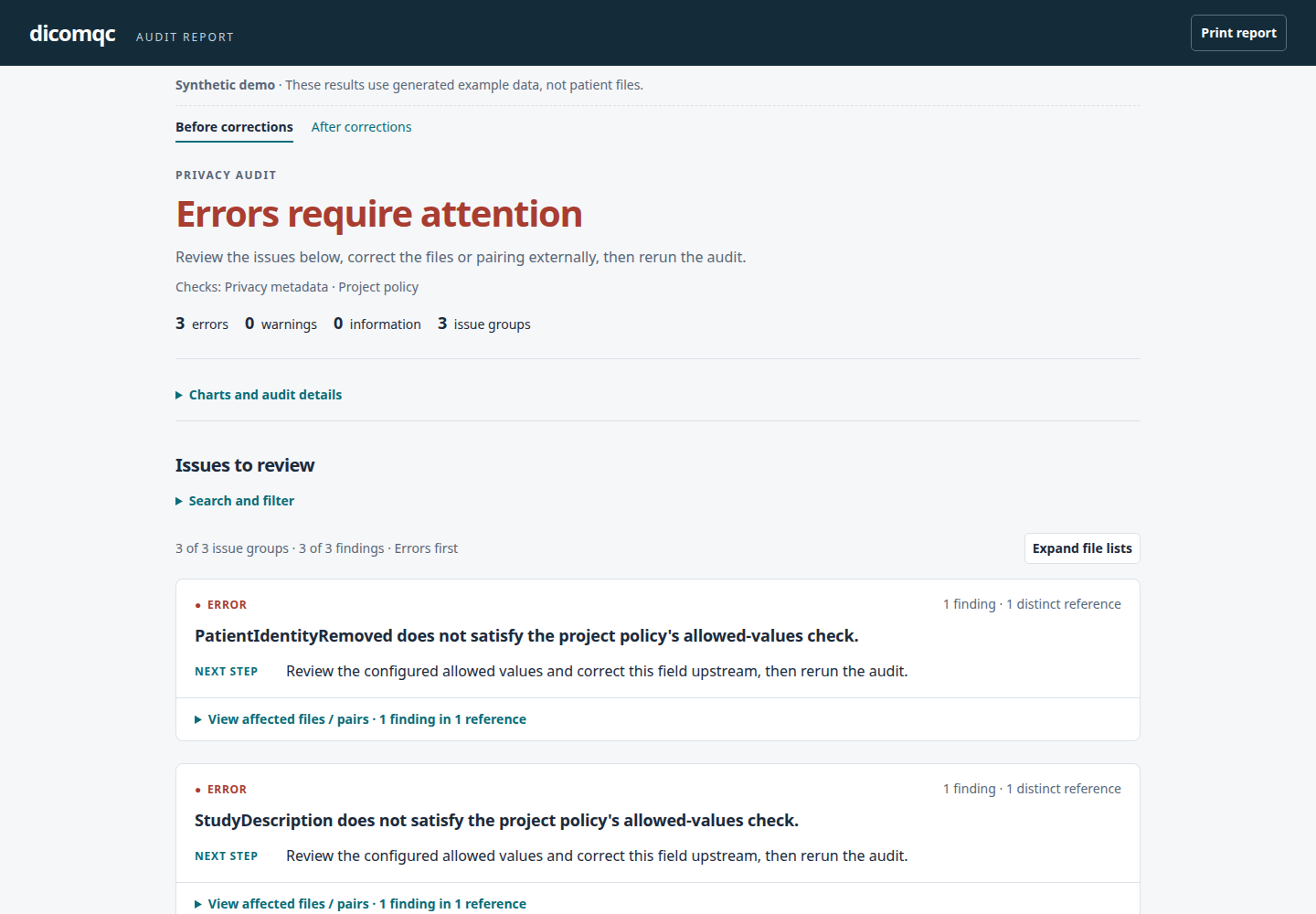
The candidate passes the built-in checks alone. With the project policy, each
row above produces one error: the identity-removal declaration is not YES,
the description is outside the approved list, and the comment is populated.
Open dicomqc-policy-demo/before.html to see all three findings in one file.
Before: three project-policy errors
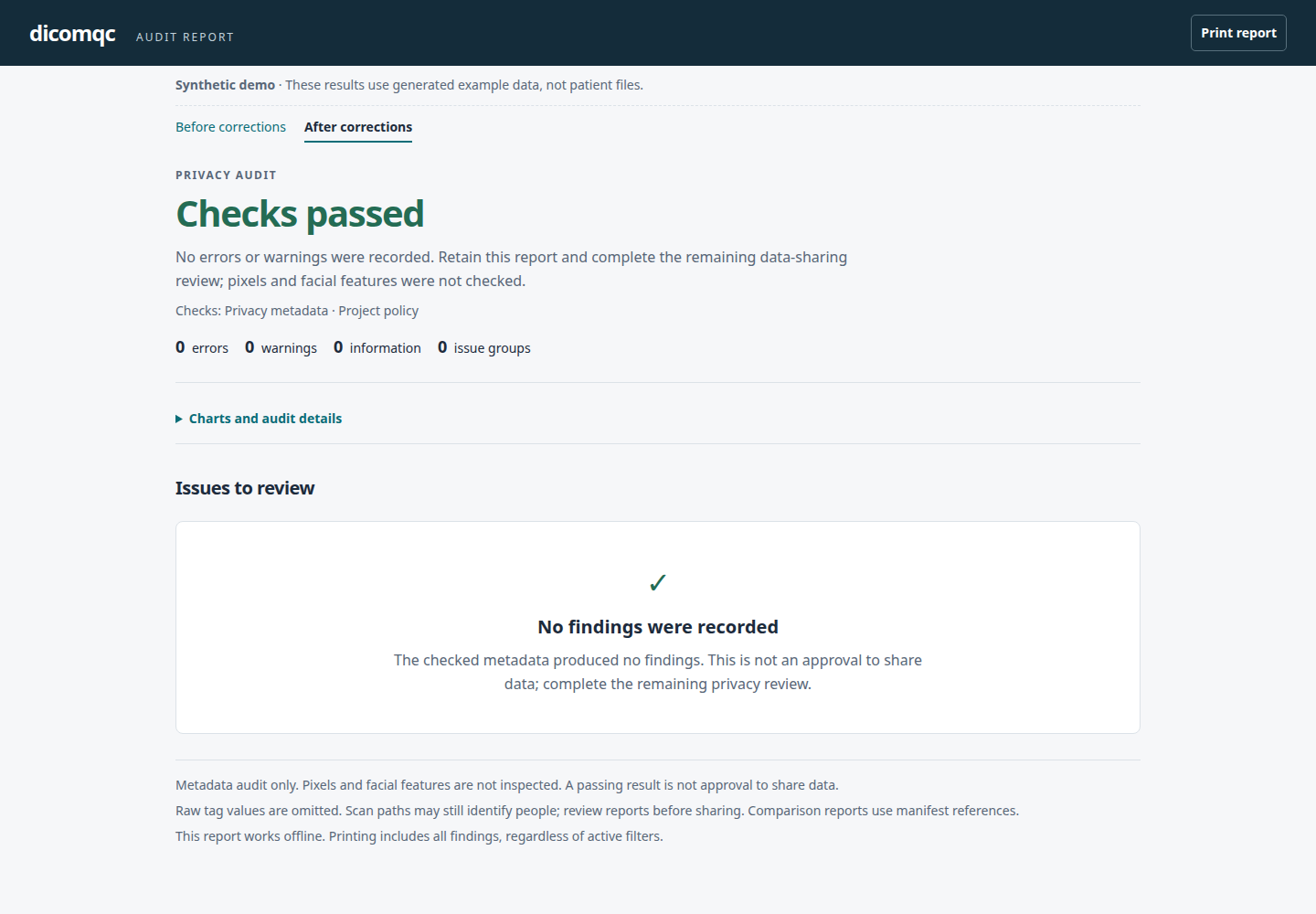
The corrected file satisfies all three requirements and the built-in checks:
zero errors, zero warnings, and no findings. Open
dicomqc-policy-demo/after.html to see the passing audit. dicomqc creates
these separate synthetic examples; its audits never edit the files.
After: all checked metadata passes
To rerun the two audits explicitly:
dicomqc scan dicomqc-policy-demo/candidate/ \
  --policy dicomqc-policy-demo/policy.yaml --html candidate-audit.html

dicomqc scan dicomqc-policy-demo/corrected/ \
  --policy dicomqc-policy-demo/policy.yaml --html corrected-audit.html
The first scan returns exit code 2; the second returns 0. The demo command
itself returns 0 when both examples produce the expected results. It also
writes before.json, before.csv, after.json, and after.csv alongside the
HTML. See the output formats reference
for JSON and CSV contents, and HTML review controls
for filters and printing.
Use your own policy
In the desktop app's privacy mode, expand Advanced setup, then use
Project policy > New policy or Choose YAML. The Policy workspace provides YAML highlighting, line numbers,
search, undo, and validation with the dicomqc engine. Save as and use writes
a new file and selects it without overwriting the original. Save the policy
outside DICOM input folders. Saving the .dicomqc project embeds a copy of the
selected YAML. Completed desktop audits also retain their policy alongside the
reports. Remove policy returns to the built-in checks without deleting the YAML file.
The separate four-rule example below uses different approved descriptions and
adds a patient-ID format check. It is not the demo's generated policy.
Save it as research.yaml, outside your DICOM input directory:
version: 1
id: research-example
rules:
  - id: no-patient-comments
    keyword: PatientComments
    check: absent_or_empty

  - id: approved-study-description
    keyword: StudyDescription
    check: allowed_values
    values: ["Brain MRI", "Chest CT"]

  - id: identity-removal-declared
    keyword: PatientIdentityRemoved
    scope: top_level
    check: allowed_values
    values: ["YES"]

  - id: patient-id-format
    keyword: PatientID
    scope: top_level
    check: matches
    pattern: "sub-[0-9][0-9][0-9]"
Change the allowed descriptions and ID format to match your project, then run:
dicomqc scan candidate/ --policy research.yaml --html policy-report.html
The same example is in examples/policies/research.yaml in the repository.
To apply a policy during a dataset comparison:
dicomqc compare source/ candidate/ --manifest pairs.csv \
  --policy research.yaml --html comparison.html
Comparison policies apply only to readable, listed candidate files, not to the original source files. Keep the policy, manifest, and reports outside both DICOM directories. Report outputs must not overwrite the policy file.
Choose checks
check | Requirement | Extra field |
|---|---|---|
absent_or_empty | The field is missing or empty. | None |
nonempty | The field exists and contains a value. | None |
allowed_values | Every value exactly matches an approved string. | values: list of quoted strings |
matches | Every value matches a full-string, case-sensitive shell pattern. | pattern: quoted string |
nonempty, allowed_values, and matches fail when the field is missing or
empty. Whitespace-only values count as empty; other values are not trimmed
before matching. Each component of a multi-valued field must pass.
Matching is case-sensitive. Patterns use * for any number of characters,
? for one character, and [0-9] for one digit; they are not regular expressions.
For example, sub-[0-9][0-9][0-9] accepts sub-001, but not sub-1 or sub-001-extra.
Each rule needs a unique id, a standard DICOM keyword, and a check.
Optional severity is error (default), warning, or info.
Use non-identifying policy and rule IDs: they appear in reports.
Quote allowed values, including "YES", "NO", numbers, and dates, so YAML
treats them as strings.
The default scope: all checks every occurrence, including fields inside
sequences. A passing occurrence does not hide a failing one. Use
scope: top_level when a field must be present on the main DICOM dataset;
a nested field cannot satisfy that requirement.
scope: all does not require the field to exist in every sequence item.
Invalid policies stop the command. Unknown fields and keywords, duplicate rule IDs, and inappropriate options are rejected rather than ignored.
Policy format limits
- Policy and rule IDs are lowercase slugs, such as
brain-mri-v1, up to 64 characters. - A UTF-8 YAML file can contain up to 100 rules and be at most 64 KiB.
- An allowed-value list can contain up to 100 strings. Strings and patterns are limited to 256 characters.
- YAML aliases, anchors, and explicit type tags are not supported.
- Binary fields, including pixel data, cannot be selected. Sequence fields
support only
absent_or_emptyandnonempty; the latter checks for at least one item, not the contents of that item. To check an inner field, name its keyword in a separate rule withscope: all.
What these checks mean
Operator-entered descriptions can contain names or other identifying details. An approved-value list can catch unexpected text without discarding useful acquisition descriptions. A populated description is not automatically unsafe; the list is a project decision. DICOM Clean Descriptors Option.
Project-specific IDs and de-identification declarations are used in real
workflows: the RICORD protocol specifies site-prefixed patient IDs and sets
PatientIdentityRemoved to YES. The example above is not an implementation
of that protocol. RSNA RICORD de-identification protocol.
PatientIdentityRemoved: YES only records what the producer declared.
A policy cannot prove that de-identification succeeded. dicomqc does not inspect
pixels, perform OCR, or certify a DICOM confidentiality profile.
Policies are additive: they do not disable or replace the built-in checks. A project ID pattern may pass while the built-in pseudonym-format check still warns. Review both findings; passing a project policy is not a sharing decision.
By default, policy reports omit observed tag values and the policy's allowed strings and patterns. Policy-scan JSON also omits raw study/series UIDs, manufacturer, and modality from its record context; ordinary scan JSON still includes those fields.
Adding --vendor-summary explicitly includes declared scanner/software labels
and private creator labels in HTML, JSON, and MultiQC, even with a policy.
Those labels may contain identifying information; a passing policy does not
establish that they are safe to share. Private payload values and policy
configuration contents remain excluded. See Scanner inventory.
JSON records the policy's id and SHA-256 file digest in a policy object; HTML and
MultiQC show them in the supporting audit details. Keep the policy file with
the audit records so reviewers can reproduce the check.
File paths and policy/rule IDs remain visible. Use non-identifying IDs and
review paths before sharing a report.