Compare source and de-identified files
dicomqc compare compares original source DICOM files with processed candidate
DICOM files. It checks that de-identification accounts for every input file and
uses patient pseudonyms consistently. It does not compare completed dicomqc
runs or their reports.
In the desktop app, select Dataset comparison in Setup and choose the source folder, candidate folder, and pairing CSV. This is separate from Privacy audit; adding a project policy checks candidate metadata only. The walkthrough below uses the CLI and the same synthetic fixtures as the desktop comparison example.
Try the comparison demo
1. Generate the data
dicomqc demo --compare --output-dir comparison-demo
The demo creates three source files for two patients, a flawed candidate dataset,
and a separate corrected dataset. All names and identifiers below are synthetic.
pairs.csv pairs the source and output filenames in this order:
| Source file | Source PatientID | Output file | Candidate PatientID | Corrected PatientID |
|---|---|---|---|---|
patient-a-visit-1.dcm | LOCAL001 | image-001.dcm | sub-001 | sub-001 |
patient-a-visit-2.dcm | LOCAL001 | image-002.dcm | sub-099 | sub-001 |
patient-b-visit-1.dcm | LOCAL002 | image-003.dcm | File missing | sub-002 |
The command writes these datasets to source/, candidate/, and corrected/
under comparison-demo/. It also runs both comparisons and writes
before.html, before.json, before.csv and their after equivalents.
The generator creates both examples; the audit itself never edits DICOM files.
2. Inspect the failing comparison
To rerun the first comparison:
dicomqc compare comparison-demo/source comparison-demo/candidate \
  --manifest comparison-demo/pairs.csv \
  --html comparison-demo/before.html \
  --json comparison-demo/before.json \
  --csv comparison-demo/before.csv
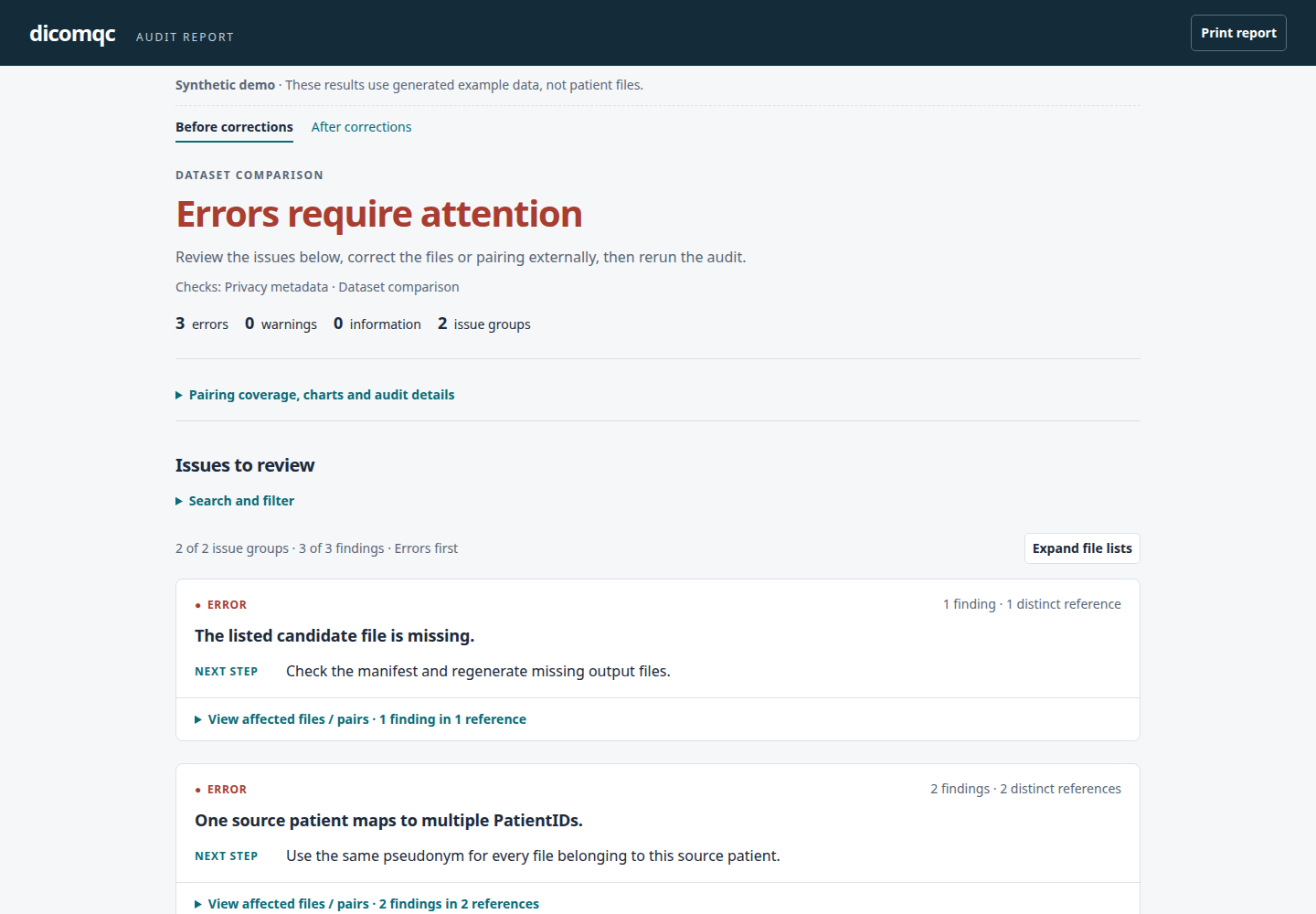
This exits 2: only two of the three pairs are readable, and the report contains
three error findings in two issue groups:
- One missing candidate file: manifest row 3.
- Inconsistent pseudonyms for one source patient: one finding each for rows 1 and 2.
Both existing candidate files pass the built-in metadata checks on their own.
The missing output and split patient identity only emerge when comparing the
datasets. Open comparison-demo/before.html directly in a browser; MultiQC is
not needed. Reports use manifest-row references instead of the synthetic IDs
shown in the input table above.
View the comparison report before corrections
JSON and CSV from this comparison
- JSON
- CSV
Example JSON finding from the synthetic comparison demo.
This is the missing-file entry in before.json's findings array, not the full
report. pair-000003/candidate identifies the third manifest row without
exposing the source patient ID.
{
  "keyword": null,
  "message": "The listed candidate file is missing.",
  "path": "pair-000003/candidate",
  "profile_id": "dataset-comparison-v0.1",
  "recommendation": "Check the manifest and regenerate missing output files.",
  "rule_id": "dataset-comparison-v0.1.missing_candidate",
  "severity": "error",
  "standard_refs": [],
  "tag": null,
  "value_state": "absent"
}
Example CSV rows from the synthetic comparison demo.
The three findings in before.csv, shown as a table with selected columns for
readability. The CSV also includes rule and profile IDs, tag, keyword, value
state, and standards references.
| path | severity | message | recommendation |
|---|---|---|---|
| pair-000003/candidate | error | The listed candidate file is missing. | Check the manifest and regenerate missing output files. |
| pair-000001/candidate | error | One source patient maps to multiple PatientIDs. | Use the same pseudonym for every file belonging to this source patient. |
| pair-000002/candidate | error | One source patient maps to multiple PatientIDs. | Use the same pseudonym for every file belonging to this source patient. |
3. Inspect the corrected comparison
The corrected dataset includes the missing file and uses sub-001 for both
visits from LOCAL001. Compare it using the same manifest:
dicomqc compare comparison-demo/source comparison-demo/corrected \
  --manifest comparison-demo/pairs.csv \
  --html comparison-demo/after.html \
  --json comparison-demo/after.json \
  --csv comparison-demo/after.csv
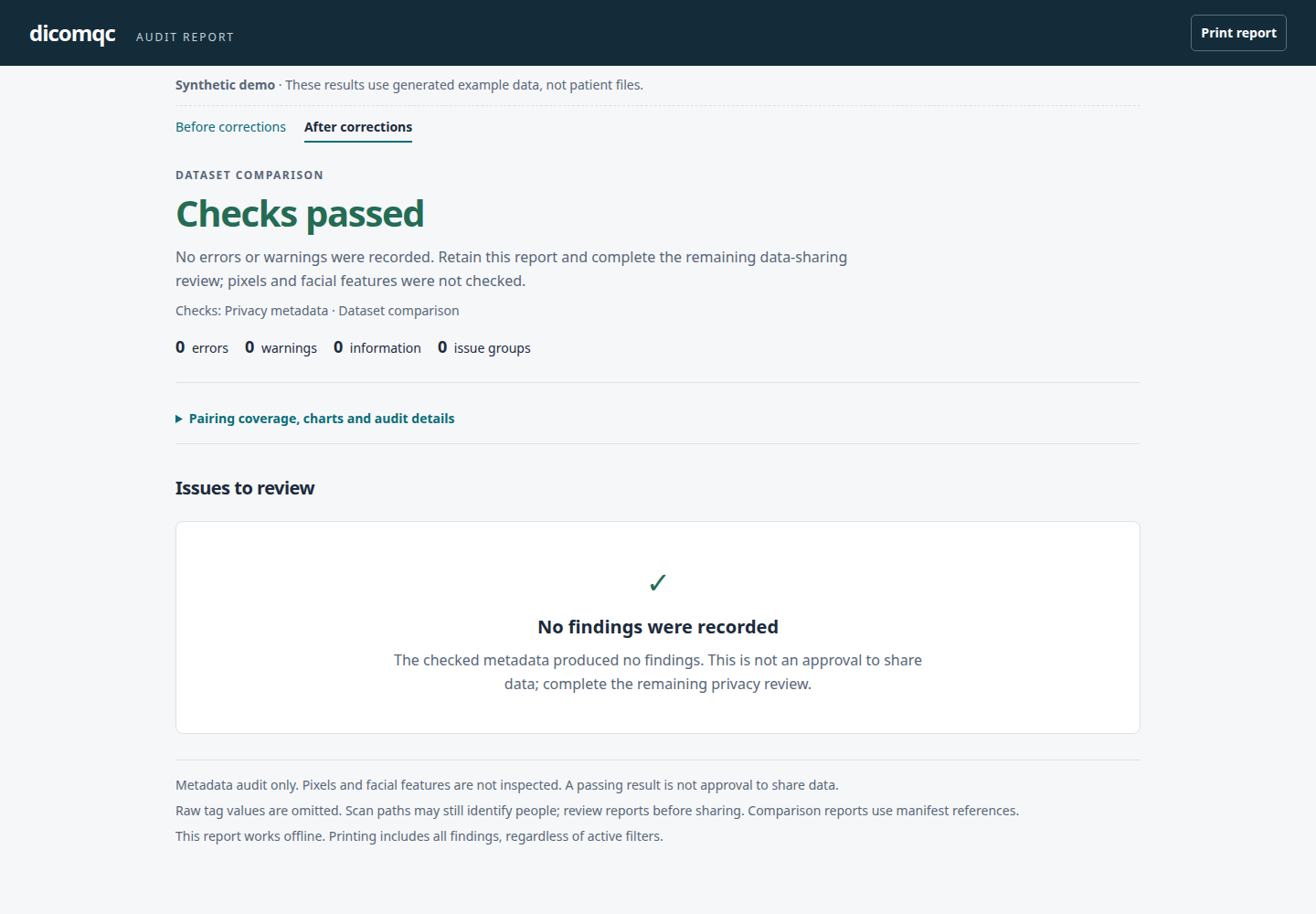
This exits 0: all three pairs are readable and there are no findings.
Open comparison-demo/after.html to see the passing result. This means the
checked metadata and pairings passed, not that every privacy risk was assessed.
Keep both demo HTML files in the same directory for their before/after links.
View the comparison report after corrections
The demo command itself exits 0 when both examples are generated with their
expected results, and 2 otherwise. Use --force to replace a marked demo
directory; unmarked directories are refused. Without --output-dir, the demo
writes to dicomqc-demo/. See output formats
and HTML review controls for details.
Prepare a pairing manifest
Create a CSV file outside both DICOM directories:
source,candidate
patient-a/visit-1/image.dcm,sub-001/visit-1/renamed.dcm
patient-a/visit-2/image.dcm,sub-001/visit-2/renamed.dcm
Paths are relative to the source and candidate directories respectively. Each
file must appear exactly once on its side of the manifest. The directories
must be separate, contain only the files being audited, and have no symbolic
links. Files do not need a .dcm extension. Keep the manifest restricted: its
paths may identify patients.
Have the de-identification process record these pairs as it writes output files. dicomqc trusts that pairing; it cannot prove that two listed files correspond. It does not guess from filenames or UIDs, which may change during de-identification.
Run the comparison
dicomqc compare raw_mri/ candidate_mri/ \
  --manifest pairs.csv \
  --json comparison.json \
  --csv comparison-findings.csv \
  --html comparison.html
Save reports outside both input directories. The command reads metadata and does not modify the DICOM files or the manifest.
It checks for:
- missing files listed in the manifest;
- source or candidate files omitted from the manifest;
- listed files that cannot be read as DICOM;
- missing or unchanged
PatientIDvalues; - one source patient receiving different output IDs;
- different source patients receiving the same output ID.
It also runs the existing research-release-v0.1 privacy checks on each readable,
listed candidate file. Original source files are not expected to pass those checks.
Add --policy FILE for project-specific checks on candidate files.
Source patients are grouped by IssuerOfPatientID and PatientID. If the issuer
is absent, equal source IDs are treated as the same patient. Use a single source
ID namespace or populate issuers before comparing data from multiple sites.
Output PatientID values must be unique across source patients in this comparison.
Patient name consistency is not checked; output names still receive the ordinary
pseudonym-format check.
Read the results
Exit codes match scan: 0 means no findings, 1 means warnings, and 2 means
errors, unreadable files, or invalid inputs. Empty manifests and duplicate pairings
are rejected instead of producing a clean result.
Parser warnings also stop a file from passing. Their original text is suppressed
because it may contain identifiers; inspect affected files in a restricted environment.
Comparison reports omit original paths, identifiers, UIDs, and other raw metadata.
A reference such as pair-000002/candidate points to the second data row of the
manifest (excluding its header). Use the restricted manifest to locate that file.
For files omitted from the manifest, unpaired-source-000001 or
unpaired-candidate-000001 identifies the first omitted relative path in sorted
order on that side. These references are local to this comparison, not stable
identifiers across different manifests or inventories.
The JSON comparison section counts source files, candidate files, manifest pairs,
readable pairs, and pairs checked for identity consistency. The usual scan counts
refer to readable, listed candidate files. Dataset errors can therefore exist
even when all scanned candidates pass their individual checks.
In HTML, Charts and audit details shows pairing coverage: both files readable, a missing file, or an unreadable file. Missing takes precedence when a pair also has an unreadable file; files outside the manifest are excluded from this chart. These are coverage counts, not privacy verdicts: a readable pair can still have findings.
Limits of this first implementation
This comparison expects one output file for every source file. It does not yet support intentional exclusions, splitting or merging files, date-shift checks, UID-reference checks, pixel comparisons, or MultiQC output for comparisons. Equal file counts alone do not establish completeness: the manifest must cover both inventories and every listed file must be readable.
A consistent pseudonym is not proof of anonymity. Review the findings and the remaining privacy risks before sharing data.