End-to-end mtDNA examples
The bundled mtDNA workflows use MToolBox to analyze mitochondrial reads from a small BAM exported by an earlier native GATK 4.6 WES or WGS single-sample run.
- MToolBox runs on x86_64 Linux only. ARM systems, including Apple Silicon, are not supported.
- The WES/WGS run must set
export_mtdna_bam: true. - Keep the WES/WGS run directory under the sample directory so CBIcall can find
exports/mtdna. - mtDNA workflows do not fall back to the full recalibrated BAM or start from FASTQ files.
First, add the export setting to the WES/WGS single-sample YAML. Any native backend can create the handoff:
mode:             single
pipeline:         wes
workflow_backend: bash
software_stack:   gatk-4.6
input_dir:        CNAG999_exome/CNAG99901P_ex
export_mtdna_bam: true
cleanup_bam:      true
The completed run contains:
CNAG999_exome/
  CNAG99901P_ex/
    cbicall_bash_gatk-4.6_wes_single_b37_*/
      exports/
        mtdna/
          CNAG99901P-DNA_MIT.bam
          CNAG99901P-DNA_MIT.bam.bai
cleanup_bam: true removes 01_bam only. The exported mtDNA BAM remains
available for the next run.
CBIcall derives the sample identifier from the input directory name. There is
no separate sample key in the parameters YAML. See
Naming Conventions for the expected layout.
- Single sample
- Cohort
1. Create the parameters YAML
Create mit_single.yaml:
mode:             single
pipeline:         mit
workflow_backend: bash
software_stack:   gatk-3.5
input_dir:        CNAG999_exome/CNAG99901P_ex
The input_dir is the sample directory containing the earlier native WES/WGS
run and its exports/mtdna directory.
2. Run CBIcall
cbicall run -p mit_single.yaml -t 4
3. Inspect the outputs
cbicall_bash_gatk-3.5_mit_single_rsrs_*/
  01_mtoolbox/
  02_browser/
  log.json
  run-report.json
  run-report.html
1. Prepare the project directory
Place each sample directory under one project directory. Every sample must have
a completed native WES/WGS single-sample run with export_mtdna_bam: true:
CNAG999_exome/
  CNAG99901P_ex/
    cbicall_bash_gatk-4.6_wes_single_b37_*/
  CNAG99902M_ex/
    cbicall_bash_gatk-4.6_wes_single_b37_*/
2. Create the parameters YAML
Create mit_cohort.yaml:
mode:             cohort
pipeline:         mit
workflow_backend: bash
software_stack:   gatk-3.5
input_dir:        CNAG999_exome
3. Run CBIcall
cbicall run -p mit_cohort.yaml -t 4
4. Inspect the outputs
CNAG999_exome/cbicall_bash_gatk-3.5_mit_cohort_rsrs_*/
  01_mtoolbox/
  02_browser/
  log.json
  run-report.json
  run-report.html
Principal mtDNA outputs
Single-sample and cohort runs use the same public artifact model:
| File | Use |
|---|---|
01_mtoolbox/mit_prioritized_variants.txt | Annotated variants with genotype, depth, and heteroplasmy values. |
01_mtoolbox/VCF_file.vcf | MToolBox VCF. |
01_mtoolbox/mt_classification_best_results.csv | Predicted mitochondrial haplogroups. |
01_mtoolbox/mit.filtered.json | Canonical filtered JSON used to generate the browser. |
02_browser/<run-id>.html | Standalone interactive browser report. |
Open the browser report
The HTML report embeds its rows and assets, so it opens directly through
file:// without a web server or internet connection.
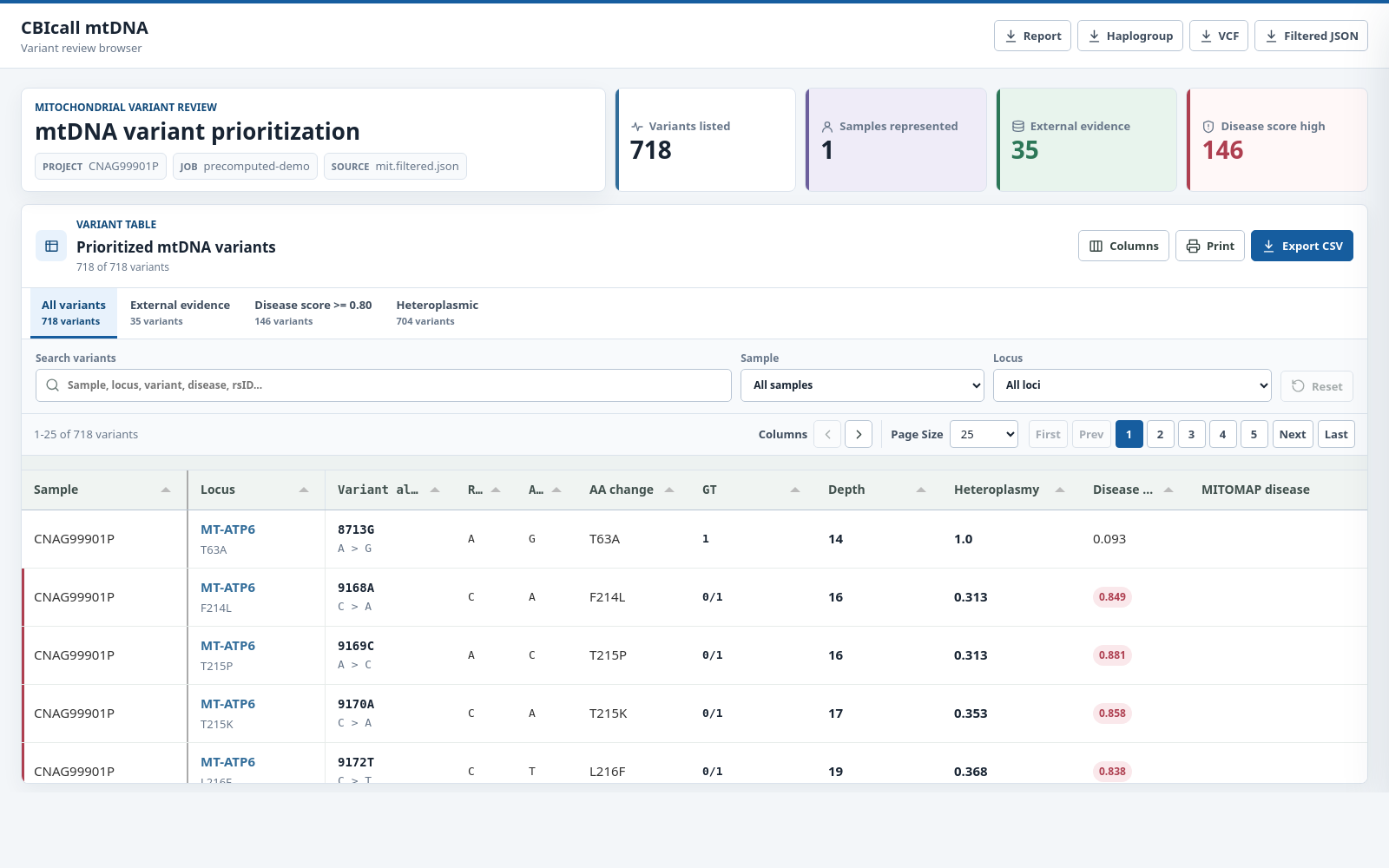
Selecting a row opens the complete annotation record:
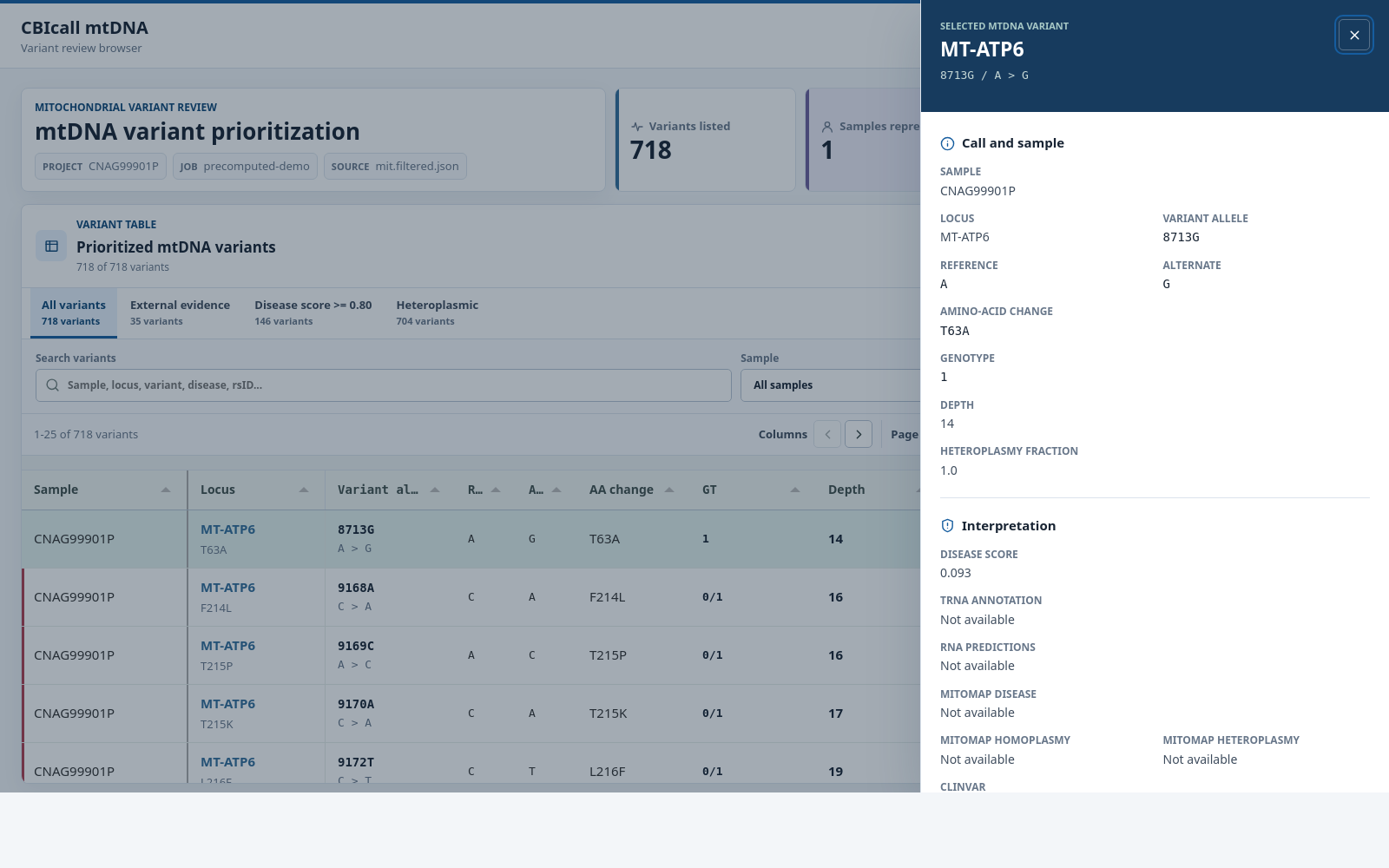
The browser supports quick filters, text and column filtering, sorting,
pagination, horizontal scrolling, a column selector, printing, and CSV export.
Its download buttons link to the report, haplogroup file, VCF, and canonical
filtered JSON in 01_mtoolbox/.
Browser fields and report filters
| Field | Meaning |
|---|---|
| Sample | Sample identifier. Multiple samples may be listed for a cohort record. |
| Locus | Mitochondrial locus or feature. |
| Variant allele | Mitochondrial position and alternative allele. |
| Ref / Alt | RSRS reference allele and observed alternative allele or alleles. |
| AA change | Predicted amino-acid change in a coding region. |
| GT | Genotype, where 0 is reference and values of 1 or greater identify alternative alleles. |
| Depth | Read depth at the variant position. |
| Heteroplasmy | Estimated heteroplasmy fraction. Confidence intervals remain available in the VCF. |
The canonical filter excludes synonymous records, records with a maximum heteroplasmy fraction at or below 0.30, records with a missing heteroplasmy value, and records with 1000 Genomes frequency at or above 0.01. See the MToolBox output documentation for the remaining annotation fields.
The report supports research QC and exploration. Genetic findings require appropriate validation and expert interpretation before clinical use.
See Outputs for the complete file reference and Configuration Reference for all accepted YAML keys.