Read metadata only
Scan DICOM files without loading pixel data and normalize release-relevant tags.
DICOM metadata audit
dicomqc validates pseudonymized DICOM datasets before release, producing redaction-safe evidence for de-identification review, private-tag handling, and MultiQC project reports.
dicomqc scan work/candidate_release_mri/
  --json reports/dicomqc/report.json
  --csv reports/dicomqc/findings.csv
  --multiqc reports/dicomqc/dicomqc_mqc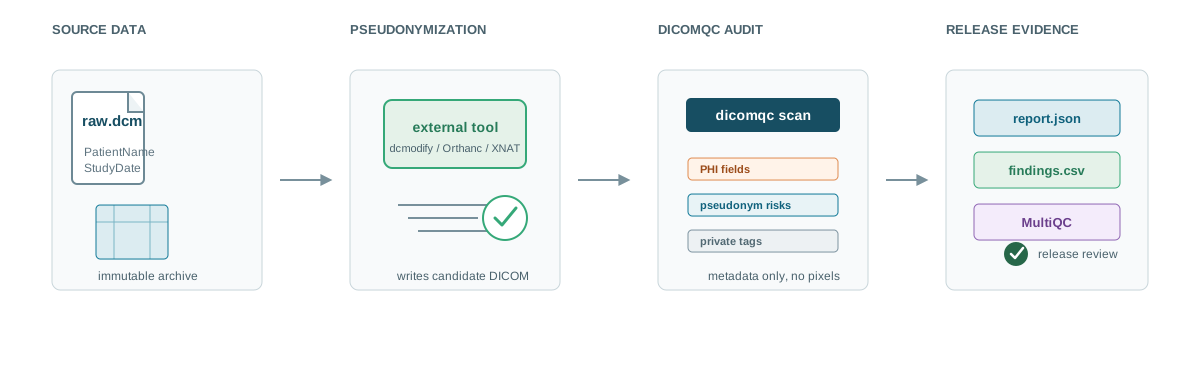
dicomqc audits the candidate release; it does not modify the original imaging data.
Scan DICOM files without loading pixel data and normalize release-relevant tags.
Flag direct PHI fields, risky pseudonym fields, and private tags as structured findings.
Write JSON, CSV, and MultiQC-compatible outputs that avoid raw DICOM values.
Use findings to update an external pseudonymization workflow, then rerun the audit.
Start here
Install dicomqc, scan a study directory, and read the exit codes.
02Place dicomqc after pseudonymization and before research release.
03Use redaction-safe JSON, CSV, and MultiQC companion evidence.
04Review the scanner, rules, report writers, and extension roadmap.