What Is Convert-Pheno?
Convert-Pheno is open-source software for converting clinical and phenotypic data between commonly used exchange models. It is mainly designed for file-based transformations, validation checks, and reproducible batch conversion.
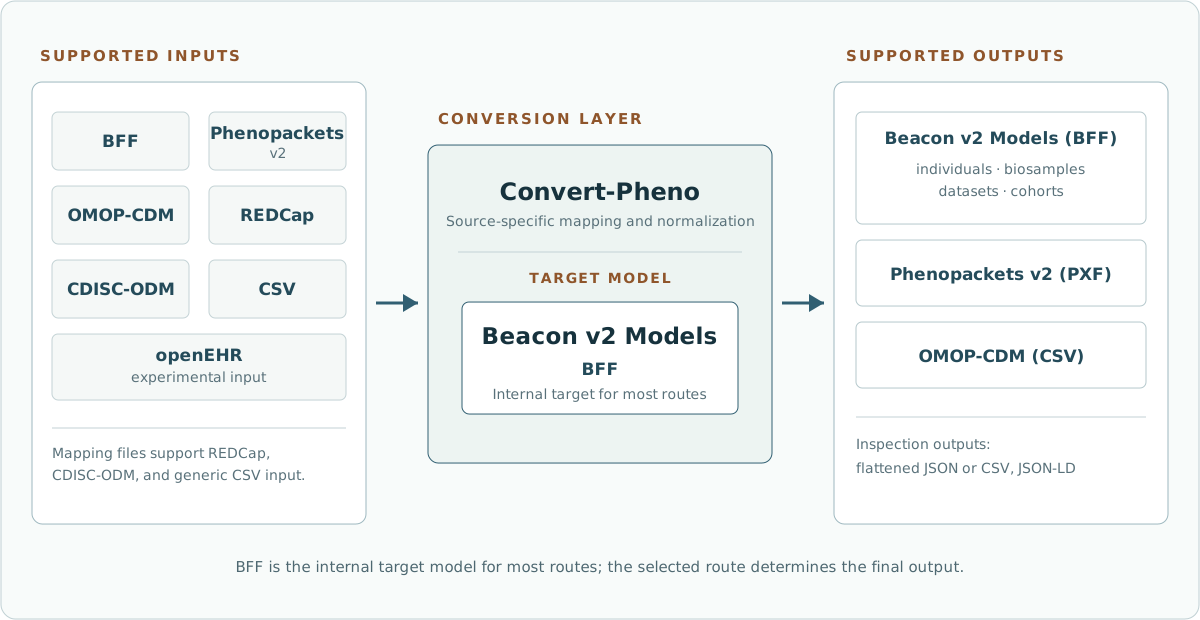
What Problem It Solves
Clinical datasets often arrive in formats that are useful inside one project but hard to reuse elsewhere. A REDCap export, an OMOP database dump, and a Phenopacket can describe overlapping clinical concepts while using different structures, identifiers, and nesting rules.
Convert-Pheno provides a controlled conversion layer so users can:
- transform supported source formats into Beacon-compatible
BFF - generate Phenopackets v2 or OMOP-CDM outputs when supported
- keep source provenance in
infofor auditability - inspect ontology lookup results through optional search audit files
- validate outputs with external schema-aware tools
How It Works
Most routes normalize data through BFF, which acts as the internal target model. That does not mean the final output must be BFF: depending on the selected route, the output can be Beacon entities, Phenopackets, OMOP-CDM CSV tables, flattened JSON, flattened CSV, or JSON-LD.
For mapping-file conversions such as CSV, REDCap, and CDISC-ODM, the mapping file defines how source columns become Beacon individuals fields and, when requested, metadata for datasets, cohorts, or biosamples.
For structured standards such as PXF and OMOP-CDM, the converter uses source-specific mapping code rather than a user mapping file.
What It Is Not
Convert-Pheno is not a clinical terminology curation platform, an OMOP ETL framework, or a Beacon API server. It can preserve source values, map known fields, and query configured ontology databases, but users still need to review mappings and validate outputs for their project.
It is also not equally mature for every route. The core file-based routes are more established than experimental areas such as openEHR input.
Main Interfaces
Most users should use the command-line interface, especially for real files, mapping files, OMOP tables, audit logs, and multi-entity BFF output.
For developers who need to call Convert-Pheno from other code, the project also exposes:
- Module usage for local Perl or Python code
- HTTP(s) API usage for self-contained JSON requests
What to read next
- Supported Formats for accepted input and output formats
- Ways to Run Convert-Pheno for CLI/API/module selection
- Conversion Recipes for short commands
- Output Validation for provenance, audit files, and validation