Beacon v2 Models (BFF)
Category: Clinical and phenotypic data model
BFF stands for Beacon Friendly Format. It is a JSON exchange
representation composed of seven collections corresponding to entities in the
Beacon v2 Models. Convert-Pheno
reads the individuals collection and can write four supported entity
collections.
individuals for bff2pxfindividuals, biosamples, datasets, cohortsinfo provenance unless --no-source-info is used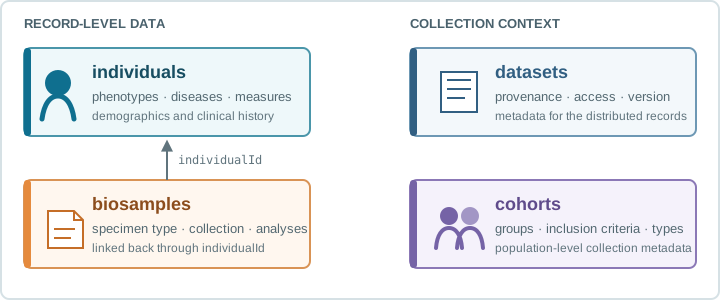
Individuals is usually the main record-level carrier of phenotypic and clinical information. Biosamples captures specimen-level context, while datasets and cohorts provide collection-level metadata.
Convert-Pheno supports BFF in both directions:
- As input, the current
bff2pxfroute reads theindividualscollection. - As output, the CLI can emit
individuals,biosamples,datasets, andcohorts.
The individuals limitation therefore applies to BFF input, not BFF
output.
infoBy default, BFF generated from OMOP-CDM, CSV, REDCap, CDISC-ODM, cBioPortal, Dataset-JSON, Dataset-XML, FHIR, i2b2, PCORnet, or Sentinel preserves
raw source values in info. This supports mapping review and source-level
queries. Use --no-source-info (or turn off Include source provenance in
Desktop's advanced options) to omit copied payloads such as
OMOP_columns, CSV_columns, REDCap_columns, CDISC_ODM, cBioPortal clinical rows, Dataset-JSON/Dataset-XML domain rows, FHIR resources, and clinical CDM source tables; mapped fields and
info.convertPheno remain.
Browsing BFF JSON data
The tested BFF fixture can be opened with JSON Crack, or Datasette Lite. These links use public test data; do not submit identifiable or sensitive clinical data to third-party services.
BFF As Input
Download the tested BFF individuals input used by the bff2pxf regression route, or supply your
own Beacon individuals JSON or YAML file.
The input can be one object or an array of objects. The generated Phenopackets output preserves that single-record or collection shape. Reverse conversion does not currently accept a complete multi-entity Beacon bundle.
Use BFF input recipes for CLI commands. Developers using the other interfaces should start with Module or HTTP(s) API.
BFF As Output
BFF has two output modes:
-obff FILEwrites oneindividualsfile.-obff --entities ... --out-dir DIRwrites one file per requested entity.
Entity-aware output supports individuals, biosamples, datasets, and
cohorts. Biosamples can be mapped directly from PXF biosamples, FHIR
Specimen, or OMOP SPECIMEN; datasets and cohorts are synthesized from normalized individuals
and can be augmented by mapping-file metadata where that input route supports
it. Dataset-JSON and Dataset-XML can instead prepopulate dataset and cohort
metadata from studyOID and the TS study title; FHIR can use
ResearchStudy and Group.
Use BFF output recipes for the
individuals-only and entity-aware command forms. Full tested inputs and
reference outputs are indexed in the
t/ fixture guide.