Overview
Beacon v2 data preparation
Turn metadata and genomic files into portable BFF collections.
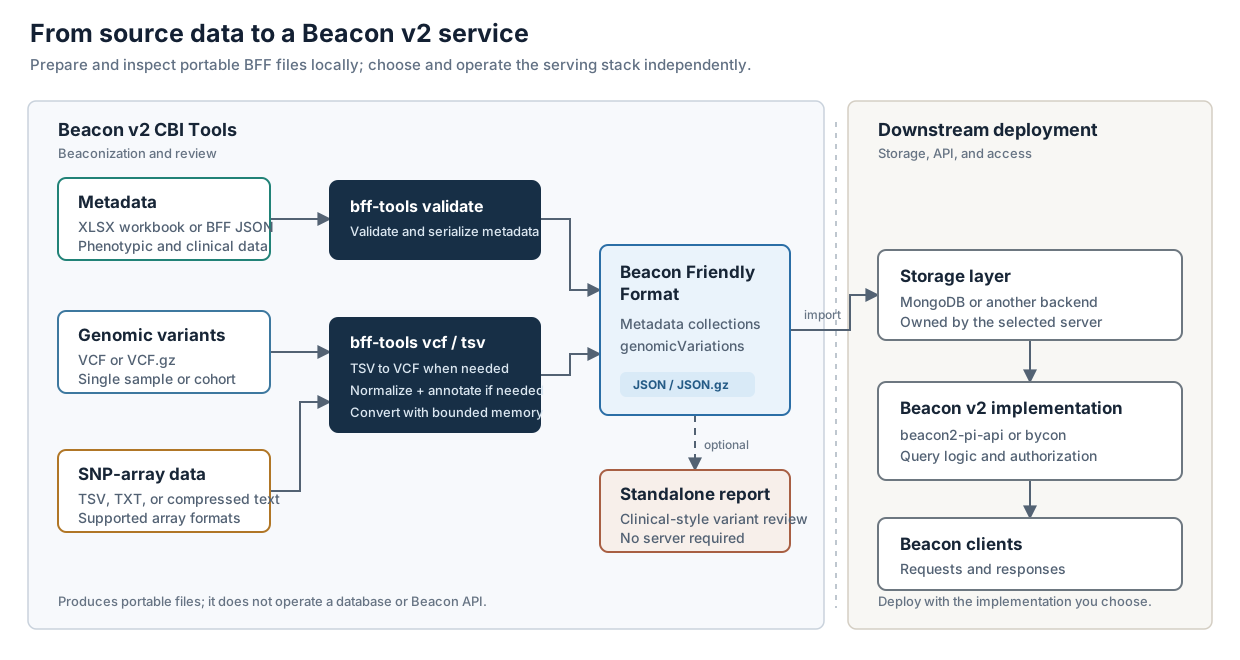
Build and validate BFF metadata from XLSX, validate existing JSON, convert genomic data, and inspect the result before connecting it to a Beacon implementation.
Beacon v2 CBI Tools does one job: it prepares data in the Beacon Friendly Format (BFF) for Beacon v2. Its command-line interface is called bff-tools.
Choose a Starting Point
Run the packaged demo
Convert an annotated VCF, validate BFF, and open the standalone browser without external resources.
Complete workflowBeaconize a dataset
Follow metadata and variants from source files through validation and review.
Quality controlBuild trust in the output
Check schema results, provenance, biological assumptions, and reproducibility.
Worked inputRun the GRCh38 example
Recreate and beaconize the included 1000 Genomes chromosome 22 subset.
HelpResolve a failed run
Find focused answers for workbooks, VCF conversion, annotation, and reports.
Core Commands
| Command | Use it for |
|---|---|
bff-tools doctor | Check installed capabilities and annotation-resource readiness without running a pipeline |
bff-tools demo | Verify an installation and inspect generated BFF without external annotation resources |
bff-tools validate | Build and validate BFF metadata from XLSX, or validate existing BFF JSON |
bff-tools vcf | Convert a VCF or VCF.gz file into BFF genomicVariations |
bff-tools tsv | Convert supported SNP-array text data through VCF into BFF |
Raw VCF and SNP-array workflows require the full annotation data to add ANN, dbNSFP, ClinVar, and COSMIC fields before conversion. Annotation is enabled by default. Use --no-annotate only for a VCF that already contains a compatible SnpEff ANN header and annotations.
The toolkit prepares and validates data structures. It does not establish clinical validity and must not be used by itself for medical decisions.