Validate a CSV
Basic command
Use the validator by passing a DDL file and an input CSV file:
bin/omop-csv-validator \
  --ddl ddl/OMOPCDM_postgresql_5.4_ddl.sql \
  --input path/to/PERSON.csv
The command:
- loads table schemas from the DDL
- infers the table name from the CSV filename
- validates each row against that schema
The validator accepts one CSV file per invocation. Each run validates one OMOP table, for example PERSON.csv, DRUG_EXPOSURE.csv, or OBSERVATION.csv.
To validate a folder of OMOP CSV files, run the command once per file. See Validate a Folder for a complete loop.
Validation is performed row by row. Large OMOP exports do not need to be fully loaded into memory before the tool starts checking records.
For engine details, tradeoffs, and local benchmark data, see Validation Engines.
The validator matches columns by header name.
If you later need a file in canonical DDL column order for import workflows such as SQLite .import or positional database loads, use reorder-csv.pl.
Why one table per run?
OMOP tables have different columns and types. Keeping one CSV file per invocation makes the table selection, exit code, JSON result, and optional report unambiguous.
If you need to validate multiple OMOP tables, run the command once per file from a shell loop, workflow manager, R script, or Python script.
The complete shell workflow is documented in Validate a Folder. For language-specific loops, see Use from R or Use from Python.
The validator normally infers the separator automatically.
Only pass --sep if your file is unusual or if automatic detection is ambiguous. For example:
bin/omop-csv-validator \
  --ddl ddl/OMOPCDM_postgresql_5.4_ddl.sql \
  --input example/DRUG_EXPOSURE.csv \
  --sep $'\t'
Override the inferred table name
If the CSV filename does not match the OMOP table name, pass --table:
bin/omop-csv-validator \
  --ddl ddl/OMOPCDM_postgresql_5.4_ddl.sql \
  --input path/to/export.csv \
  --table person
Save the derived schemas
You can also write the generated schema set to JSON:
bin/omop-csv-validator \
  --ddl ddl/OMOPCDM_postgresql_5.4_ddl.sql \
  --input path/to/PERSON.csv \
  --save-schemas schemas.json
Use JSON for automation
The default output is meant for humans reading a terminal. If another program needs to read the result, use --json. This replaces the human-readable stdout with a JSON object; it does not create an additional file:
bin/omop-csv-validator \
  --ddl ddl/OMOPCDM_postgresql_5.4_ddl.sql \
  --input path/to/PERSON.csv \
  --json
This returns one JSON object with:
- whether validation succeeded
- the schema name used
- the number of failing rows
- row-level error messages when validation fails
JSON mode still processes the input row by row. It stores failing rows in row_errors, so memory use depends mainly on the number of failures rather than the total number of rows.
For language-specific examples, see Use from R and Use from Python.
Spreadsheet-friendly review output
The CLI can write two report formats for Excel or LibreOffice:
--report-tsv--report-xlsx
The input remains CSV or TSV. These flags add a report file.
See Spreadsheet Reports for the exact input/output behavior and when to use each mode.
Reading the result
If validation succeeds, the command exits with status 0 and prints a success message.
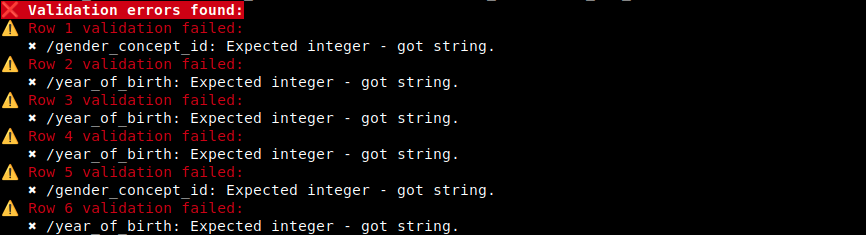
If validation fails, the command exits with status 1 and prints:
- the failing row
- one or more validator messages for that row
In --json mode, fatal setup errors such as “no schema found” return exit status 2 with a fatal_error field.
For large files, the validator starts checking rows immediately rather than waiting to read the whole file first.
Example of the default human-readable error output:
What counts as a row
The CLI reports data-row positions, not header positions. The first data row after the header is reported as row 1.