Phenopackets v2 (PXF)
Category: Clinical and phenotypic data model
PXF stands for Phenotype eXchange Format. Phenopackets v2 defines a structured exchange model for an individual, phenotypic findings, diseases, measurements, treatments, biosamples, and related metadata. Convert-Pheno reads and writes its JSON or YAML representation.
biosamples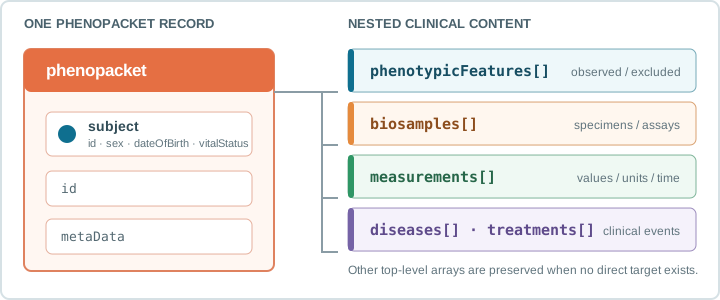
Phenopackets organizes information through
top-level elements.
Convert-Pheno processes the
Phenopacket element
serialized as JSON or YAML.
Convert-Pheno supports PXF in both directions:
- As input, for routes including
pxf2bff,pxf2omop, and inspection-oriented outputs. - As output, from BFF, OMOP-CDM, REDCap, CSV, CDISC-ODM, Dataset-JSON, Dataset-XML, FHIR, i2b2, PCORnet, Sentinel, and openEHR input.
Browsing PXF JSON data
The tested PXF fixture can be opened with JSON Crack, or Datasette Lite. These links use public test data; do not submit identifiable or sensitive clinical data to third-party services.
PXF As Input
Use the small input from the 5-Minute Quickstart, or Download the tested PXF biosamples input to exercise biosample conversion.
A PXF file can contain one Phenopacket object or an array of Phenopackets. BFF individuals-only output preserves that shape.
When PXF contains biosamples, entity-aware BFF output maps them to first-class
Beacon biosamples. In individuals-only mode they are retained under
info.phenopacket.biosamples; interpretations are similarly retained in
info.phenopacket because they are not yet a first-class CLI output entity.
subject.vitalStatus is preserved under info.phenopacket.vitalStatus for
round trips. If no preserved value exists during BFF-to-PXF conversion, the
fallback is ALIVE unless --default-vital-status specifies another
supported status.
Use PXF input recipes for commands covering individuals-only, multi-entity BFF, and OMOP output.
When requesting BFF datasets or cohorts, an optional compact
Mapping V2 file can replace
the generic synthesized entity metadata. It does not change the PXF-to-BFF
individual or biosample mapping.
PXF As Output
PXF can be generated from BFF, OMOP-CDM, REDCap, CSV, CDISC-ODM, Dataset-JSON, Dataset-XML, FHIR, i2b2, PCORnet, Sentinel, and openEHR. Routes that do not begin with BFF normalize through the internal BFF representation before the Phenopacket is written.
Use the relevant input section in Choose a Conversion for
the command. Full tested inputs and reference outputs are indexed in the
t/ fixture guide.