Install a dataset
Open Data → Add dataset on Desktop, or Admin → Data → Add dataset on Web. Installation is available to the desktop owner and web administrators. Other web users select datasets already made available to them.
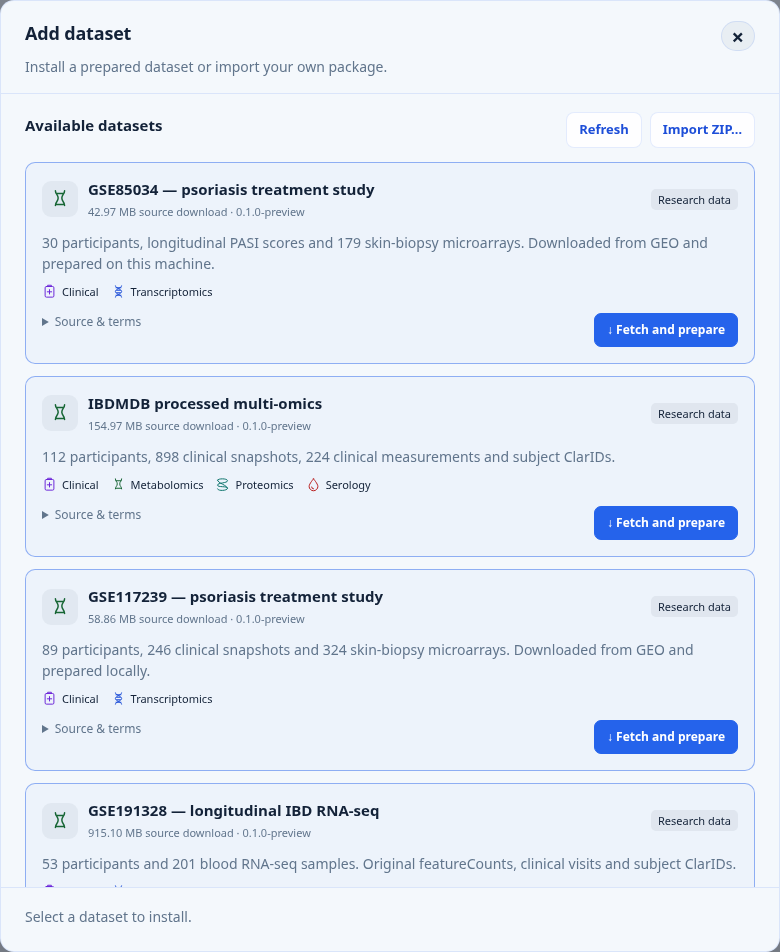
Choose a listed study or import a package you prepared yourself. Scroll the catalogue to see more entries.
Download, prepare, explore
- Choose Browse available datasets and select a study.
- Review its contents and source terms, then choose Download and prepare or Download and install, as offered.
- Keep the app open while it downloads, validates, and prepares the database.
- When Ready appears, choose Add to workspace selection, then Apply workspace.
DuckDB preparation is automatic. To start browsing, add the dataset to your workspace selection and apply it.
The two synthetic datasets show Included with COHORTome. They cannot be reinstalled, including through ZIP import.
Choose where the data comes from
| Route | What happens |
|---|---|
| Fetch and prepare | Downloads processed study products from the original provider and prepares them locally. No GitHub token needed. |
| Download and install | Downloads a prepared package from COHORTome Store. |
| Import local package | Imports a resource ZIP you already have. Only use packages from a trusted source. |
For your own clinical tables and assays, start with COHORTome Store: prepare a dataset.
For Fetch and prepare, read the linked source conditions and check I have reviewed the source information and applicable usage conditions. Acknowledgement is recorded; it is not a licence grant or permission to redistribute the data.
New imports start with AI access blocked, private classification, and admin-only visibility on Web. Review their policies in Data → Installed datasets before enabling model access or sharing them.
Available studies and preparation notes
These studies use Fetch and prepare, not a Store archive. The app downloads processed products, not raw sequencing or array-intensity files.
| Dataset | Prepared contents |
|---|---|
| GSE85034 | 30 participants, PASI and treatment groups, 179 microarrays |
| GSE117239 | 89 participants, PASI and treatment groups, 324 microarrays |
| GSE191328 | 53 participants, 201 clinical snapshots and blood RNA-seq gene counts |
| GSE42296 | 39 Crohn/RA participants, 78 paired clinical snapshots and microarrays |
| GSE68310 | 133 participants, 880 observations, harmonized respiratory expression and clinical metadata |
| IBDMDB | 112 participants, 898 clinical snapshots, 224 CRP/ESR measurements, metabolomics, metaproteomics and serology |
IBDMDB downloads four products, approximately 155 MB in total, from the official catalogue. Metabolomics retains all 81,867 features, including unnamed features; metaproteomics is not a human protein panel. One unlinked serology column remains in the auxiliary source table but is excluded from the linked matrix. This exclusion is recorded in the package. Preparation does not normalize values or collapse repeated samples.
If an older IBDMDB package is already installed, remove it through Admin → Data before testing the locally built replacement. The app does not silently replace an installed dataset or repair references in existing chats/cohorts.
GSE191328 downloads one metadata file and 201 processed featureCounts files; download time can exceed conversion time. GSE42296 now reads the original GEO processed matrix, retaining its precision instead of using the older float32 intermediate export. Both disease groups and all paired visits remain included.
GSE68310 combines HR-VILAGE expression, earlier RIGEL metadata and an original GEO phenotype supplement. Its confirmation links to the separate source declarations. Only wholly unmeasured expression columns are omitted and listed; measured values are neither imputed nor filtered. Numeric visits are timed from first illness assessment, not enrollment baseline. Clinical mapping remains limited to sex and baseline enrollment age; other source information is retained.
GSE65391 remains on hold while replicate identities are checked. GSE11903 is excluded from this catalogue.
The first recipe includes 30 participants, 150 clinical visits, 179 skin-biopsy arrays and 47,323 probes. Convert-Pheno maps the clinical data to BFF v2; ClarID-Tools generates subject identifiers. Expression values are retained without further normalization. They are microarray measurements, not counts suitable for limma-voom. Multiple biopsies from one participant are not independent participants. Ambiguous source visit labels retain their labels without invented elapsed times.
Private Store downloads and GitHub tokens
The Store repository is currently private. Open GitHub access for private downloads and supply a token with read access to its contents. The token is used for that download only and is not saved. Public releases need no token. Never paste a token into a chat or a dataset URL.
Source checks, conversion tools, and download records
The app checks the exact size and SHA-256 checksum of source downloads. Progress shows downloading, local preparation, validation, and database preparation. Source downloads and intermediate staging files are removed when the attempt ends; checksums, mappings, and preparation provenance remain with the dataset.
The acknowledgement receipt records the local account, UTC time, dataset/recipe version, notice, and links reviewed. It is not proof of legal permission.
Only reviewed recipes shipped with COHORTome can run. An arbitrary GEO accession, download URL or script cannot be supplied. If the upstream bytes change, the app stops instead of silently preparing a different release. Hugging Face downloads allow bounded HTTPS redirects only within that provider's download hosts and still require the exact checksum. Public access does not establish permission for unrestricted redistribution; check the original terms and cite the study. These data are not hosted by COHORTome Store.
This path requires Convert-Pheno 0.35 and ClarID-Tools 0.04, with codebook 0.04.
The new shared Perl runtime includes these tools; older desktop bundles may
contain Pheno-Ranker only. Native deployments can configure
COHORTOME_CONVERT_PHENO_BIN, COHORTOME_CLARID_TOOLS_BIN and
COHORTOME_CLARID_CODEBOOK (the versioned YAML file). Missing tools produce an
error before the download starts.
Local ZIP format, size limits, and interrupted imports
Choose Import local package and select a resource ZIP containing one dataset
folder, including resource.json, the dataset manifest, and source files.
Local imports are structurally validated but have no independently reviewed
archive checksum.
Catalogue downloads are written to disk and their checksums verified before package validation and DuckDB preparation. ZIPs are limited to 1 GiB and extracted contents to 4 GiB. Unsafe paths, symlinks, and encrypted ZIPs are rejected.
Cancellation is available before database preparation. Failed installations are rolled back. Retry downloads start again rather than resuming a partial archive.
Where are datasets stored?
Change the location in Settings → Jobs & storage → Dataset storage.
| Deployment | Choose a location |
|---|---|
| Desktop | Use the folder picker. |
| Web | An administrator enters an existing absolute server path. |
| Docker | Use a path inside a persistent mounted volume. |
The setting affects new imports only. Keep external disks connected while using their data.
Storage layout and recovery after a restart
The selected folder holds temporary downloads/extraction files and an
installed/ subfolder with a separate directory for each imported package.
Existing datasets do not move when this setting changes. Their registered
paths remain in use, and duplicate detection still checks them. The query-store
cache remains in the app's runtime directory.
The default import location is state/resources/ under the runtime directory.
Desktop uses its per-user application-data directory, separately for source
launches and packaged apps. See Desktop storage
for the paths.
In Docker, select a path backed by a persistent mounted volume. This setting does not create a Docker mount. An external disk must remain connected while its datasets are in use.
The current installer runs in the app process, separately from analysis jobs. It does not need Redis. Progress can be reopened while that process is running; after a restart, retry an interrupted installation. A completed dataset that an administrator disabled is preserved, not replaced by a retry.
Remove a dataset
Open the dataset in Data, then choose Remove dataset and type its ID. Bundled examples cannot be removed. Finish or cancel queued and running jobs first, including jobs for other datasets and users.
Chats, cohorts, and results remain, but links to the removed dataset stop working. Reimporting does not repair those references. Source files are kept unless you explicitly choose the file-removal option.
What removal changes and how files can be recovered
| Item | After removal |
|---|---|
| Dataset registration and prepared DuckDB store | Removed. |
| Chats, cohorts, and results | Kept; dataset references no longer load. |
| Source files, by default | Kept in place. |
| Installer-managed files, with file removal selected | Moved to removed/ beside installed/ for manual recovery. |
| Other source folders | Never moved or deleted. |
Moving files to removed/ does not free disk space or permanently erase them.
After removal, use Reload workspace, then select and apply the datasets you want to use. A revised resource must have a new resource version and matching archive checksum; do not overwrite an existing release.