Analysis
Select a method, choose its patients and measurements, then inspect the result. Built-in methods do not require an LLM.
Run an analysis
- Choose a method under What analysis would you like to run?
- In Patients, select the workspace, a subset, or saved cohorts.
- In Inputs, select the assay, features, or clinical measurement required.
- Review the selected data and request.
- Run the analysis. Results appear in the chat.
The step bar follows Method → Patients → Inputs → Review → Results. Click a step to return to its controls. Selecting a method does not run it.
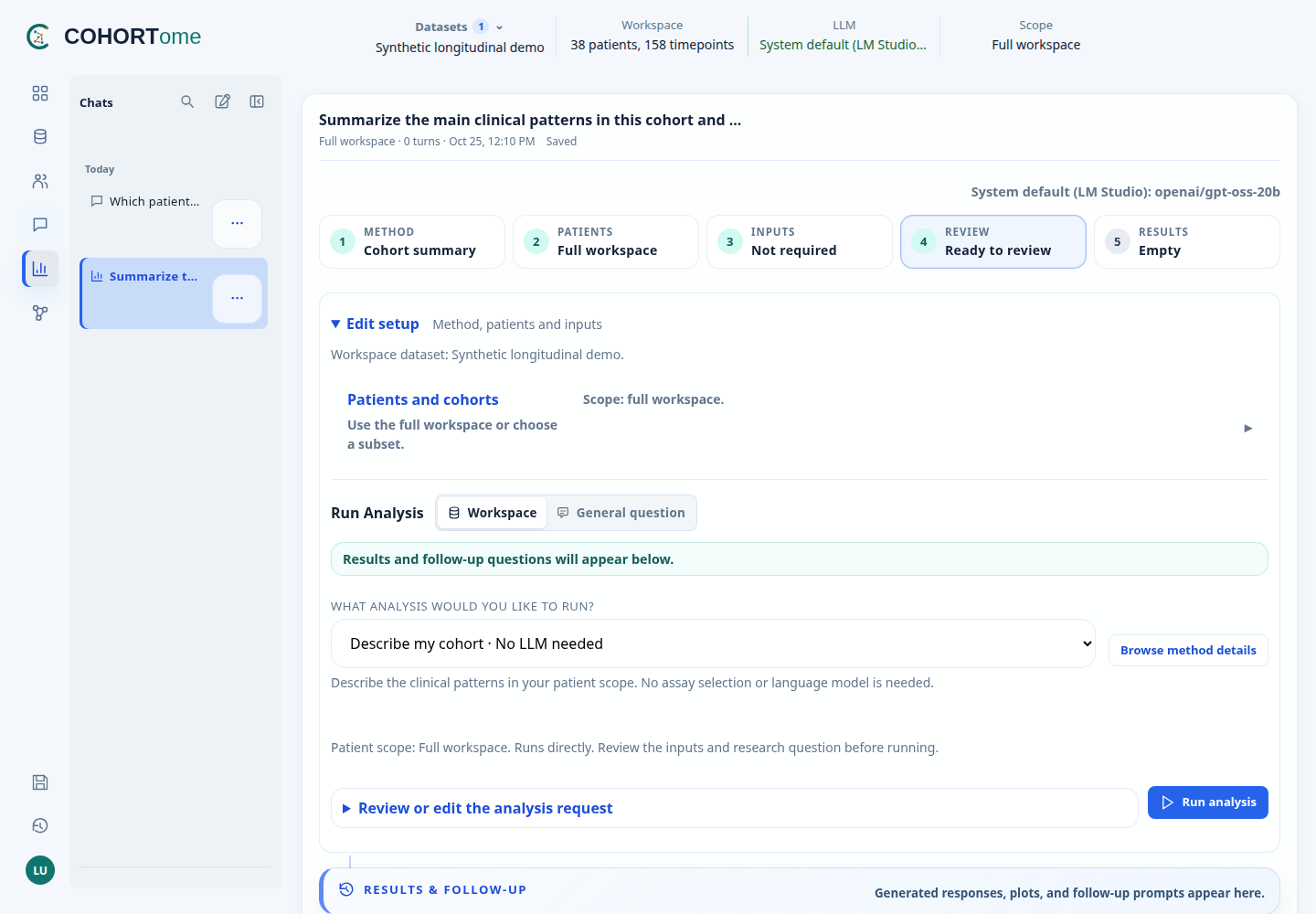
Setup checks identify missing inputs. Execution also checks the actual values, sample linkage, and model design. Review sample size, confounding, and study design before interpreting a result.
Select patients
- One group
- Compare two groups
Use the full workspace or one selected cohort for summaries, PCA, and single-group analyses. A Query result or Pheno-Ranker selection can also be opened in Analysis.
Attach saved cohorts as Cohort A and Cohort B. The method checks whether both groups have the measurements it needs. Two nonempty patient cohorts can still have too few linked assay samples.
For single-assay comparisons, both groups must overlap the same selected matrix. The app does not merge different transcriptomics matrices into one comparison.
Use the app's selection actions to retain dataset and sample IDs. A patient cohort and a sample selection are not interchangeable. See patient and sample selection.
Reading results
Replies contain the method summary, usable sample and feature counts, plots, and any exclusions or limitations. Expand Result files for tables, images, parameters, logs, and available source snapshots.
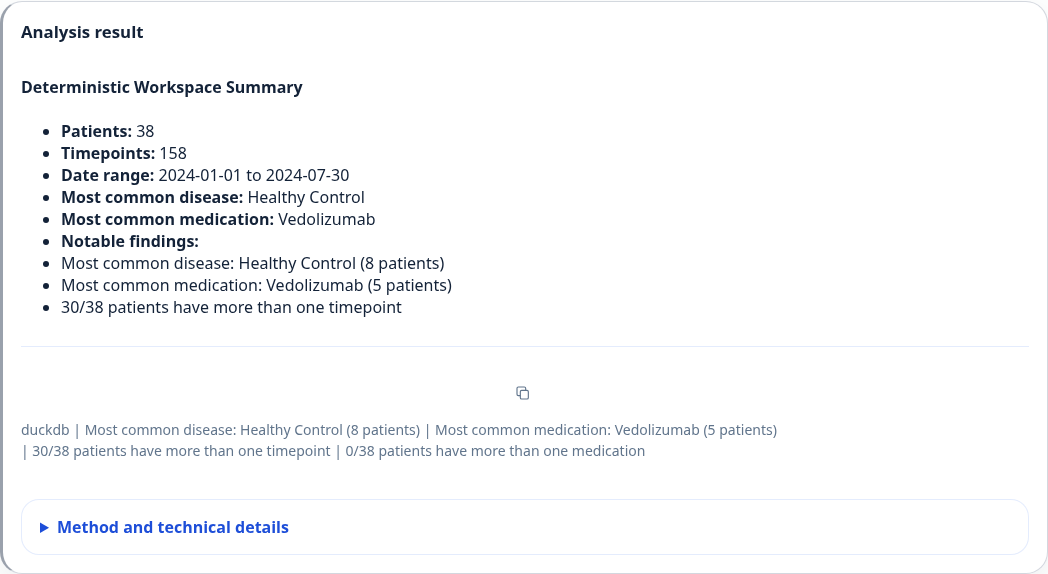
A completed summary using the Synthetic longitudinal demo; no LLM is needed. Other methods add their own plots and result files.
Use Runs above the avatar to find a previous execution. The Queue view shows background-job status. A chat can hold several runs and follow-up questions.
Desktop manages a local queue; keep the app open until the run finishes. On Web, an administrator must provide Redis and an active RQ worker. External R, Perl, or other tools must be installed where the analysis runs.
Choose a method
Use Browse method details to search the catalog by method, category, or tag. A compatible assay selector appears for methods that need one. The catalog requires Detailed access to the active datasets.
| Input | Examples |
|---|---|
| Clinical records | Cohort summary, trajectory, treatment response, Kaplan–Meier |
| Integer RNA counts | DESeq2; transcriptomics signature workflow |
| RSEM expected counts | limma-voom |
| Processed methylation M-values | PCA; limma differential methylation |
| Quantitative immune-cell or serology values | Feature-wise Wilcoxon comparison |
| Two linked measurements | Spearman association |
The transcriptomics signature workflow runs DESeq2 followed by Hallmark enrichment as one background job. It requires one compatible raw-count matrix; it does not accept fractional expected counts.
Clinical measurement selection
For trajectory, treatment-response and Kaplan–Meier methods, select a Clinical measurement in Inputs. The list comes from numeric measurements in the current patient scope and includes units. Coverage shows how many patients have values and how many have observations on at least two different dates. In A/B mode, both groups are checked. Missing values are not imputed.
These methods require at least one patient with repeated dated observations in each group. Kaplan–Meier also requires at least two patients with dated values per group. These are minimum execution checks, not evidence of adequate sample size. Measurements with inconsistent units are blocked; harmonize them upstream.
The selected measurement, rather than the example marker in the prompt, controls the run. It is saved with the session and result. Treatment-response requests still specify the treatment in the prompt; Kaplan–Meier requests specify the event operator and threshold there. Review those choices before running. Measurement selection and these clinical runners do not require an LLM.
Compare two measurements
Select Associate two measurements in Analysis, or follow the shortcut from Dashboard → Multimodal. Select two matrices from different modalities and an exact feature ID from each. Each feature dropdown lists up to 50 matches, with readable names where supplied. Search by name, description, units or ID, then select a match to see its description and units. Missing annotations are marked explicitly. Gene names come from the bundled gene annotation; other descriptions must be supplied with the assay. Changing a matrix or search clears the previous feature selection. Select Use these measurements, review the research question and active scope, turn off A/B comparison, then run. No language model is used. Parameters, results and matrix hashes are saved with the Analysis conversation.
For a first trial, select only Synthetic cross-sectional demo and compare:
- Immune-cell / flow-cytometry matrix:
CD4_T_cells_fraction - Serology matrix:
CRP_mg_L
The synthetic demo also offers explained example buttons: CD4 T cells versus C-reactive protein, and B cells versus anti-double-stranded DNA antibodies. These fill the selectors without running an analysis. The measurements and their associations are simulated, not biological findings.
Dataset authors can add an optional feature_annotations object to an assay
entry in assays/manifest.json, keyed by the exact feature ID. Each entry can
supply label, description and unit strings. These describe existing features;
they do not rename IDs or convert values. Only annotations for returned features
are sent to the browser. Compact external matrices up to 64 MiB can be browsed
without importing their measurement values into DuckDB.
Results include a scatter plot coloured by recorded clinical disease, overall and within-group Spearman correlations, and matched, unmatched, missing, invalid-linkage and repeated-observation counts. Matching requires exact clinical sample/timepoint IDs and agreeing patient links, not patient ID alone. The earliest complete dated pair per patient is retained; undated pairs sort last, with sample ID breaking ties.
This first version requires one dataset, explicit sample-to-patient metadata, at least three complete patients, and matrices no larger than 64 MiB or 1,000 samples. Large matrices need a prepared feature panel. Constant features and groups with fewer than three patients have undefined correlations.
Values use their supplied scales: no normalization, imputation or covariate adjustment is performed. Use normalized RNA data for biological interpretation; raw or expected counts can reflect library size. Group differences can produce an overall correlation without a within-group relationship. No p-values, significance claims, causal claims or predictive models are provided. Synthetic results demonstrate software behaviour only.
Assay tool requirements
Transcriptomics comparisons require at least two samples per group and one sample per patient. These are execution minima, not sample-size recommendations. A matrix covering only one treatment group cannot support a comparison with patients absent from that matrix.
limma-voom adjustment and molecular method details
The limma-voom method accepts fractional RSEM expected counts. An administrator can declare numeric and categorical adjustment variables in the assay manifest:
{
  "sample_metadata_file": "assays/transcriptomics/sample_metadata.tsv",
  "patient_linkage": "sample_metadata_file",
  "analysis_covariates": ["age", "sex", "batch"],
  "analysis_covariate_types": {
    "age": "numeric",
    "sex": "categorical",
    "batch": "categorical"
  }
}
The metadata table must contain sample_id, patient_id, and the declared
covariate columns. Numeric-looking batch identifiers remain categorical when
declared that way. Exact-sample linkage may also use a technical metadata table
without a patient column when the manifest explicitly declares exact_sample_id.
The selected cohorts determine which samples enter the model. All selected covariate values must be complete; prepare and document a complete-case cohort before running if necessary. The runner stops for missing or invalid values, constant requested covariates, rank-deficient designs, or no residual degrees of freedom. It does not silently remove patients or adjustment variables.
The result states which covariates were used and reports the Cohort A minus
Cohort B effect. Without declared covariates it is labelled an unadjusted
exploratory model. Result files include model.json, design_matrix.tsv,
contrast.tsv, gene_filter.tsv, normalization_factors.tsv, and
session_info.txt, alongside the scoped sample table, covariate specification,
and existing expression results. These files retain the actual design,
filtering, normalisation, and package versions for review.
Expression filtering uses the final design matrix. The input-gene count and the genes actually tested after filtering are reported separately. Model selection remains an explicit study decision; an LLM does not choose or remove adjustment variables automatically.
If the chosen dataset contributes samples to only one side, the curated differential-expression tools fail with a validation error instead of silently dropping one cohort.
For the current DESeq2 and Hallmark pathway tools, the first-version constraints are:
- at least two samples in
Cohort A - at least two samples in
Cohort B - one sample per patient
In practice, that means baseline-only transcriptomics datasets are the safest first choice.
For the synthetic large transcriptome fixtures, remember that treatment-specific matrices only contain their own patient subset. For example, an infliximab matrix does not contain vedolizumab patients. If you want a broad split across many synthetic patients, use the baseline matrix for that workspace.
The methylation tools use one selected processed M-value assay view. A view can be the complete externally stored assay or an administrator-installed, versioned feature panel. Panel choices are labelled in the assay selector and their identity, version, source, and match counts are retained with the result. The complete probe matrix remains in the protected dataset files; COHORTome does not materialize all CpG-by-sample values in DuckDB.
The panel summary distinguishes probes that were absent from the supplied
matrix from probes excluded during ingestion validation. In particular, a CpG
with any Inf or -Inf M-value is excluded from the compact analysis view and
counted explicitly; COHORTome does not coerce an infinite value to a finite
number. This filtering decision and the resulting retained feature count are
stored with the analysis provenance.
Methylation QC and PCA checks the supplied matrix and sample linkage in the current Analysis scope. It does not repeat raw-array preprocessing or probe filtering from IDAT files. limma differential methylation uses Cohort A and Cohort B as the comparison groups and requires both cohorts to overlap the same selected methylation assay.
Other datasets can remain loaded. Methylation, immune-cell and serology analyses use only samples from the selected assay's source dataset; they do not merge matrices across studies. Cohort overlap is checked against that assay before running. Repeated samples from one patient are not treated as independent observations in cohort comparisons.
The immune-cell and quantitative-serology tools also use one selected assay plus disjoint saved Cohort A and Cohort B selections. Each cohort must overlap the assay by at least three samples. The runner applies a Wilcoxon rank-sum test to each feature, reports rank-biserial effect sizes, and controls the displayed feature-wise false-discovery rate with Benjamini-Hochberg correction.
These comparisons are deliberately labeled exploratory and unadjusted. They test values on the scale supplied by the assay release: COHORTome does not normalize, batch-correct, transform, or impute those measurements in this runner. A positive rank-biserial effect means higher ranks in Cohort A; a negative effect means higher ranks in Cohort B. Demographic, recruitment, treatment, technical, and other confounders remain unmodeled, so this result is useful for screening and prioritization rather than confirmatory inference. Immune-cell abundance features can also be compositional, while serology missingness can vary by marker; inspect the cohort-specific missing counts before interpreting the ranking.
The compact source matrices remain in the protected dataset files. They are read directly by the curated runner, are not materialized in DuckDB, and are not copied into the job output. Analysis stores only compact aggregate results and records of the inputs and method used.
Questions and LLM explanations
Use Write a request / follow-up to type a question. Supported requests run directly; model-dependent requests need an approved provider.
Workspace questions use permitted context from the selected data. General question sends the question and recent general-question history, without attaching workspace data. It does not run a dataset analysis.
Do not paste confidential records into a General question sent to an external provider. The absence of attached workspace data does not remove sensitive text from your own question.
Follow-up suggestions marked LLM interpretation prepare an explanation request. The provider is called when you run it. If policy or availability blocks the model, the app reports that rather than substituting another analysis.
Seeing a detailed result in the app does not mean those details were sent to a model. See model access.
Chats and saved work
Use New → Analysis chat for a separate conversation. Chats save their questions, selected cohorts, settings, and results. Folders and pins work as they do in Query.
After switching datasets, use Load this chat’s datasets to restore the original selection. If source data changed, start a new chat. Saved cohorts referenced by an Analysis chat cannot be deleted until those references are removed.
Deleting a chat keeps generated runs and files. Use the separate cleanup controls in Settings to remove generated data; active jobs cannot be removed through completed-artifact cleanup.
Custom Python / R scripts (synthetic prototype)
Select Custom Python / R script with only the bundled Synthetic cross-sectional demo loaded. This is available to users with Detailed access, not just admins. Other datasets, modified demo files and mixed workspaces are rejected by the server. Restricted data cannot be enabled by changing a dataset label.
- Keep your current patient/cohort selections. Selected demo assays are used; if no assays are selected, all four demo modalities are prepared.
- In Inputs, choose Python or R. Paste an existing script, or use
Generate data-aware template to obtain an input example. COHORTome creates
patients,clinical,samples, andassays[modality]objects. The template documents column types, units/value kinds, feature IDs, matrix orientation and linkage. - If using a generated template, use Copy template for AI, describe your question to an external coding assistant, and paste its completed script into the editor. The copied template contains schemas and feature metadata, not patient IDs or values. You can also edit or run the template without any AI.
- Review the code and click Run. It runs through the background queue. Open the completed run in Analysis for output files, plots and audit details.
Use Check inputs before running or copying: it shows the prepared language, package versions, cohort patient counts and matched A/B sample counts for each assay. A single-cohort template explicitly says that Cohort B is not used. For an A-versus-B question, turn on comparison in Patients and attach both groups; preparation and copying are blocked if either group is missing. An assay with zero samples in one group cannot support that comparison, even when both patient cohorts exist. Assays with no samples in the scope are listed as not included.
The copied template instructs the external AI to use the declared language and packages, treat the input contract as authoritative, and explain missing requirements instead of inventing groups or substituting a different method. It also asks generated scripts to fail explicitly when required inputs are missing. These instructions help guide the AI; they do not enforce statistical correctness. Review the returned code before running it.
Changing language, cohorts or assays requires a fresh preparation. The server checks the input fingerprint and image identity again at submission and execution. One custom run per user may be queued/running at a time. Draft code is saved with the Analysis session; resetting the template replaces that draft, not old runs.
The Python 3.11 environment includes fixed versions of NumPy, pandas, SciPy,
Matplotlib and statsmodels. The R 4.2.2 environment includes base R, limma 3.54.1,
edgeR 3.40.2 and ggplot2 3.4.1. Versions are listed in the generated template.
These are the pinned prototype versions, not a claim to provide the latest releases.
Administrators add packages when building the image; users do not install them
during execution. Scripts have no network, package-installation service or access
to the COHORTome runtime. Limits are 90 seconds, one CPU, 512 MiB RAM and 64
processes. Scratch space is memory-backed and bounded. Save up to eight files
(4 MiB total) as CSV, TXT or PNG under /work/output; unsupported or oversized
files are not collected. Logs are truncated. CSV files are script-generated;
review them before opening them in spreadsheet software.
Scripts, versions, and audit files
Custom runs retain analysis.py or analysis.R, input_contract.json, exact synthetic input
files, logs, output files and audit.json with script hash and immutable image ID.
Audit files and results use the existing user ownership and Detailed-access
checks. A completed process is not evidence that its statistics are appropriate.
New direct Analysis replies expose an Analysis implementation source snapshot and hash. These snapshots are deduplicated and retained independently of subsequent source edits. They identify the core Analysis module, not a standalone reproducer or an archive of every dependency. Curated background runners retain their adapter source; R runners execute retained copies of their R script (and the methylation helper where applicable). Existing command logs and result parameters remain part of the audit. Older runs cannot acquire historical code retroactively.
Advanced: configure the sandbox
The web app can remain native Uvicorn. Build the separate execution image:
docker build -t cohortome-script-sandbox:prototype-v1 docker/script-sandbox
The prototype uses the local Unix Docker socket on the native web/worker host. Both processes need permission to inspect the image; the worker creates containers. Never mount that socket into the script container. This does not wire the Docker Compose web/worker services to a host daemon. Deploying that arrangement needs a separate design; do not add a Docker socket mount to solve it casually.
Start Redis and the ordinary Analysis worker using the existing launch recipe. Restart web and worker after installing backend changes. Missing Docker/image access blocks execution but does not prevent template preparation. There is no fallback to running scripts on the host.
The container uses a read-only root and inputs, no network, dropped capabilities,
non-root execution and no-new-privileges, following the controls documented in
Docker's container run reference.
It still shares the host kernel. These checks are a development prototype, not a
claim of safe multi-tenant arbitrary-code execution. Restricted-data support
requires a separate threat review and stronger isolation assessment.